
E-book accessibility
Accessible EPUB 3: production and remediation for EPUB Accessibility 1.1
An accessible EPUB is an e-book that a blind or low-vision reader can navigate and have read aloud in the correct language: meaningful headings, described images, and metadata that tells the shop what the file supports. I produce accessible EPUB 3 files from InDesign, Word or PDF, and remediate existing EPUBs to EPUB Accessibility 1.1 and WCAG 2.2 AA — with the verifier reports, and a plain list of what those verifiers cannot check.
In short
What I do
- Remediate an existing EPUB 2 or EPUB 3 file so that it meets EPUB Accessibility 1.1 at WCAG 2.2 Level AA (or 2.1 AA, if your distributor asks for that).
- Build a new reflowable EPUB 3 from an InDesign package, a Word file or a PDF, with accessibility designed in rather than added later.
- Write the accessibility metadata in the package file, and prepare a matching ONIX list 196 proposal for your metadata or distribution team.
- Deliver each file with a DAISY Ace report, an EPUBCheck report and a findings report.
Not part of this service
- Editing or translating the text. The wording stays as you supply it; I change structure, not sentences.
- Testing with disabled readers. My findings come from the file, the specification and the verifiers. User testing is a separate discipline.
- Third-party certification. I am not an accredited certifier. The conformance statement in the file is a declaration by the person who did the work, and it says so.
- Legal advice. Whether the European Accessibility Act applies to you, and who counts as the service provider in your sales chain, is for your lawyer.
- Shop and DRM settings. What a retailer’s platform does with the file after upload is outside the file.
Is this page for you?
This page is for you if one of these describes your situation:
- You sell e-books to consumers in the EU and your distributor now asks for accessibility metadata or a conformance statement.
- Your e-books are exported straight from InDesign or converted with a one-click tool, and nobody has looked inside them.
- A conversion house delivered files that “pass EPUBCheck” and you want to know whether that means they are accessible. (It does not; see the worked example below.)
- You have a backlist and need to decide which titles are worth remediating and which are cheaper to rebuild.
Check one of your e-books in one minute
No software needed. Rename a copy of the EPUB from .epub to .zip, open it, and open the file ending in .opf in a text editor.
- Search for
dc:language. If it saysenoren-USand your book is in Turkish or German, a screen reader will read the whole book with English pronunciation rules. - Search for
accessibilitySummary. If it is missing, the file has no accessibility metadata, and shops cannot tell readers what it supports. - Search for
conformsTo. If it is missing, the file makes no claim to meet EPUB Accessibility.
Three correct answers are a good sign, not proof: image descriptions, headings and reading order do not show up in this test.
Read on for the technical detail. Below: what makes an EPUB accessible, a measured before-and-after example with downloadable reports, and what EU law says about e-books. To skip ahead, send one e-book and I will tell you what is wrong with it.
A valid EPUB is not the same as an accessible EPUB
A valid EPUB follows the format rules; an accessible EPUB also works with a screen reader, braille display, magnification or read-aloud. EPUBCheck tests the first. EPUB Accessibility 1.1 describes the second, and most of it sits where a proof-reader never looks.
Language
The language is declared in the package file and on each content file; text-to-speech uses it to pick voice and pronunciation. Converters fill in a default when nobody sets it — in the example below, en-US on a Turkish short story. The page looks perfect; the audio does not.
Structure and navigation
Bold text that looks like a chapter title is not a heading. Without real headings, a working table of contents and landmarks, a screen-reader user has to listen from the beginning. EPUB 3 semantic markers (epub:type) also need matching ARIA roles so that assistive technology understands them.
Images
An image without a text alternative does not exist for a blind reader. Covers are the usual case: conversions often insert them with no description, or in an SVG wrapper with no accessible name. Decorative images are marked as decorative; maps, charts and diagrams need a description that carries the same information.
Accessibility metadata
EPUB Accessibility 1.1 requires discovery metadata in the package file: how the content can be perceived (accessMode, accessModeSufficient), which features it has (accessibilityFeature), any hazards (accessibilityHazard) and a plain-language accessibilitySummary. A conformance statement (dcterms:conformsTo) says which level the file claims. Shops read it, or its ONIX equivalent, and show it before purchase.
Page numbers from the printed edition
When an e-book reproduces the pages of a printed edition, EPUB Accessibility 1.1 asks for a page list, so that a student can go to “page 112” like everyone else in the room, and the print source has to be identified in the metadata. When there is no printed edition, there are no page numbers to reproduce, and I do not invent them.
Evidence: one short story, before and after
Here is a measured worked example on a public-domain text — not a client job. I converted a Turkish short story the way a quick automated conversion does, then remediated it. Both files and all reports can be downloaded below.
Source and license
The text is Kaşağı (“The Curry Comb”) by Ömer Seyfettin, taken from Turkish Wikisource, revision 172873. The author died in 1920; the work is in the public domain. I made the cover image myself. The 855-word text is identical, word for word, in the source and in both files (checked by script).
The “before” file is not a publisher’s file. I produced it with pandoc 3.1.3 using default settings, to represent what a typical quick conversion puts out: no language set, the title taken from an ASCII file name, the cover picture placed on the first page with no description.
What was wrong, measured
| Measured | Before (default conversion) | After (remediated) |
|---|---|---|
| Declared language | en-US (4 files) | tr (package and all 6 content and navigation files) |
| Language on the package element | missing | xml:lang="tr" |
| Title and author | “Kasagi”, no author | “Kaşağı”, Ömer Seyfettin |
| Accessibility metadata properties | 0 | 12 |
| Images without a text alternative | 1 of 1 | 0 of 1 (Turkish description of the cover) |
| Level-1 headings | 3, all reading “Kasagi” | 1, with level-2 and level-3 headings below |
| ARIA roles matching epub:type | 0 | 4 (cover, table of contents, chapter, colophon) |
| Dialogue paragraphs | 42 paragraphs; 5 run several speakers together | 73 paragraphs, one per speaker turn |
| Page list | none | none — no printed source, so none invented |
What the verifiers report
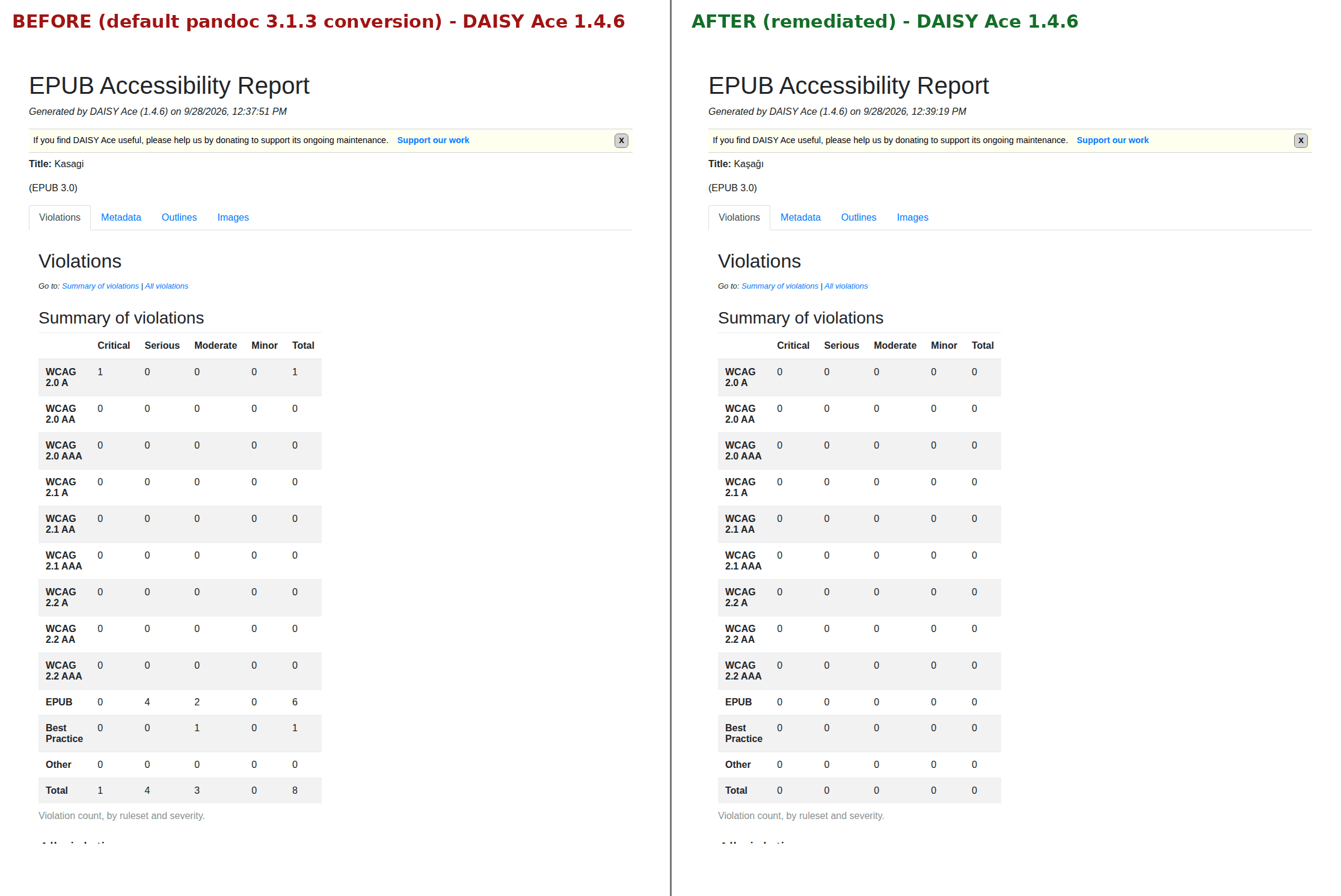
DAISY Ace 1.4.6 moved from 8 violations to none. EPUBCheck 5.2.1 found no errors or warnings in either file — which is the point: the unusable “before” file is a perfectly valid EPUB.
| Verifier | Before | After |
|---|---|---|
| Ace 1.4.6 outcome | fail | pass |
| Ace violations: critical / serious / moderate / minor | 1 / 4 / 3 / 0 (total 8) | 0 / 0 / 0 / 0 |
| Ace: accessibility metadata missing | 9 of 9 | 2 optional fields (certifier credential and report), left out on purpose |
| EPUBCheck 5.2.1 (EPUB 3.3 rules) | “No errors or warnings detected.” 0 errors, 0 warnings | “No errors or warnings detected.” 0 errors, 0 warnings |
What the verifiers do not report
Four problems in the “before” file appear in neither report. I found them by reading the file.
The wrong language
Ace accepted en-US for a text that is entirely Turkish. It only flagged the missing language attribute on the package element. A read-aloud voice would still have used English pronunciation.
A title without its letters
“Kaşağı” had become “Kasagi”, and there was no author at all. Neither tool checks whether the metadata is right, only whether some of it exists.
A cover page with no accessible name
The converter’s separate cover page wrapped the image in SVG with no accessible name. Ace did not flag it; I replaced it with a described image.
Speakers run together
In 5 paragraphs, several lines of dialogue ran into one another. That is a structure problem for anyone listening, and no verifier looks for it.
In general, the tools also do not judge whether an image description is useful (alt="image" passes), whether the declared metadata is true, whether foreign-language passages are marked, or how the book behaves in a real reading app. I did not test this example with a screen reader or a reading app, and I say so in the report.
Metadata for your catalogue: ONIX list 196 (proposal)
In short: ONIX is the format publishers use to send book data to retailers, and code list 196 carries the accessibility features that shops display. For the remediated file I also prepared the matching ONIX entries, as a proposal for the metadata team — nothing was submitted anywhere.
Show the code list (for metadata and distribution teams)
With ProductFormFeatureType 09, the codes are: 04 (EPUB Accessibility 1.1), 82 (WCAG 2.2), 85 (level AA), 10, 36, 52, 11, 13, 14, 22, 29, 30, 32, 90 (certification by name), 91 (assessment date) and 00 (the accessibility summary as free text). Codes 19 and 41 (page numbering, page list) are deliberately not claimed. I checked the code meanings against EDItEUR list 196.
Download both files and compare
You do not have to take the tables on trust. The ZIP contains both EPUB files, both complete Ace HTML reports and both EPUBCheck outputs.
| File | What it is | Size |
|---|---|---|
| Worked example (ZIP) | Before and after EPUB, Ace HTML reports, EPUBCheck text and JSON output | 819 KB |
| Ace report, before (PDF) | Violations tab of the Ace 1.4.6 report: fail, 8 violations | 204 KB |
| Ace report, after (PDF) | Violations tab of the Ace 1.4.6 report: pass, 0 violations | 131 KB |
| Comparison image (PNG) | The two Ace summaries side by side | 138 KB |
The PDFs show only the first tab of each Ace report; the full reports are in the ZIP.
What you receive
You receive the finished EPUB 3, the verifier reports and a written account of what was changed and what was not.
- The remediated or newly built EPUB 3, with the text unchanged and the change in structure documented.
- A DAISY Ace report and an EPUBCheck report for each file.
- A findings report: what was corrected, what was found and left alone on purpose (for example a colour choice that belongs to the designer), and what the verifiers do not check.
- Correct language, title and author metadata; heading structure; table of contents and landmarks; reading order; image descriptions;
epub:typesemantics with matching ARIA roles; a page list where a printed edition exists. - Accessibility metadata in the package file and an accessibility summary in the book’s language.
- An ONIX list 196 proposal your metadata team can check and use.
How the work runs
You send one real file first; the price is fixed before any work starts.
- Send one e-book. The EPUB, or the InDesign package, Word file or PDF it should be made from. I inspect it and tell you what is actually wrong, including the parts not worth paying to fix.
- You receive a scope and a fixed price for the title or the set, before anything starts.
- I do the work. You receive a preview copy marked as such, together with the Ace and EPUBCheck reports, to check in your own reading app.
- Your approval releases the final files and the findings report.
Pricing
I price each job after I have seen the material. Page count alone does not decide the effort: a clean 300-page novel from a consistent InDesign template can take less time than a 40-page textbook with tables, maps and a printed edition to match. You get a fixed price for the set before any work starts — no hourly meter. Fixed-layout titles such as picture books and comics I assess case by case, because how far they can be made accessible depends on how they were built.
Why this matters now
Since 28 June 2025, e-books sold to consumers in the EU fall under the European Accessibility Act. What that means for a particular publisher is a legal question.
Legal note: this page covers the technical side. Whether the law applies to you, and who carries the obligation in your sales chain, is for your legal adviser to confirm.
- The European Accessibility Act, Directive (EU) 2019/882, lists “e-books and dedicated software” among the services it covers and defines them in Article 3(41). Its Annex I, Section IV, asks among other things for “the provision of the structure, flexibility and choice in the presentation of the content”, for alternative renditions that work with “a variety of assistive technologies”, and for “digital rights management measures” that “do not block accessibility features”.
- Member states apply their national laws from 28 June 2025. In Germany this is the Barrierefreiheitsstärkungsgesetz (BFSG), which names “E-Books und hierfür bestimmte Software” in § 1(3).
- Article 4(5) of the directive exempts microenterprises that provide services. Whether that applies to you, and who counts as the service provider when a book is sold through a platform, is for your lawyer to decide.
- The directive does not name a file format. EPUB Accessibility 1.1 is the W3C Recommendation (current version dated 17 October 2024) that publishers use to state how an EPUB meets these requirements, with conformance strings such as “EPUB Accessibility 1.1 – WCAG 2.2 Level AA”.
Publishers outside the EU — in Türkiye, the UK, the US — meet this through their sales to EU consumers. When a distributor asks for accessibility metadata, the file has to back it up.
Frequently asked questions
Our e-books pass EPUBCheck. Are they accessible?
Not necessarily. EPUBCheck tests whether the file follows the EPUB format rules. In the worked example above, the default conversion passed EPUBCheck with no errors or warnings, while DAISY Ace found 8 accessibility violations in the same file.
Do you need the InDesign file, or can you work from the EPUB?
Either works. I remediate existing EPUBs directly. If the book will be re-exported, fixing the InDesign template as well saves work on later editions; I will tell you when that is the better route.
Can you make an EPUB from a PDF?
Yes, as a reflowable EPUB 3. The text and images are taken over, but the page layout becomes a new, flowing layout rather than a copy of the PDF pages. If the PDF has a printed edition behind it, its page numbers can be carried into a page list.
Which WCAG version should the conformance statement use?
EPUB Accessibility 1.1 accepts WCAG 2.0, 2.1 or 2.2. I use WCAG 2.2 Level AA by default, because it includes the 2.1 criteria; if your distributor or client asks for “WCAG 2.1 Level AA”, the file can declare that instead.
Who writes the image descriptions?
I write them in the book’s language, from the image and the surrounding text. For informative images — maps, charts, scientific figures — I mark the descriptions for your editor or author to confirm, because they know what the image is meant to show.
Do you test with a screen reader?
No, and I do not claim otherwise. My findings come from the file, the EPUB specifications and the verifiers. Testing by readers who use assistive technology is a separate discipline, commissioned separately.
Is the file certified after your work?
The file states that it conforms to EPUB Accessibility 1.1 and names me as the person who assessed it. That is a self-declaration, not a certification by an accredited third party, and the metadata does not pretend otherwise.
Related services
Send me one e-book
One file — the title that worries you most, or the one your distributor asked about. You get back a straight account of what is wrong with it, including the parts that are not worth paying to fix.
Ali Karabüyük · Tekirdağ, Türkiye · working remotely with clients worldwide · document and image production since 2004, professional practice since 2008.