
Email accessibility
Accessible HTML emails and newsletters, built or fixed to WCAG 2.2 AA
An accessible HTML email is one that a screen-reader user can follow, that still makes sense with images turned off, and that stays readable on a 320-pixel phone screen and in dark mode. I build new newsletter and notification templates and fix the ones you already send: layout tables marked as presentation, real headings, alt text, live text instead of text in images, contrast, link texts that say where they lead, a declared language, dark-mode styles and a plain-text part, well under the size at which Gmail clips a message. You receive HTML to import into your sending tool, with axe-core reports and a plain list of what the checks did not cover.
In short
What I do
- Build accessible HTML templates for newsletters, campaigns and shop notifications (order confirmation, shipping update), or fix the one you use.
- Replace offers baked into images with live HTML text, and image buttons with coded (“bulletproof”) buttons.
- Set headings, alt text, link texts, language, contrast, dark mode, a preheader and a plain-text version.
- Deliver before-and-after axe-core reports, contrast tables for light and dark mode, screenshots and a findings report.
Not part of this service
- Rewriting your copy. I change structure, not sales text. Link texts, alt texts and the plain-text version are the exception, and you approve each one.
- Work inside your sending tool. I deliver HTML that you or your developer import into Mailchimp, Klaviyo, Brevo, Shopify, WooCommerce or another tool. I do not claim tested integrations with any of them.
- Deliverability. Spam scoring, SPF, DKIM, DMARC and list hygiene are not covered.
- Tests in real email clients and with screen readers, apart from the optional step described below.
- Legal advice. Whether accessibility law or marketing-email rules apply to you is for your lawyer to decide.
Is this page for you?
This page is for you if one of these describes your situation:
- You run an online shop selling to consumers in the EU, and your newsletters and order e-mails are part of your European Accessibility Act work.
- Your designer delivers each newsletter as one large picture, with the discount, the code and the end date inside it.
- You are an agency building templates in Mailchimp, Klaviyo or Brevo for clients, and a client or a tender asks for WCAG AA.
- Your e-mails scroll sideways on phones or become unreadable in dark mode, and you want to know why before paying for a redesign.
Check your last newsletter in one minute
- Images off: turn off automatic images in your mail program (in Gmail on the web: Settings → See all settings → General → Images) and open your last campaign. Can you still read the offer, the code and the end date?
- Link texts: read only the links. “Click here” and “More” tell a screen-reader user, who often moves from link to link, nothing.
- Phone: if you have to scroll sideways, the layout has a fixed width.
- Size: “[Message clipped] View entire message” at the end of a Gmail message means the HTML is too large, and what follows, often the unsubscribe link, is hidden.
Read on for the technical detail. Below: what makes an HTML email accessible, a measured before-and-after example on a fictional shop newsletter with every file downloadable, and the rules for selling into the EU. To skip ahead, forward me one newsletter and I will tell you what is wrong with it.
What makes an HTML email accessible
An accessible email carries its message in live, structured HTML text rather than in pictures and styling, because email clients block images, strip CSS and wrap your message inside their own page.
Layout tables marked as presentation
E-mails still use tables for layout, because Outlook on Windows renders HTML with the Word engine. A layout table without role="presentation" can be announced as a data table, with rows and columns that mean nothing; marked as presentation, the grid is skipped and only the content is read.
Real headings and a sensible reading order
A table cell styled to look like a heading cannot be reached by heading navigation. Real h1–h3 elements let readers move through a newsletter section by section, also in webmail. When columns stack on a phone, source order becomes reading order, so the source is written in the order the message should be read.
Live text instead of text in images, and alt text
Many mail programs block images until the reader allows them. If the discount, the code and the date exist only in a picture, the reader sees an empty box and a screen reader announces nothing useful. Informative images need alt text that says what they show (WCAG 2.2, 1.1.1); decorative ones get alt="" so that they are skipped. Buttons are styled links with a VML fallback for Outlook, not pictures of buttons.
Contrast, text size and link text
Text needs a contrast of at least 4.5:1 against its background, or 3:1 for large text (WCAG 2.2, 1.4.3); light grey footers at 9 or 10 pixels are where newsletters fail most visibly. Link texts say where they lead, such as “View the ceramic mug” or “Unsubscribe”, so that a list of links makes sense on its own (WCAG 2.2, 2.4.4).
Language, dark mode, plain text and size
I set lang and dir on the <html> element and again on the message wrapper, because webmail clients often drop the <html> element. A <title> and a preheader give the message a name and a preview line. Dark mode needs its own palette: some apps follow prefers-color-scheme styles, others invert colours on their own. A plain-text part in a multipart/alternative message serves readers and programs that do not show HTML, and a one-click List-Unsubscribe header (RFC 8058) lets the mail program show its own unsubscribe button. Gmail clips messages whose HTML exceeds about 102 KB.
Evidence: a shop newsletter, before and after
This is a measured worked example on a fictional newsletter, not client work. I built a typical image-heavy campaign e-mail, measured it, rebuilt it accessibly and measured it again in headless Chromium. No real email client and no screen reader were used; the limits are listed below. All files can be downloaded.
Source and licence
- Content: everything is fictional. The newsletter is for a made-up Turkish shop, “Örnek Mağaza — Ekim kampanyası” (an October campaign), written in Turkish. The shop, its address, products, prices, the code
EKIM40and the reserved, non-resolving domainornek-magaza.exampledo not exist. Both footers say so, and the .eml carries anX-Example-Noticeheader. - Images: simple shapes I drew; the social icons are generic letter circles, not brand logos. No third-party content is used, and the files may be reused as examples.
- Tools: axe-core 4.13.0, run with the tags
wcag2a,wcag2aa,wcag21a,wcag21aa,wcag22aandwcag22aa, in Chromium 141.0.7390.37 (headless, driven by Playwright 1.56.0). Alongside it, my own audit script for colour pairs, font sizes, alt text, links, tables, images off, a 320-pixel viewport and emulated dark mode.
The newsletter text is Turkish; the reports and evidence images are in English.
What axe-core reported
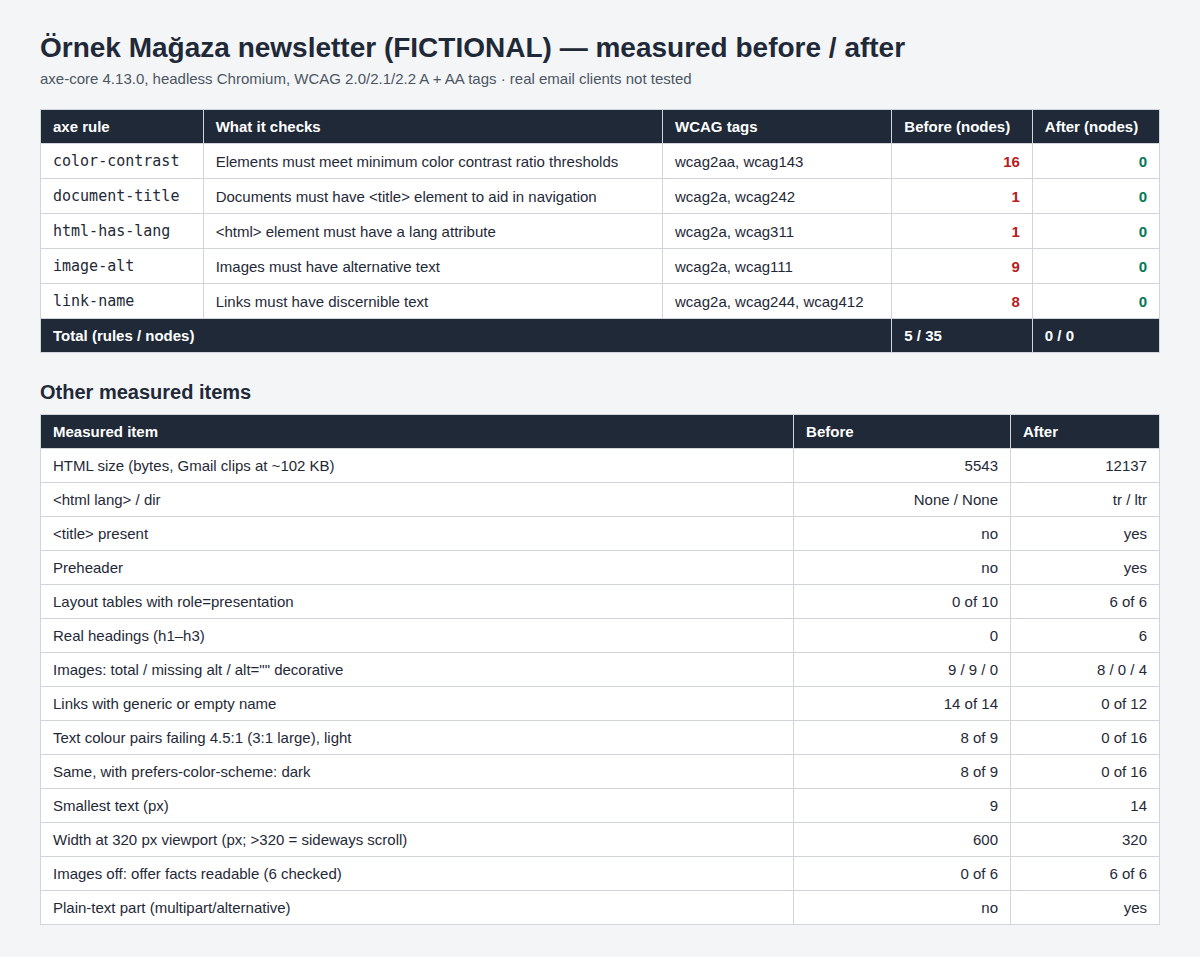
| Rule | WCAG | Before (elements) | After (elements) |
|---|---|---|---|
color-contrast | 1.4.3 | 16 | 0 |
image-alt | 1.1.1 | 9 | 0 |
link-name | 2.4.4, 4.1.2 | 8 | 0 |
html-has-lang | 3.1.1 | 1 | 0 |
document-title | 2.4.2 | 1 | 0 |
| Rules failed / elements | – | 5 / 35 | 0 / 0 |
Before, axe also listed one item for manual review (bypass); after, none. Of its best-practice rules, which are not WCAG requirements, landmark-one-main and region still appear after the rebuild. I left them on purpose: the mail program wraps the message in its own page and landmarks, so a <main> element inside the e-mail does not help. The rebuilt message uses role="article" with an aria-label instead.
What else I measured
| Measured | Before | After |
|---|---|---|
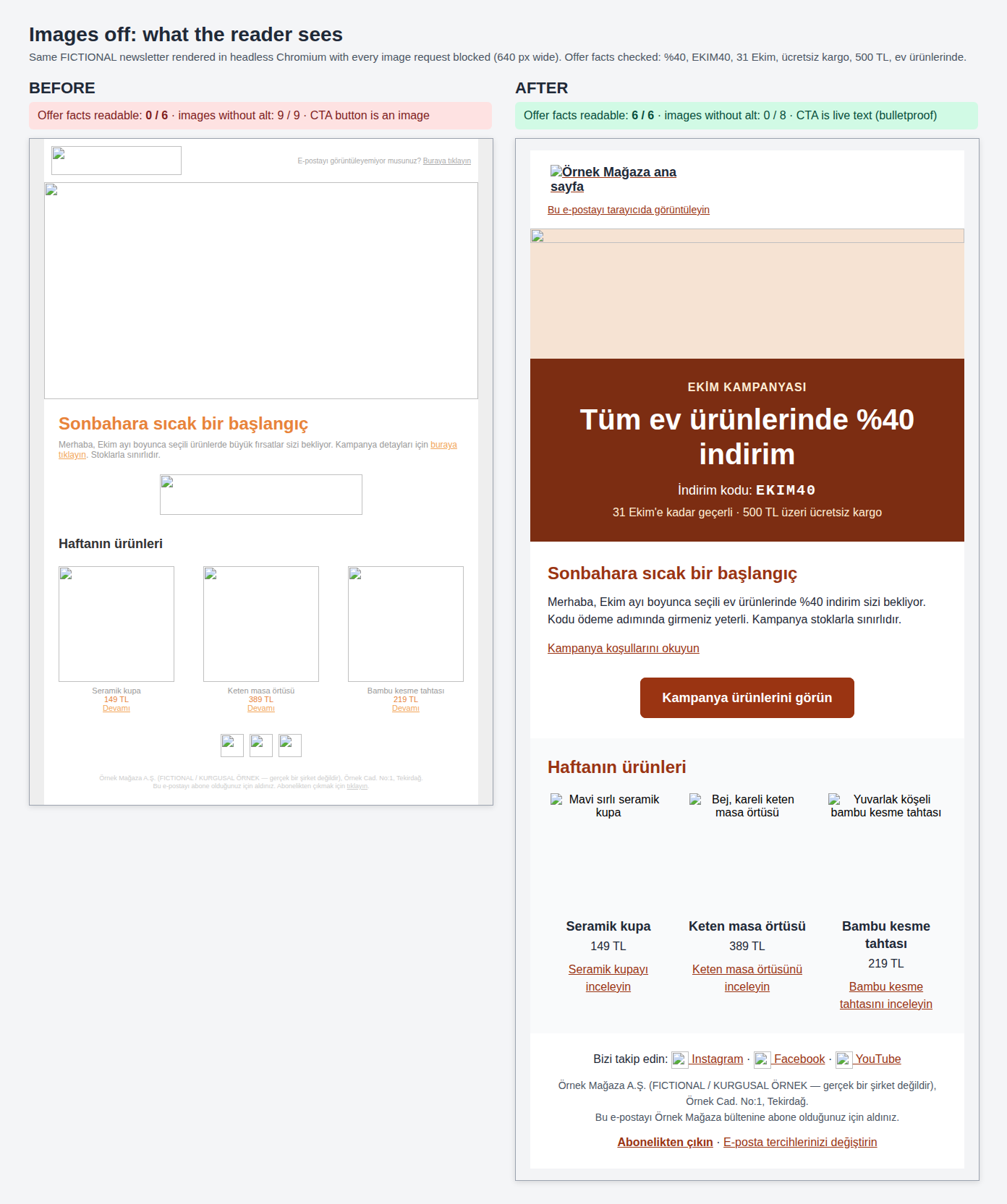
| Offer facts readable with images off (%40, EKIM40, 31 Ekim, free shipping, 500 TL, home products) | 0 of 6 | 6 of 6 |
Layout tables with role="presentation" | 0 of 10 | 6 of 6 |
| Real headings | 0 (styled cells) | 6 (h1 1, h2 2, h3 3) |
Images: total / without alt / decorative alt="" | 9 / 9 / 0 | 8 / 0 / 4 |
| Links with a generic or empty name | 14 of 14 | 0 of 12 |
| Text colour pairs below 4.5:1 (3:1 large), light | 8 of 9 (lowest 1.61:1) | 0 of 16 (lowest 6.99:1) |
| Same, with dark mode emulated | 8 of 9 (no dark styles) | 0 of 16 (lowest 8.7:1) |
| Smallest text | 9 px | 14 px (body 16 px, line height 24 px) |
| Document width in a 320 px viewport | 600 px (280 px sideways scroll) | 320 px (columns stack) |
lang / dir, <title>, preheader | none / none, missing, none | tr / ltr, present, present |
| Plain-text alternative | none | yes, in multipart/alternative |
| HTML size (Gmail clips at about 102 KB) | 5,543 bytes | 12,137 bytes (12,392 inside the .eml) |
Full contrast tables for light and dark mode, with every colour pair, are in the axe summary inside the ZIP.
What I changed
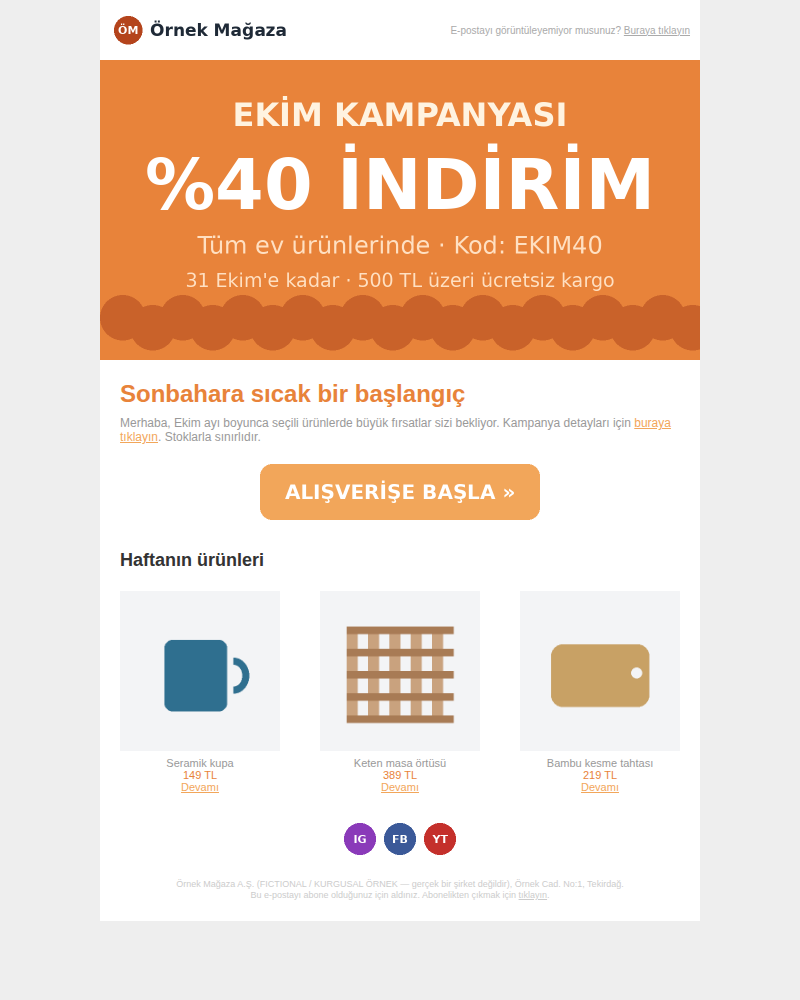
- The offer: it existed only inside a 600×300 image without alt text. It is now live text on a solid
#7c2d12background; the hero image above it is decorative (alt=""). - Button and images: the image button became a styled link in a presentation table, with a VML
v:roundrectfallback for Outlook. The logo link reads “Örnek Mağaza ana sayfa” (home page), products have descriptive alt text, and the social icons are decorative next to visible link text. - Links: “Buraya tıklayın” (click here) and “Devamı” (more) became texts such as “Seramik kupayı inceleyin” (view the ceramic mug) and “Abonelikten çıkın” (unsubscribe).
- Colour, size and structure: 16 px body text in
#1f2937,#4b5563and#9a3412; h1 to h3;lang="tr" dir="ltr", a title and a preheader; a fluid container with a 600 px maximum whose columns stack at 620 px and below. - Dark mode and the message:
color-schememeta tags, aprefers-color-scheme: darkpalette,[data-ogsc]overrides and a white plate behind the logo; a plain-text part in amultipart/alternative.eml withList-Unsubscribeand one-click headers.
What the checks do not report
“Click here” passes
axe’s link-name rule flagged 8 links, the ones with no name at all. My own list found 14 of 14 generic or empty: “Buraya tıklayın” has a name, so axe accepts it.
An offer inside a picture
axe asks only whether alt text exists. An alt such as “October campaign” would satisfy it while the discount, code and date stay invisible with images off. The images-off test looks for six facts in live text.
The dark mode of the apps
My result is Chromium’s prefers-color-scheme: dark emulation. Gmail apps and Outlook apply their own forced colour inversion, which it does not reproduce.
Rendering in real clients
Outlook, Gmail, Apple Mail, Yahoo and Samsung Mail were not tested. Outlook ignores border-radius and media queries; the VML button and [data-ogsc] rules follow standard patterns but were not verified there.
No screen reader was used (NVDA, JAWS, VoiceOver, TalkBack); axe checks the code, not what a screen reader announces inside webmail. No automated check judges whether alt text is good, whether the reading order makes sense or whether the language is plain; I reviewed those by hand. My contrast script cannot measure text in or over images. The size is the raw file; sending tools add tracking, so the real margin under Gmail’s limit is smaller. Deliverability, authentication and legal checks were not part of the example.
Download the files and compare
| File | What it is | Size |
|---|---|---|
| Worked example (ZIP) | Before and after HTML, the .eml with its plain-text part and inline images, the plain text on its own, raw axe-core results (JSON), the axe summary with full contrast tables (HTML), all screenshots, the images and the findings | 1.5 MB |
| Before, desktop | Screenshot at 800 px, images on | 68 KB |
| After, desktop | Screenshot at 800 px, images on | 122 KB |
| After, dark mode | Chromium prefers-color-scheme: dark emulation, not a mail app | 120 KB |
| Before and after at 320 px | First screen of a 320 px viewport, side by side, at 2× scale | 216 KB |
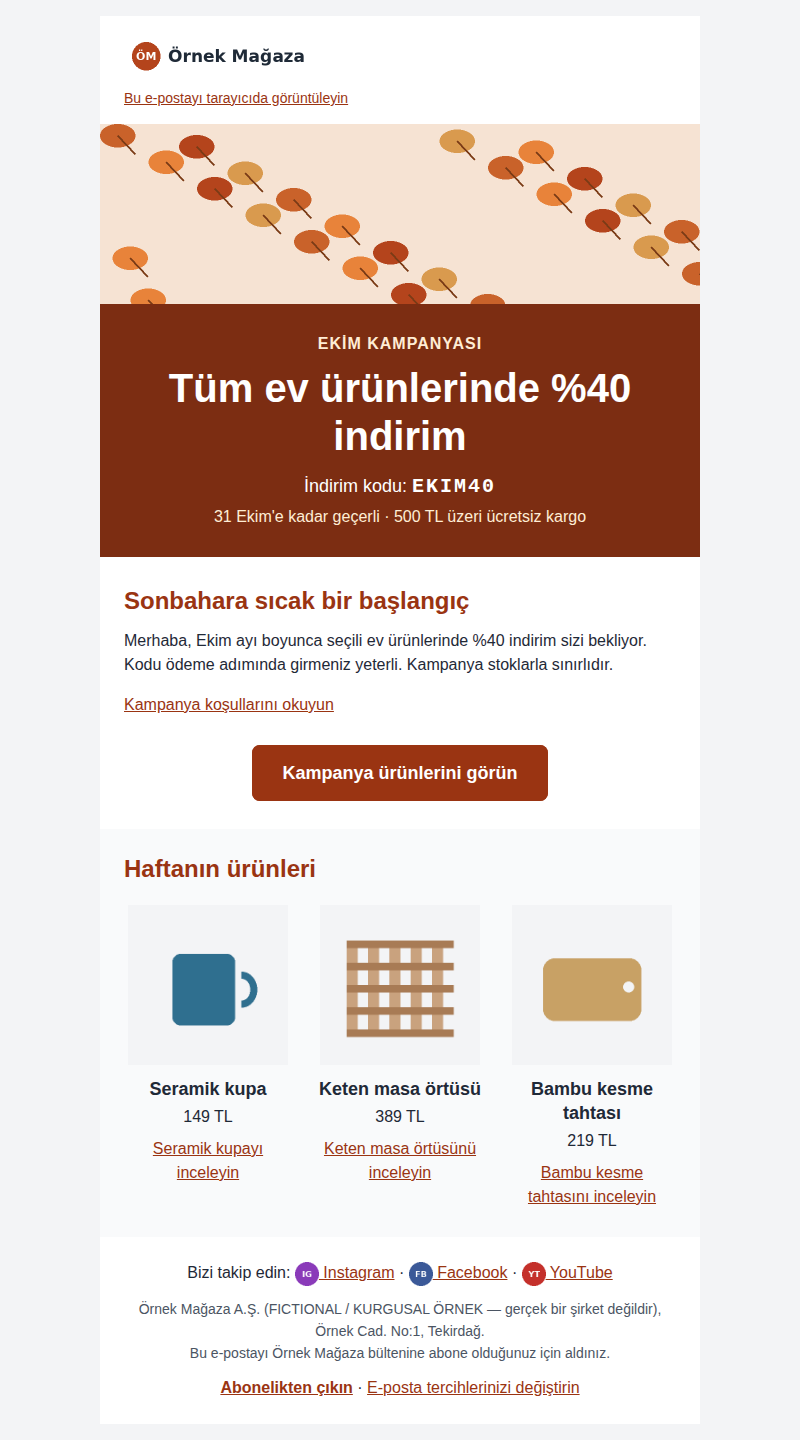
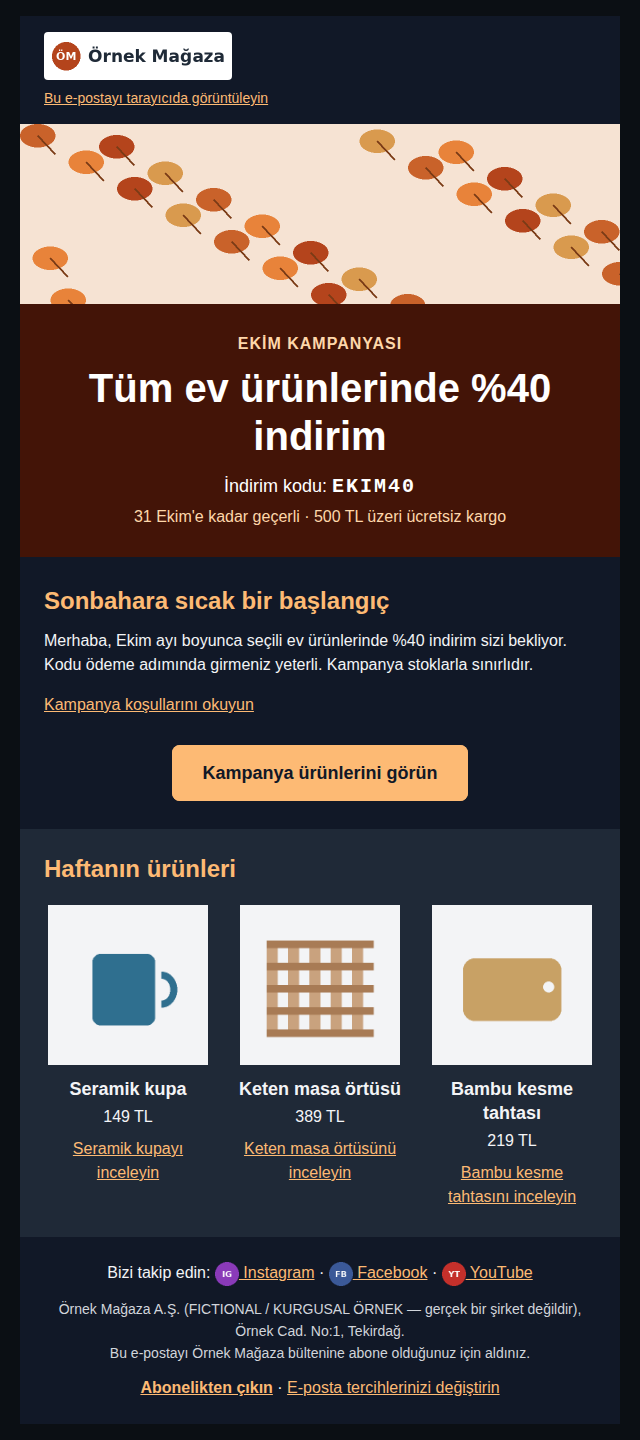
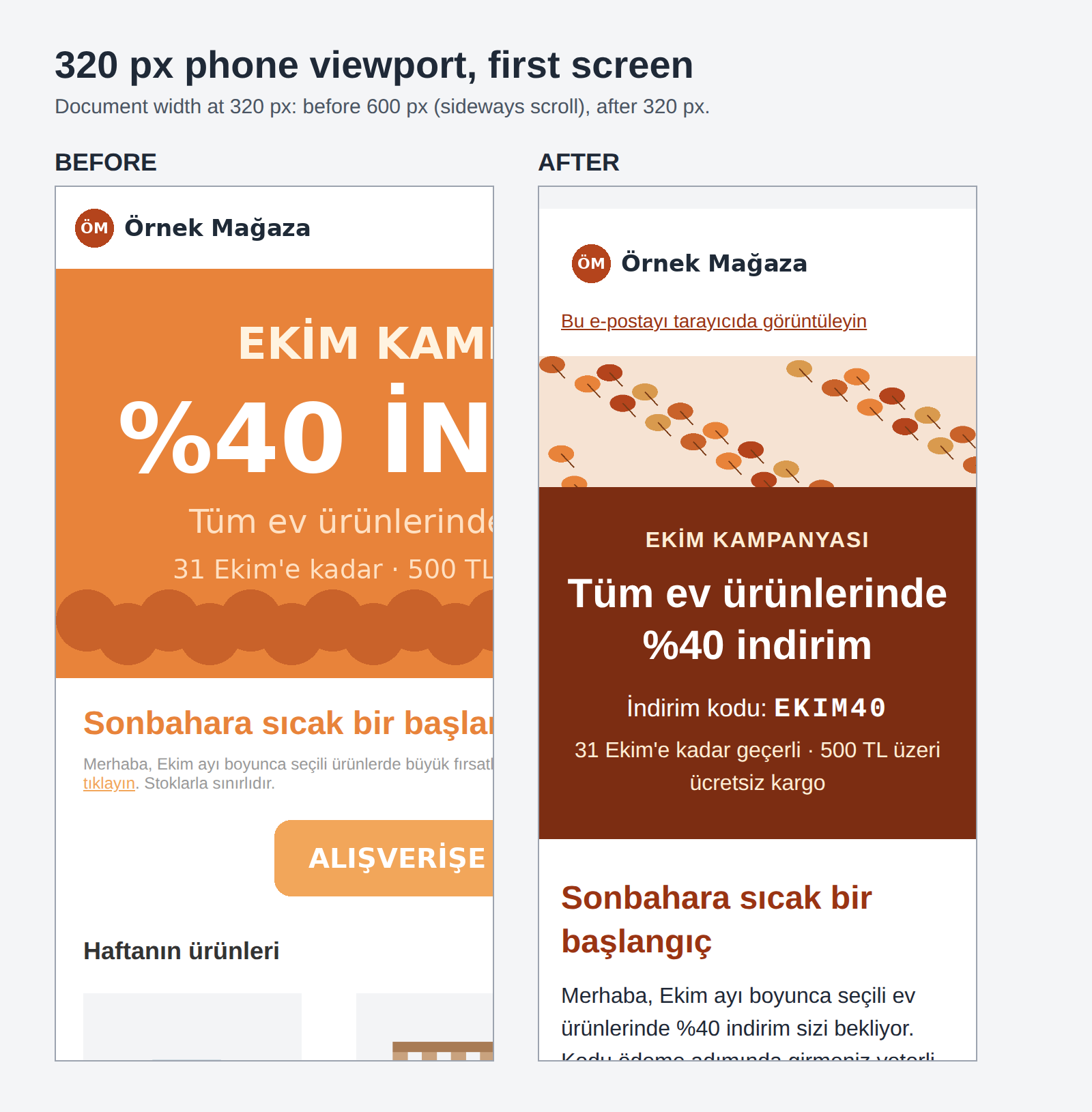
The HTML, .eml, plain-text and JSON files are available only inside the ZIP.
What you receive
You receive an HTML template ready to import, its plain-text version, and reports that show what was measured and what was not.
- The accessible HTML template, with the merge tags or template variables of your existing version kept in place.
- A plain-text version and a preheader text, for your approval.
- Before-and-after axe-core reports, contrast tables for light and dark mode, and screenshots at desktop width, at 320 px, with images off and in emulated dark mode.
- A findings report, including what was left alone on purpose and what the checks cannot see, plus a one-page note for whoever writes your next campaigns.
Mailchimp, Klaviyo and Brevo accept your own HTML as a custom template; Shopify notifications are edited as code in the shop admin, and WooCommerce e-mails through template overrides in your theme. You or your developer import the HTML and send a test to yourself; I correct what comes back wrong. If you have an account with an email testing tool such as Litmus or Email on Acid, I can review its client screenshots as an optional step; without one, the report states this as a limit.
How the work runs
You send one real e-mail first; the price is fixed before any work starts.
- Forward one newsletter, or send its HTML export. The campaign or order e-mail that worries you most. I tell you what is actually wrong, including the parts not worth paying to fix.
- You receive a scope and a fixed price for that template or the whole set.
- I do the work. You receive a preview, marked as such, with the axe-core report, the screenshots and a list of any colour or wording changes for your approval.
- Your approval releases the final files: the HTML, the plain-text version and the findings report.
Pricing
I price each job after seeing the material. The number of e-mails alone does not decide the effort: one modular master template that all your campaigns reuse can take less time than three one-off newsletters built from images. You get a fixed price for the set before work starts, with no hourly meter. If your campaigns share one template, fixing that template is usually the cheaper route, and I will say so.
Why this matters now
Since 28 June 2025, e-commerce services offered to consumers in the EU fall under the European Accessibility Act. Whether, and how far, that reaches your newsletters and order e-mails is a legal question.
Legal note: this page covers the technical side. Whether the law applies to your shop, and to which of your e-mails, is for your legal adviser to confirm.
- The European Accessibility Act, Directive (EU) 2019/882, covers e-commerce services, and member states apply their national laws from 28 June 2025. Germany’s Barrierefreiheitsstärkungsgesetz (BFSG) names “Dienstleistungen im elektronischen Geschäftsverkehr” in § 1(3) No. 5. The directive describes these services through websites and mobile apps; it does not list e-mail as a separate channel.
- Article 4(5) of the directive exempts microenterprises that provide services. Whether that applies to you is for your lawyer to decide.
- The technical yardstick used in practice is WCAG 2.2, Level AA. It is written for web content; HTML e-mail uses the same technologies.
Shops outside the EU, in Türkiye, the UK or the US, meet these rules through their sales to EU consumers. And without any law, an offer the reader cannot see with images blocked, on a phone or in dark mode does not sell.
Frequently asked questions
Will the template work in Mailchimp, Klaviyo or Brevo?
These tools accept custom HTML templates, and I write the HTML for that. I have not tested imports into specific platforms, so you or your developer import it and send a test; I keep your merge tags and correct what the import breaks.
Have you tested it in Outlook, Gmail and Apple Mail?
Not in the worked example: it was measured in headless Chromium only, and I say so. If you have an account with an email testing tool, I can review its client screenshots as an optional step. Otherwise, real-client rendering stays a stated limit in the report.
Do you test with a screen reader?
No, and I do not claim otherwise. My findings come from the code, the standards, axe-core and manual review. Testing by people who use assistive technology should be commissioned separately.
Can our designer keep sending the newsletter as one image?
That is the main thing to stop. In the example, a reader with images blocked could read 0 of the 6 offer facts before and 6 of 6 after. Images can stay as decoration or product photos; the offer itself belongs in live text.
Will the e-mail get too big for Gmail?
Accessible code adds some weight, but not much. In the example the HTML grew from 5,543 to 12,137 bytes, far below Gmail’s clipping point of about 102 KB. Sending tools add tracking code, so I measure the size of your real export as well.
Does the European Accessibility Act apply to our newsletters?
That is a legal question, and your lawyer decides it. The directive covers e-commerce services and describes them through websites and apps, without listing e-mail separately. I build to WCAG 2.2 AA either way and document what was checked.
Related services
Send me one newsletter
One e-mail — the campaign, order confirmation or template that worries you most. Forward it to me as it arrived. You get back a straight account of what is wrong with it, including the parts that are not worth paying to fix.
Ali Karabüyük · Tekirdağ, Türkiye · working remotely with clients worldwide · document and image production since 2004, professional practice since 2008.