
Image descriptions
Alt text writing in English, German and Turkish for shops, websites and documents
Alt text is the short text alternative a screen reader speaks instead of an image, and what shows when the image fails to load. I write alt text and longer image descriptions in English, German and Turkish for e-commerce catalogues, websites and documents, following the W3C WAI images tutorial: informative, decorative or functional, and always written for the context where the image appears. You receive them as a CSV ready for your shop or developer, and an honest note on what automated checkers can and cannot confirm.
In short
What I do
- Write alt text for product images, category and banner images, blog and news images, and icons that act as links or buttons — in English, German and Turkish.
- Decide per image whether it is informative, decorative or functional, and write accordingly — including
alt=""where silence is the right answer. - Write longer descriptions for charts, diagrams and infographics, and alt text for images in Word, PowerPoint and PDF documents.
- Review existing alt texts and flag file names, duplicates of captions, keyword lists and descriptions that no longer match the image.
- Deliver everything as a CSV or spreadsheet keyed to your file names, SKUs or URLs, with a short style note for your team.
Not part of this service
- Entering the texts into your shop or CMS. The CSV is ready for import by your developer; for WordPress and WooCommerce I can quote the entry separately.
- Product copy and translation of other content. I write the image alternatives, not product descriptions or page text.
- Testing with screen-reader users. My work follows the W3C guidance and is checked with automated tools; user testing is a separate discipline.
- Legal advice. Whether the European Accessibility Act applies to your shop is for your lawyer to decide.
Is this page for you?
This page is for you if one of these describes your situation:
- You run an online shop selling to consumers in the EU and hundreds or thousands of product images have empty or missing alt attributes.
- Your alt texts were filled automatically with file names, product titles or keyword lists, and an audit or a customer pointed it out.
- You sell in more than one language and the alt texts exist only in one — or were machine-translated without anyone looking at the images.
- An accessibility checker reports “images must have alternative text” and you need the texts, not just the error count.
- You publish reports, catalogues or presentations with charts and diagrams that need a real description.
Check your own product page in one minute
Open one of your product pages, right-click the main product image and choose “Inspect”. The highlighted code shows the alt attribute.
- No
altat all: a screen reader may read out the file name or the image address instead. alt="IMG_4521.jpg"oralt="image": present, useless, and accepted by automated checkers — see the worked example below.- Alt text identical to the product name in the heading above it: the listener hears the name twice and learns nothing about the product’s look.
An alt text that says what the product looks like — colour, material, shape, what is included — is a good sign. Do the same for one image in a blog post and one decorative banner.
Read on for the detail. Below: how good alt text is decided, a measured before-and-after example with the axe-core results and the CSV deliverable, what checkers cannot judge, and what the European Accessibility Act says about online shops. To skip ahead, send ten images with their page links; I will tell you what is wrong with the current texts and write a few of them as a sample.
How good alt text writing works
Good alt text answers one question: what does this image contribute here? The W3C WAI alt decision tree sorts images into a few types, and each type gets a different kind of text.
Informative images
A photo or illustration that carries information gets a short description of that information. On a product page, that means the product as a buyer sees it; in an article, the detail the paragraph is about. No “image of”, no repetition of the text next to it.
Decorative images
Background textures, dividers and mood images that add nothing to the content get an empty alt attribute, alt="". The screen reader then skips them. A text alt on a decorative strip is noise on every page load.
Functional images
An image that is the only content of a link or button describes the action or destination, not the picture: “Search”, not “magnifying glass”; “Read the post: Night launch at Cape Canaveral”, not “rocket”.
Complex images and images of text
Charts, diagrams and maps need a short alt text plus a longer description nearby, carrying the same data. Images of text should contain the same words in their alt text — or, better, be replaced by real text.
Context decides the text
The same photograph can need two different alt texts. In the worked example, one coffee photo appears on a product page and in an article about espresso crema — and gets a different text in each place, in all three languages.
| Language | Product page (describes the product) | Article about crema (describes the crema) |
|---|---|---|
| English | Red glazed cup with a white inside on its matching saucer, filled with espresso, steel teaspoon beside it | Freshly pulled espresso with an even, hazelnut-brown crema covering the surface |
| German | Rot glasierte Tasse mit weißer Innenseite auf passender Untertasse, mit Espresso gefüllt, Teelöffel aus Edelstahl daneben | Frisch gezogener Espresso mit gleichmäßiger, haselnussbrauner Crema auf der Oberfläche |
| Turkish | Beyaz iç yüzeyli kırmızı sırlı fincan, aynı renk tabağıyla; içinde espresso, tabakta çelik çay kaşığı | Yeni çekilmiş espresso; yüzeyi eşit, fındık rengi bir kremayla kaplı |
Each language version is written from the image and the page in that language, not translated word by word: German product texts follow German catalogue habits, Turkish ones Turkish usage.
Evidence: one demo page, before and after
This is a measured worked example on a fictional shop page with public-domain and CC0 photographs — not a client job. I built a typical “before” page with the usual alt-text mistakes and an “after” page with corrected alternatives, and ran the axe-core accessibility engine on both. Both pages, the axe results and the CSV can be downloaded below.
Source and license
The five photographs ship with the open-source library scikit-image 0.26.0, whose documentation states the license of each: a coffee cup (CC0, photographer Rachel Michetti), a cat (CC0, Stefan van der Walt), a rocket on the launch pad (SpaceX, public domain), a NASA astronaut portrait (public domain) and a brick texture (CC0). The shop “Örnek Kafe”, its product, price and articles are fictional and labelled as such on the pages. The search icon is a small drawing I made for the page.
What was wrong, and how it was fixed
| Image use | Before | After |
|---|---|---|
| Product photo (coffee cup) | no alt attribute | describes the product: colour, glaze, saucer, spoon |
| Same photo in the crema article | alt="coffee" | describes the crema the paragraph is about |
| Cat photo in an article | alt="image123.jpg" | short description of the cat |
| Astronaut portrait with a caption | alt repeated the caption word for word | adds what is visible; the caption keeps name and date |
| Brick strip in the header | alt="decorative brick wall texture background image" | alt="" (decorative) |
Rocket hero image (div role="img") | no accessible name | aria-label with a description |
| Rocket thumbnail as the only content of a link | no alt attribute | states the link destination |
| Search icon in an otherwise empty button | SVG with no accessible name | “Search” |
What axe-core reports
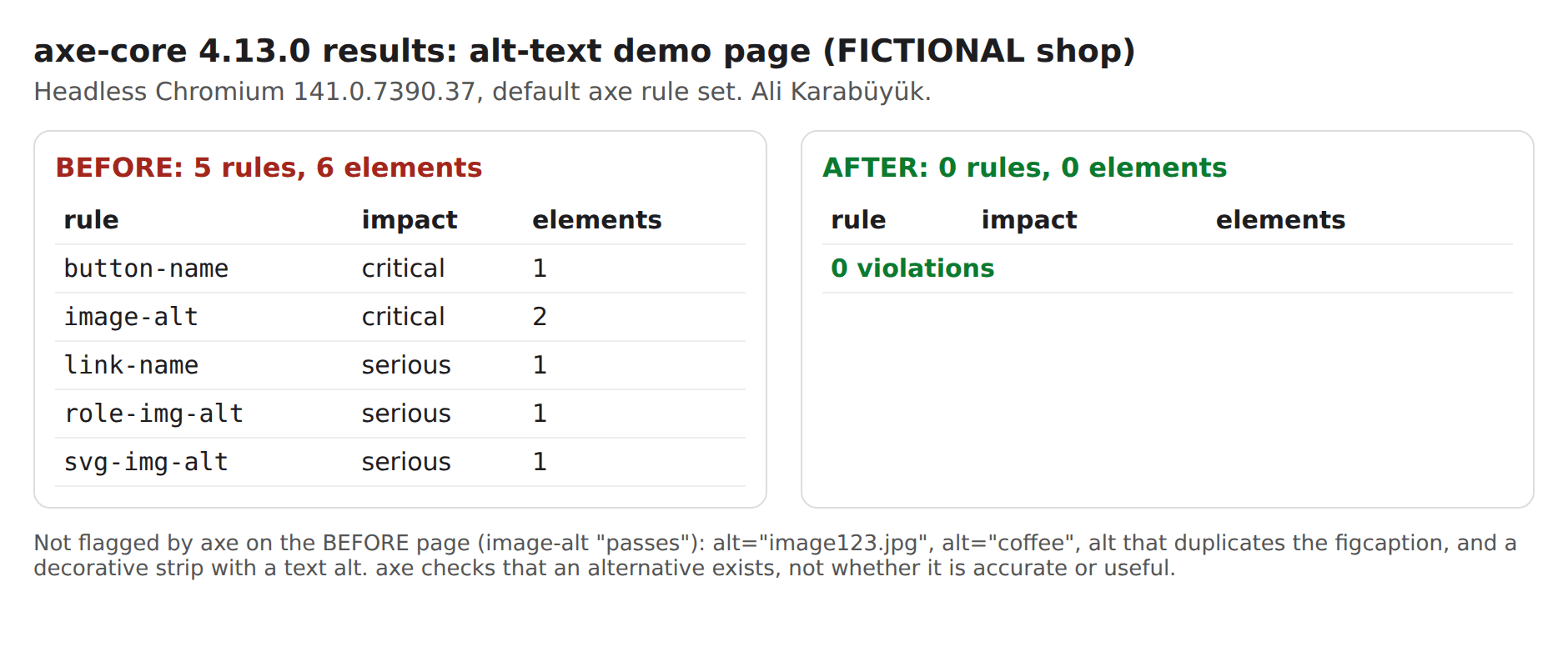
axe-core 4.13.0, run in headless Chromium 141 with its default rule set, found 5 violated rules on 6 elements on the before page, and none on the after page.
| Rule | Impact | Before | After |
|---|---|---|---|
image-alt | critical | 2 elements | 0 |
button-name | critical | 1 element | 0 |
link-name | serious | 1 element | 0 |
role-img-alt | serious | 1 element | 0 |
svg-img-alt | serious | 1 element | 0 |
| Total | 5 rules, 6 elements | 0 violations; 42 rules passed |
What axe-core does not report
On the before page, axe’s image-alt rule passed four alt texts that are plainly wrong. A checker can confirm that an alternative exists; it cannot tell whether it is right.
File names
alt="image123.jpg" passed. A screen reader reads it aloud, digits and all.
Empty words
alt="coffee" passed. It is not wrong, just useless for a paragraph about crema.
Caption duplicates
An alt text that repeats the visible caption passed. The listener hears the same sentence twice.
Decorative images with text
The brick strip’s long alt text passed. Whether an image should be decorative is a judgement, not a rule a checker can run.
Checkers also cannot judge accuracy (does the text match the image?), context (does it say what matters on this page?), language, or whether a chart description carries the same data as the chart. That is the part of the work a person does. I did not test the pages with a screen reader; the pages are in English, with the German and Turkish texts delivered in the CSV.
The deliverable: one CSV row per image use
The CSV has one row per image use — 8 in the example — with the columns filename, context, image_type, alt_tr, alt_de, alt_en, decorative, the “before” value, source and license, and notes explaining each decision. In your project the key column is whatever your system uses: file name, SKU, media ID or page URL.
| File | What it is | Size |
|---|---|---|
| Worked example (ZIP) | Before and after HTML pages (images embedded), both axe-core JSON results, the CSV, web-size images, findings | 695 KB |
| Alt text deliverable (CSV) | 8 rows, English, German and Turkish, UTF-8 | 4.9 KB |
| axe-core summary (PNG) | Before and after results side by side | 123 KB |
What you receive
You receive finished alt texts in the languages you need, in a file your system can take, with the reasoning written down.
- A CSV or spreadsheet with one row per image use: key column, context, image type, alt text per language, a decorative flag and notes.
- Longer descriptions for charts, diagrams and infographics, placed where your page or document can show them.
- A review list of existing alt texts that should change, and why.
- A one-page style note for your team: length, tone, what to leave out, how to handle new products.
- An axe-core check of sample pages before and after, if the texts are already live.
How the work runs
You send a small real sample first; the price is fixed before the full set starts.
- Send ten images with their page links — or a product export with image URLs. I review the current texts and write a few as a sample in the languages you need.
- You receive a scope and a fixed price for the full set, before anything starts.
- I write the texts. You receive a preview CSV marked as such, to check with your product or content team.
- Your approval releases the final file and the style note.
Pricing
I price each job after I have seen the material. A series of similar packshots goes faster than a mix of lifestyle photos, infographics and charts, and each additional language adds real writing, not a copy. You get a fixed price for the set before any work starts — no hourly meter.
Why this matters now
Since 28 June 2025, e-commerce services offered to consumers in the EU fall under the European Accessibility Act, and missing text alternatives are among the most common failures. What that means for a particular shop is a legal question; this page covers the technical side.
- The European Accessibility Act, Directive (EU) 2019/882, covers e-commerce services, and member states apply their national laws from 28 June 2025. Germany’s Barrierefreiheitsstärkungsgesetz (BFSG) names “Dienstleistungen im elektronischen Geschäftsverkehr” in § 1(3) No. 5.
- Article 4(5) of the directive exempts microenterprises that provide services. Whether that applies to you is for your lawyer to decide.
- The technical yardstick used in practice is WCAG. WCAG 2.2 Success Criterion 1.1.1, Non-text Content (Level A), requires a text alternative for non-text content, and decorative images to be implemented so that assistive technology can ignore them.
Shops outside the EU — in Türkiye, the UK, the US — meet this through their sales to EU consumers. And alt text is not only for screen readers: it is shown when images fail to load and is read by search engines to understand what an image shows.
Frequently asked questions
Our site passes an automated accessibility check. Are our alt texts fine?
Not necessarily. Automated checkers confirm that an alternative exists, not that it is right. In the worked example, axe-core accepted alt="image123.jpg", alt="coffee", a copy of the caption and a text alt on a decorative image.
How long should an alt text be?
As short as possible while still carrying what the image contributes; WCAG sets no character limit. In the worked example the English alt texts for informative photos are 79 to 106 characters, and the functional link text is 45. Complex images get a short alt text plus a longer description.
Should alt texts contain SEO keywords?
They should describe the image accurately, in the words your customers use. An accurate description of a product usually contains its natural search terms anyway. Keyword lists in alt text make the page worse for screen-reader users.
Does the same image always get the same alt text?
No. Alt text depends on why the image is on the page. In the worked example, one coffee photo gets a product description on the product page and a description of the crema in the article.
When should the alt text be empty?
When the image is decorative, or when the same information is already in text right next to it — for example an image inside a link that also contains the link text. Then alt="" is correct; leaving the attribute out entirely is not.
Do you translate alt texts, or write each language?
I write each language from the image and the page in that language. The facts stay the same across languages, but word order, catalogue terms and length follow each language’s own habits.
Can you deliver in a format our shop can import?
Yes. I deliver CSV or a spreadsheet keyed to whatever your system uses — file name, SKU, media ID or URL — with the columns your developer asks for. Importing the file is usually done by your developer; for WordPress and WooCommerce I can quote it separately.
Related services
Send me ten images
Ten images with their page links — ideally a mix of product photos, article images and the banner nobody thinks about. You get back a straight account of what is wrong with the current alt texts, and a few rewritten as a sample in the languages you need.
Ali Karabüyük · Tekirdağ, Türkiye · working remotely with clients worldwide · document and image production since 2004, professional practice since 2008.