
Image provenance
C2PA Content Credentials: adding and checking provenance in image workflows
C2PA Content Credentials are a signed record inside an image file: who produced it, which tool, which edits, which source file, and whether generative AI was involved. I set up and check Content Credentials in photo-editing and publishing workflows — in Photoshop, in scripted pipelines and on the way through your CMS — and I explain plainly what a valid credential proves and what it does not. Below is a measured worked example you can download and verify yourself.
In short
What I do
- Check your images for Content Credentials and report what they contain, whether the signature and hashes are valid, and whether the signer is trusted.
- Set up Content Credentials in your editing workflow: Photoshop export settings, the right action and source-type labels for retouching and generative edits, and the ingredient (source file) link.
- Trace where your publishing chain removes them — export presets, image optimisers, CMS thumbnails, CDN transformations — and show which step to change.
- Build scripted signing and verification with the open-source C2PA tools for batch or server-side workflows, using the certificate you provide.
- Deliver a findings report with the verifier output for every file.
Not part of this service
- Providing a trusted signing certificate. Certificates that public verifiers treat as trusted come from certification authorities on the C2PA Trust List and belong to you or your tool vendor. I work with yours; for tests I use clearly marked test certificates.
- Deciding whether an image is “real”. Content Credentials record what the signer declared. They are not a forensic authenticity test, and I do not sell them as one.
- Watermarking or AI detection services. Invisible watermarks and detection models are separate technologies from separate vendors.
- Legal advice. Whether the EU AI Act obliges you to mark or disclose anything is for your lawyer to decide.
Is this page for you?
This page is for you if one of these describes your situation:
- You run a retouching studio, agency or newsroom and clients or editors now ask whether images carry Content Credentials — or ask you to label generative edits.
- You use Generative Fill or similar tools in client work and want the edit declared consistently, not left to individual export settings.
- You export with Content Credentials, but on your website or shop the credentials are gone, and nobody knows at which step.
- A platform or client showed you a result such as “signer not trusted” or “no Content Credentials” and you need to know what it means.
- You are a developer or product owner who needs signing and verification in a pipeline, with a clear line between test certificates and production certificates.
Check one of your published images in one minute
Download an image from your live website or shop — the file as visitors receive it, not your export — and drop it on contentcredentials.org/verify, the public verification page of the Content Authenticity Initiative.
- “No Content Credentials” on an image you exported with credentials: a step between Photoshop and the browser removed them. In the worked example below, one re-save with a standard image library was enough.
- Credentials shown, but the signer is not recognised: the file was signed with a certificate that is not on the trust list the verifier uses.
- Credentials shown, with your tool as signer and the edit history you expect: the chain works for this image. Other image sizes generated by your CMS may still behave differently.
Read on for the technical detail. Below: how Content Credentials work, a measured example with signed files you can download, what verifiers do not check, and where the EU AI Act fits in. To skip ahead, send one image or one link and I will tell you what it carries and where it gets lost.
How C2PA Content Credentials work
A C2PA manifest is a small signed data package embedded in the image file. It binds statements about the image to the exact pixels with a cryptographic hash, and the signature binds both to a certificate. Change the pixels and the hash fails; strip the package and nothing is left to check.
Assertions: what the file says about itself
The manifest holds “assertions”: an actions list (opened, cropped, colour-adjusted, edited), the tool that did each step, the author or organisation, and for generative edits a digital source type from the IPTC vocabulary, for example trainedAlgorithmicMedia for a fully generated image or compositeWithTrainedAlgorithmicMedia when generated content is combined with a photograph. The source image can be recorded as an “ingredient” with its own thumbnail and its own credentials, if it had any.
Signature and trust
A verifier checks three separate things: the signature is intact, the hashes match the pixels, and the signing certificate chains to an authority it trusts. The first two are mathematics. The third is a list: the C2PA Trust List, maintained under the C2PA Conformance Program, names the certification authorities that issue signing certificates to conforming products. A self-made certificate can produce a perfect signature and still be reported as untrusted.
Where credentials get lost
Most publishing chains were built before C2PA and re-encode images freely: export presets that drop metadata, compression plugins, WordPress-generated sub-sizes, CDN resizing, social platforms. Any tool that writes a new JPEG without C2PA support produces a file with no manifest. A verifier then reports “no credentials” — not “tampered” — so the loss is silent.
Content Credentials in Photoshop
Photoshop can attach Content Credentials when you export, with your name, linked accounts and the edits made; Adobe documents it in “Content Credentials in Adobe Photoshop”, where the panel is still labelled Beta at the time of writing. In that case Adobe’s certificate signs the manifest. I have retouched images in Photoshop for more than twenty years; Content Credentials are the new part of that workflow, and this page shows how I test them rather than claiming a track record with them.
Evidence: one photo, signed, tampered and re-saved
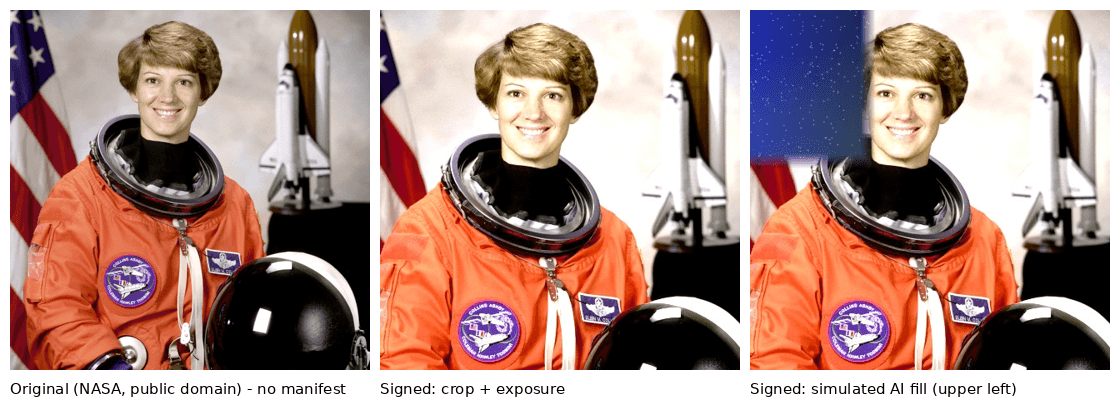
This is a measured worked example on a public-domain photograph — not a client job. I edited the image twice, signed both versions with a test certificate chain, verified them with two independent tools, then changed one bit in one file and re-saved another. All files and verifier outputs can be downloaded below.
Source and license
The source is the portrait of NASA astronaut Eileen Collins shipped as astronaut.png (512 × 512 pixels) with the open-source library scikit-image 0.26.0. Its documentation states: “No known copyright restrictions, released into the public domain.” The original file carries no Content Credentials; both verifiers report that no manifest was found.
What was done
| Step | Detail |
|---|---|
| Edit 1 | Cropped to 432 × 432 pixels, brightness × 1.25, contrast × 1.08 (Pillow 12.2.0) |
| Edit 2 | Edit 1, plus the flag area — 15.27 % of the image — replaced. Simulated generative edit: the fill was generated procedurally, no AI model was used, and the manifest says so in the action description. |
| Certificate | My own test chain: root CA → ES256 signing certificate (P-256, key usage digitalSignature, extended key usage emailProtection). Marked “TEST … demo only”; not on any trust list. |
| Actions recorded | c2pa.opened (linked to the original as ingredient), c2pa.cropped, c2pa.color_adjustments; edit 2 adds c2pa.edited with digital source type compositeWithTrainedAlgorithmicMedia and the replaced region |
| Author | Ali Karabüyük (schema.org CreativeWork assertion) |
| Signing tool | c2pa-python 0.37.12 (C2PA SDK 0.91.0), claim version 2 |
What the verifiers report
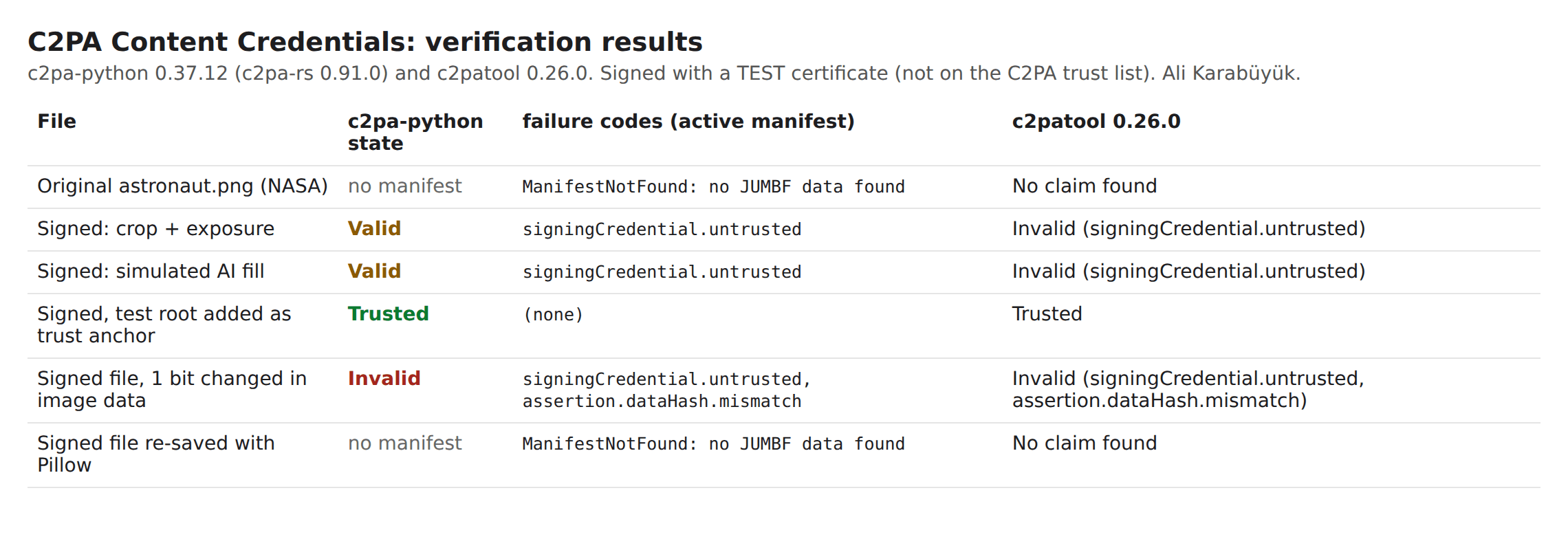
Signature and hashes are valid on both signed files; the only failure is that the signer is not trusted — exactly what a test certificate should produce. Adding my test root as a trust anchor turns the result into “Trusted” in both tools, which shows that trust is the only open point.
| File | c2pa-python 0.37.12 | c2patool 0.26.0 |
|---|---|---|
| Original (NASA) | no manifest found | “No claim found” |
| Signed: crop and exposure | “Valid”, failure code signingCredential.untrusted | “Invalid”, signingCredential.untrusted |
| Signed: simulated generative fill | “Valid”, failure code signingCredential.untrusted | “Invalid”, signingCredential.untrusted |
| Signed, test root supplied as trust anchor | “Trusted”, no failure codes | “Trusted” |
| Signed file, one bit changed in the image data | “Invalid”: signingCredential.untrusted, assertion.dataHash.mismatch | “Invalid”, same two codes |
| Signed file, re-saved once with Pillow | no manifest found | “No claim found” |
The two tools word the untrusted case differently: the current SDK reports “Valid” with the untrusted code listed as a failure, the older c2patool reports “Invalid” with the same code. The code is what matters. For production, the signing certificate has to chain to an authority on the C2PA Trust List; a private or self-made certificate will always show as untrusted in public verifiers.
For the tamper test I flipped one bit at byte 289,928 of the signed JPEG, inside the compressed image data. You cannot see the change; both verifiers report assertion.dataHash.mismatch. The re-save test is the more common real-world case: one ordinary re-save removed the entire manifest, and the verifiers could only say that there was nothing to verify.
A side effect worth knowing: file size
With default settings, the signed version of edit 1 is 317,282 bytes; the same image unsigned is 55,330 bytes. Most of the difference is two preview thumbnails inside the manifest (127,519 and 129,260 bytes) — together larger than the image itself. Thumbnail size can be set or switched off, and for web images it should be.
What the verifiers do not report
Whether the statements are true
The edit 2 file declares a generative edit that was in fact procedural, and it verifies exactly like an honest file. C2PA proves who signed which statements and that nothing changed afterwards — not that the statements are correct.
Anything about files without credentials
The unsigned original and the re-saved copy both read as “no manifest”. That is neither evidence of manipulation nor of authenticity.
Who the person is
A certificate identifies its holder, and the author field is a declaration. Verified personal identity needs separate identity assertions or a certificate with vetted subject data.
Revocation and time
Revocation was not checked in this example (signingCredential.ocsp.skipped) and no time-stamping authority was used, so validity is tied to the certificate’s own lifetime.
The example also has limits of its own: JPEG output only, one PNG ingredient, verification with two tools that share the same open-source core, and no test with an online viewer, video, PDF or remote manifests.
Download the files and verify them yourself
The two signed JPEGs are inside the ZIP below. Unzip them and drop them on any C2PA verifier: you should see the manifest, the edits, the ingredient — and an untrusted test signer.
A live demonstration I did not plan. I first put the two signed JPEGs on this site as separate downloads. The WordPress media library stored them byte for byte (317,282 bytes), but the content delivery network in front of this site served a recompressed copy of 31,076 bytes — without the manifest. Exactly the silent stripping described above, on my own site. So the signed files are offered only inside the ZIP, which the network passes through unchanged (checked by SHA-256).
| File | What it is | Size |
|---|---|---|
| Worked example (ZIP) | Original, signed, tampered and re-saved images; manifest definitions; c2pa-python and c2patool outputs; public test certificates; findings | 2.0 MB |
| Verification summary (PNG) | The results table as an image | 179 KB |
| Comparison image (PNG) | Original and both edits side by side | 449 KB |
The private keys of the test certificates are not published. Anyone can make a test certificate; that is exactly why verifiers do not trust them.
What you receive
You receive working credentials in your files, verifier output that proves it, and a written account of what your chain does to them.
- A check of your sample images: manifest contents, validation state and the exact status codes, in plain language.
- A map of your publishing chain showing where credentials survive and where they are removed, with the setting or step to change.
- Recommended Photoshop export settings and a short house rule for labelling edits, including generative ones, with the IPTC source types explained.
- For scripted workflows: a signing and verification script set up with your certificate, and a test run on your files.
- A findings report with the verifier output for every file, and a list of what the verifiers did not check.
How the work runs
You send one real file or one live link first; the price is fixed before any work starts.
- Send one image or one page link. Ideally the export and the published version of the same image. I tell you what they carry and where the difference comes from.
- You receive a scope and a fixed price for the check, the workflow set-up or the pipeline, before anything starts.
- I do the work. You receive preview results marked as such, with the verifier output, to check in your own environment.
- Your approval releases the final files, scripts and the findings report.
Pricing
I price each job after I have seen the material. Checking twenty images from one website is a different job from setting up signing in a server pipeline, and the number of export paths and CMS steps matters more than the number of images. You get a fixed price for the defined work before it starts — no hourly meter. Certificate costs, if you need your own trusted certificate, are between you and the certification authority.
Why this matters now
Since 2 August 2026, the transparency rules in Article 50 of the EU AI Act apply, including machine-readable marking of AI-generated images. Whether and how they apply to your business is a legal question; this page covers the technical side.
- Regulation (EU) 2024/1689 (AI Act), Article 50(2), requires providers of AI systems that generate synthetic image, audio, video or text content to ensure that the outputs are marked in a machine-readable format and detectable as artificially generated or manipulated. Article 50(4) requires deployers who generate or manipulate images constituting a deep fake to disclose that.
- The Digital Omnibus on AI, Regulation (EU) 2026/1744, in force since 27 July 2026, added a transition: providers whose generative systems were placed on the market before 2 August 2026 have until 2 December 2026 to comply with Article 50(2). The European Commission’s AI Act Service Desk timeline lists both dates.
- The same regulation reworded Article 50(7): the Commission encourages codes of practice on detecting, marking and labelling artificially generated content, and assesses whether following them is adequate for compliance.
- The AI Act does not prescribe C2PA. Content Credentials with IPTC source types are one widely used machine-readable marking method; watermarking is another, and they are often combined.
Most obligations sit with the providers of AI tools, not with the studio using them. But clients, platforms and newsrooms increasingly ask for credentials that survive to publication, and that is a workflow question — who marks what, and whether the marking survives the CMS. Whether you count as a deployer of a deep fake is for your lawyer.
Frequently asked questions
Does a valid Content Credential prove that an image is authentic?
No. It proves that the manifest was signed with a particular certificate and that the image has not changed since. What the manifest says — who edited it, whether AI was used — is a declaration by the signer. In the worked example, a file that declares a generative edit it did not have verifies exactly like an honest one.
Why does my image show “no Content Credentials” on my website?
Almost always because a step after export re-encoded the file: a compression plugin, a CMS-generated image size, a CDN or a platform upload. In the worked example, one ordinary re-save removed the whole manifest. I trace the step by comparing the export with the file your visitors actually receive.
Can you sign images with a certificate that verifiers trust?
Only with a certificate that you or your tool vendor hold from a certification authority on the C2PA Trust List. When you export from Photoshop, Adobe’s certificate signs. For custom pipelines I set up signing with your certificate; I do not issue certificates, and test certificates stay marked as tests.
Which digital source type should a generative edit use?
The IPTC vocabulary distinguishes a fully generated image (trainedAlgorithmicMedia) from a photograph combined with generated content (compositeWithTrainedAlgorithmicMedia). A retouch that replaces part of a photo with generated pixels is usually the second. I document the choice per edit type so that your team labels consistently.
Do Content Credentials make images larger?
Yes, and with default settings noticeably. In the worked example the signed JPEG was 317,282 bytes against 55,330 bytes unsigned, mostly because of two embedded thumbnails. Thumbnail settings can be reduced for web delivery.
Are we obliged by the AI Act to add Content Credentials?
That is a legal question, and your lawyer decides it. Article 50 puts the marking duty mainly on providers of generative AI systems and the disclosure duty for deep fakes on deployers; it does not prescribe C2PA. I can make the technical side work and document it, whichever marking you decide on.
Can credentials be removed on purpose?
Yes. Anyone can strip a manifest by re-saving the file, and the result simply has no credentials. That is why C2PA is useful for showing provenance you want to show, and why a missing credential proves nothing on its own.
Related services
Send me one image
One file, or one link to a published page — ideally the image whose credentials disappeared, or the one a client asked about. You get back a straight account of what it carries, what it proves, and where your chain loses it.
Ali Karabüyük · Tekirdağ, Türkiye · working remotely with clients worldwide · document and image production since 2004, professional practice since 2008.