
Accessibility reports for software vendors
VPAT accessibility conformance report (ACR) for your software, based on a real audit
A VPAT accessibility conformance report (ACR) is the document a buyer asks for when it wants to know how far your product meets WCAG, EN 301 549 and Section 508. I audit your web application and write the ACR in the VPAT® 2.5 Rev INT format, which covers all three standards in one report. If you need it, I also draft an accessibility statement for the EU. A “Supports” in my report rests on a test result or on code I have read; what was outside the tested scope is named in the report, not claimed. The ACR stays what it is: your self-declaration as the vendor, not a certificate.
In short
What I do
- Audit the screens and user flows we agree on: axe-core in several UI states, scripted keyboard, focus, dialog, reflow and target-size checks, and a reading of the HTML, CSS and JavaScript against each WCAG 2.2 Level A and AA criterion.
- Write the ACR in VPAT 2.5 Rev INT: WCAG 2.2, EN 301 549 and the Revised Section 508 Standards, with a remark on every row that says how it was checked.
- Draft an EU accessibility statement in the structure of the EU model statement, in English, Turkish or German.
- Give your developers a findings list with the criterion, the element and a proposed fix, and re-test after their changes if that is in scope.
Not part of this service
- Screen-reader and user testing. NVDA, JAWS, VoiceOver and testing with disabled people are not included. If a buyer requires them, they can be added to the scope, and the ACR then says what was tested and how.
- A certificate. There is no official VPAT certification. The ACR is a declaration your company makes about its own product.
- Fixing your code. I propose the fix; your developers make it.
- Native mobile and desktop apps. This page describes web applications. Native apps need other tools and are scoped separately.
- Legal advice. Whether the European Accessibility Act, a national law or a tender clause applies to you is for your lawyer to decide.
Is this page for you?
This page is for you if one of these describes your situation:
- A US customer, university or agency asks for a “VPAT” before it buys, and you do not have one, or yours describes a version you no longer ship.
- An EU public tender asks for conformance with EN 301 549, or for a conformance report with the bid.
- An enterprise procurement or vendor questionnaire has an accessibility section that you cannot answer with evidence.
- Your product is used by consumers in the EU, and you need the accessibility information the European Accessibility Act asks for.
- You already have an ACR that says “Supports” on every row, and nobody can show how it was tested.
Check your current report in one minute
- Header: does your ACR name the product version, the report date, the VPAT edition and the evaluation methods? Without them, a buyer cannot tell what was tested.
- Conformance column: if every row says “Supports” and none says “Partially Supports”, expect questions from an experienced reviewer.
- Your own login page: click into the address bar and press Tab repeatedly. If at any stop you cannot see where the focus is, WCAG 2.4.7 is not supported, whatever the report says.
Read on for the technical detail. Below: what a VPAT and an ACR are, a measured audit of a demo web app before and after remediation with every file downloadable, what automated tools miss, and the rules in the EU and the US. To skip ahead, send me a link to your product and the questionnaire that asks for the report.
What a VPAT accessibility conformance report is
The VPAT® is a blank template published by the Information Technology Industry Council (ITI); an ACR is that template filled in for one version of one product. Buyers often say “VPAT” when they mean the completed report.
One edition for three standards
VPAT 2.5 comes in four editions: 508, EU, WCAG and INT. The INT edition combines WCAG, the Revised Section 508 Standards and EN 301 549 in one document. Each WCAG row also says which EN 301 549 clause and which Section 508 provision it stands for, so the same test result is reported once.
Five conformance levels, and what each one claims
Every row gets one of five terms. Supports means the functionality meets the criterion without known defects. Partially Supports means some of it does not. Does Not Support means most of it does not. Not Applicable means the criterion is not relevant, for example captions in a product without video. Not Evaluated means nobody checked. The VPAT 2.5 rules reserve it for Level AAA criteria, so every Level A and AA row needs a real answer. That makes scope matter: 2.4.5 needs more than one page, and the documentation and support chapters need your help and support content.
Why WCAG 2.2, 2.1 and 2.0 all appear in one report
WCAG 2.2 is the current W3C Recommendation, with 55 criteria at Level A and AA. EN 301 549 V3.2.1 is built on WCAG 2.1, and the Revised Section 508 Standards still point to WCAG 2.0. WCAG 2.2 also removed criterion 4.1.1 Parsing, which the older two still list. An INT report therefore carries three subsets of the same results and reports 4.1.1 separately.
Why an automated scan is not an audit
axe-core and similar tools test what they can decide from one page state: contrast, missing labels, missing alt attributes, a missing language. They cannot tell whether a keyboard user gets stuck, whether a dialog keeps focus or whether an error is linked to its field. An ACR built on a scan alone marks those rows “Supports” by default.
Evidence: a demo web app, audited before and after
This is a measured worked example on a fictional product, not client work. I wrote a small web app, a login and a dashboard, and put accessibility defects into it on purpose. Version 1.1 adds a help and documentation page, so that the ACR’s documentation and support rows are rated against something real. I then audited it, fixed it, audited it again with the same scripts and wrote the ACR and the statements. All files can be downloaded below.
Source, tools and method
- Product: “Örnek Yazılım — Randevu Paneli”, an appointment dashboard by the fictional company Örnek Yazılım A.Ş. The interface is in Turkish. Version 1.0 has the defects; version 1.1 is the remediated one, with the help page (its phone number is a marked placeholder). Every screen, report and statement is labelled as an example. The code is my own work, with no third-party content.
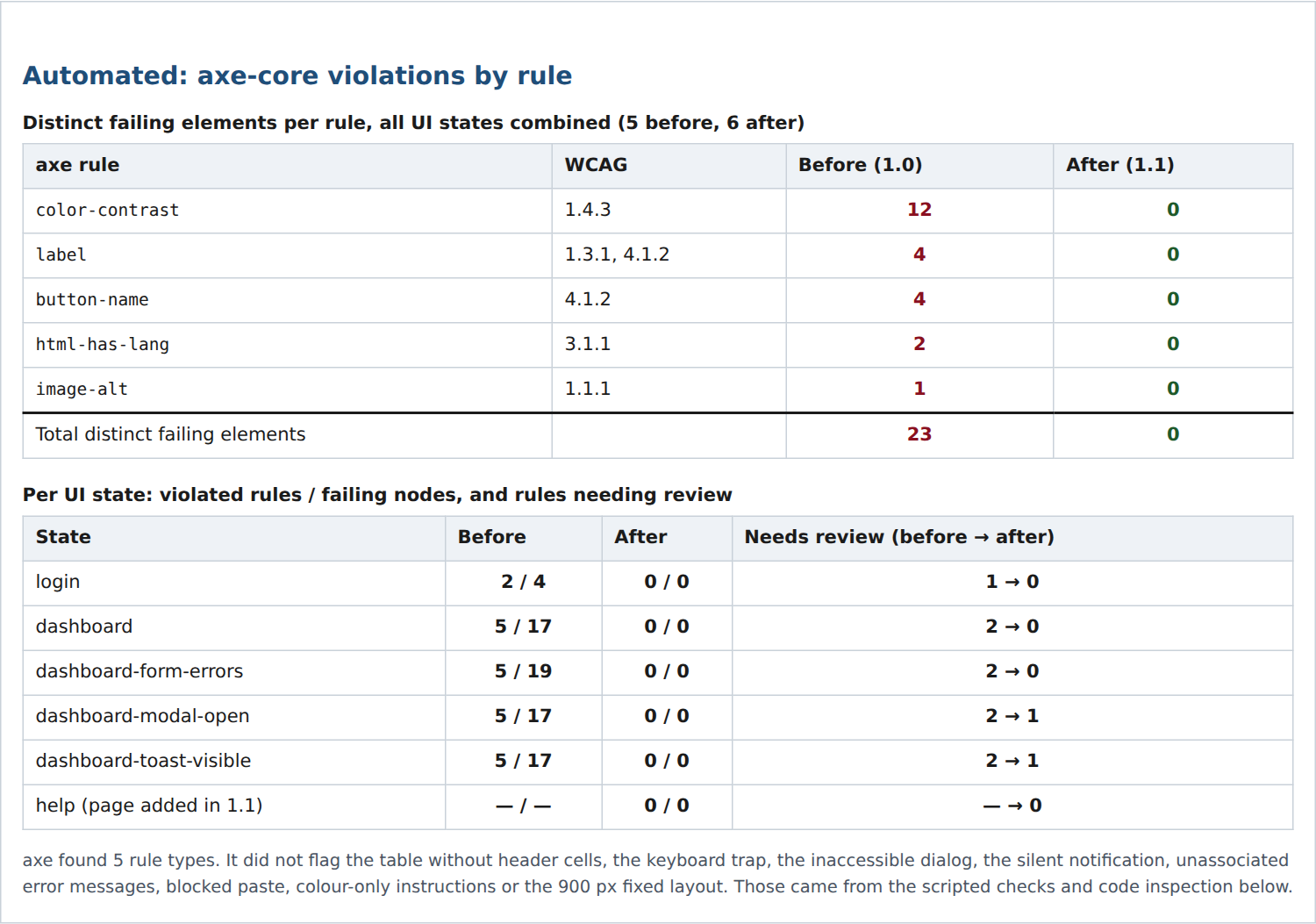
- Automated: axe-core 4.13.0 with the WCAG 2.0, 2.1 and 2.2 A and AA tags, run in the states login, dashboard, dashboard after an empty form submit, dialog open and notification visible, plus the help page in version 1.1. Plus the Nu Html Checker.
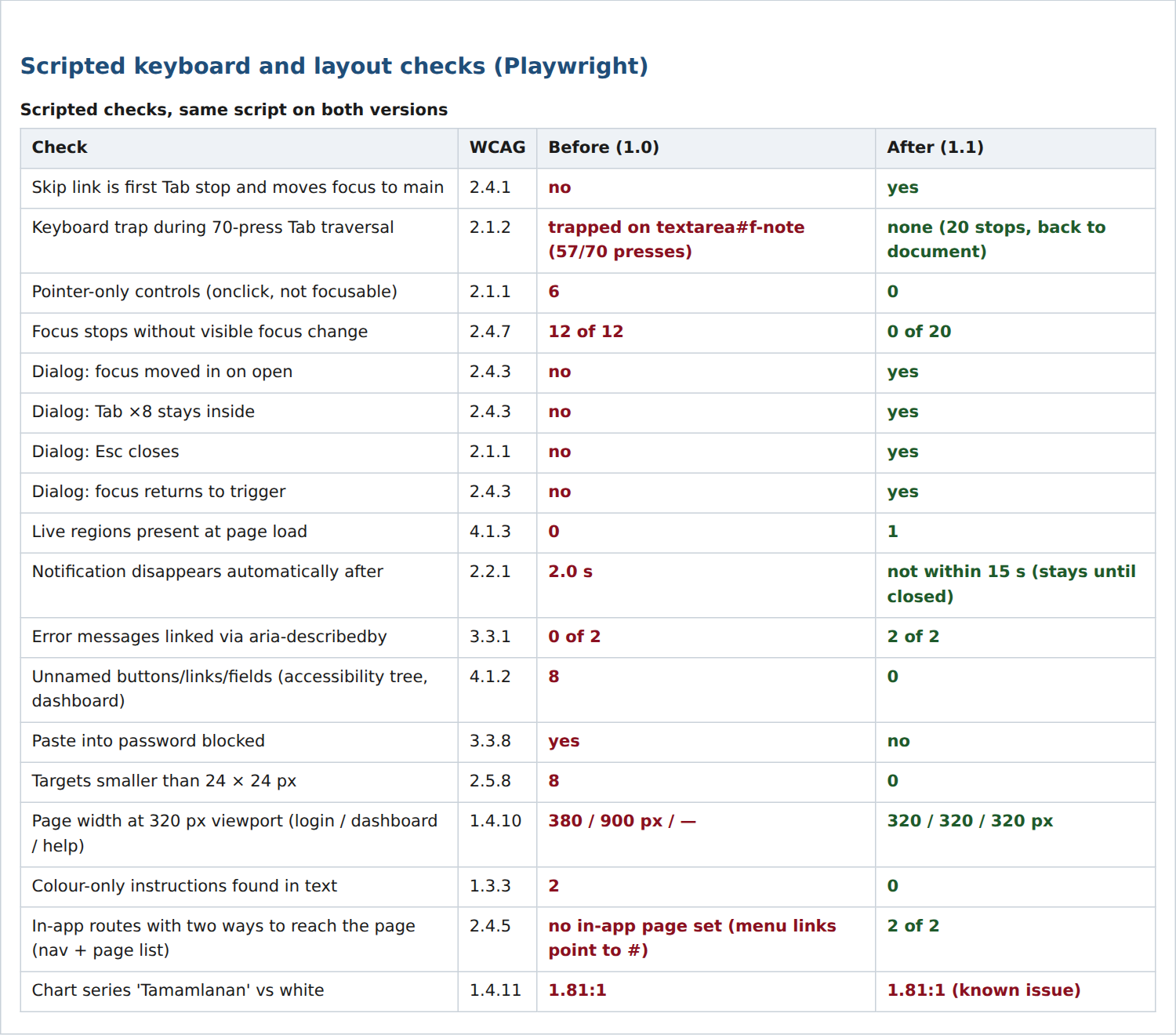
- Scripted: Playwright 1.56.0 with Chromium 141: a 70-press Tab traversal with trap detection, visible focus at every stop, dialog behaviour, live regions, error association, accessible names from the browser’s accessibility tree, paste, target size, layout at 320 px and 640 px, text spacing, chart contrast from the image pixels, and a link inventory of the navigation, footer and page list on every page.
- Manual: I read the HTML, CSS and JavaScript, and the help and support content, against each criterion and clause. This is code inspection, not screen-reader testing.
What was wrong, measured
| Measured | Version 1.0 | Version 1.1 |
|---|---|---|
| axe: distinct failing elements, all states | 23 | 0 (help page: 0) |
| axe by rule: contrast / label / button name / page language / image alt | 12 / 4 / 4 / 2 / 1 | 0 / 0 / 0 / 0 / 0 |
| Keyboard trap | on the notes field, 57 of 70 Tab presses | none; 20 unique stops on the dashboard |
| Controls that work only with a mouse | 6 | 0 |
| Focus stops with no visible focus change | 12 of 12 | 0 of 20 |
| Dialog: focus moves in / stays in / Esc closes / focus returns | no / no / no / no | yes / yes / yes / yes |
| Notification | disappears after 2.0 s; no live region | stays until closed; 1 live region |
| Error messages linked to their field | 0 of 2 | 2 of 2; focus moves to the first invalid field |
| Buttons, links and fields without a name | 8 (dashboard) | 0 on all 3 pages |
| Paste into the password field | blocked | allowed |
| Targets smaller than 24 × 24 px | 8 | 0 of 41 (login 9, dashboard 20, help 12) |
| Page width at a 320 px viewport (login / dashboard / help) | 380 / 900 px / – | 320 / 320 / 320 px |
| In-app pages reachable in two ways (menu and page list) | no page set; menu links pointed to # | 2 of 2 |
| Nu Html Checker errors | 1 | 0 |
| Chart series “Tamamlanan” against white | 1.81:1 | 1.81:1, left in on purpose |
My own first fix did not pass. On the first run of version 1.1, the dashboard was still 373 px wide at 320 px, because visually hidden text escaped the table’s scroll container. The script caught it and I fixed it. A second run found 5 list links on the help page only 17 px high; they now have a 24 px minimum height. Both runs are kept in the ZIP.
What the ACR reports after the audit
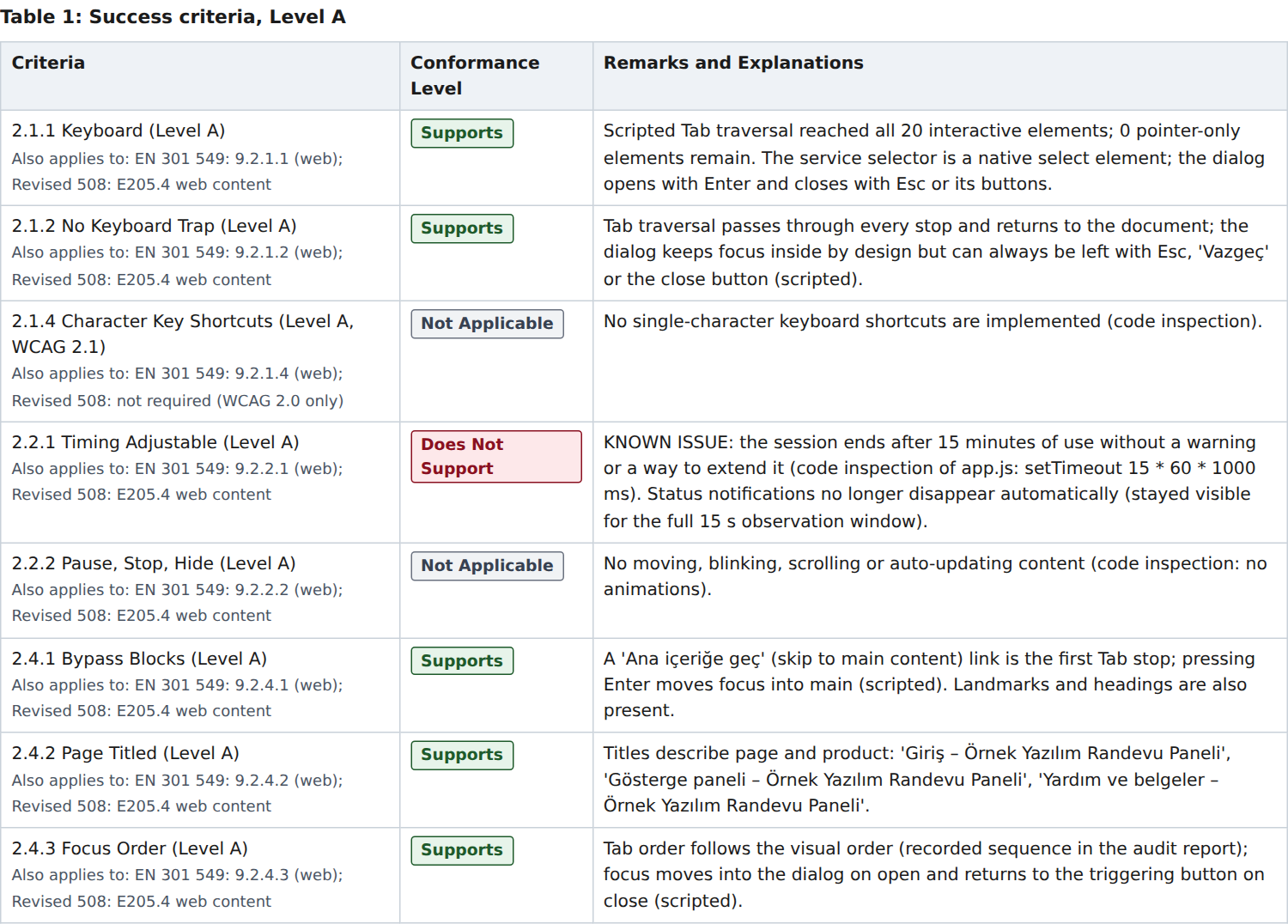
Of the 55 WCAG 2.2 criteria at Level A and AA, version 1.0 supports 13 and version 1.1 supports 40. Version 1.1 is not clean, and the ACR says so.
| Conformance level | 1.0, WCAG 2.2 A+AA (55) | 1.1, WCAG 2.2 A+AA (55) | 1.1, EN 301 549 clause 9 (50) | 1.1, Section 508 (38) |
|---|---|---|---|---|
| Supports | 13 | 40 | 37 | 30 |
| Partially Supports | 1 | 1 | 1 | 0 |
| Does Not Support | 26 | 1 | 1 | 1 |
| Not Applicable | 15 | 13 | 11 | 7 |
| Not Evaluated | 0 | 0 | 0 | 0 |
The EN 301 549 and Section 508 columns are the WCAG 2.1 and WCAG 2.0 subsets of the same results, each including 4.1.1.
Three rows stay open in version 1.1:
- 2.2.1 Timing Adjustable — Does Not Support. The session ends after 15 minutes with no warning and no way to extend it. Found by reading the JavaScript; no scan reports it.
- 1.4.11 Non-text Contrast — Partially Supports. The light chart series has 1.81:1 against white, below the 3:1 required. The same values are in a data table under the chart.
- EN 301 549 12.2.3 / Section 508 603.3 — Partially Supports. The help page offers support by e-mail and phone only, with no sign-language, real-time-text or relay option.
“Not Evaluated” appears once in the ACR, on a Level AAA row, as the VPAT 2.5 rules require. 2.4.5 Multiple Ways is Supports: a link inventory showed both in-app pages reachable through the main menu and through the page list in the footer. The documentation and support rows (Section 508 chapter 6, EN 301 549 chapter 12) were rated against the help page and the support information on it. I audited that page like the product: axe 0, Nu Html Checker 0, no overflow at 320 px, no small targets, no unnamed links. Chapter 6 comes out as 3 Supports, 1 Partially Supports and 1 Not Applicable (602.4, as there is no printed documentation); EN 301 549 chapter 12 as 4 Supports and 1 Partially Supports. Real support conversations were not part of the sample, and the remarks say so. The 11 EN 301 549 functional performance statements come out as 6 Supports, 4 Partially Supports and 1 Not Applicable, inferred from the WCAG results rather than tested separately. EN 301 549 clause 5 (except 5.9, which is Supports), chapters 6–8, 10, 11 and 13, and Section 508 chapters 4 and 5 (501–504) are Not Applicable, each with its reason.
What the automated scan did not report
axe found 5 kinds of problem in version 1.0. The scripted checks and the code reading found 14 more that axe did not flag at all:
A keyboard trap
Focus entered the notes field and never left: 57 of 70 Tab presses landed there. axe tests a page state, not a sequence of key presses.
A dialog that is not a dialog
No role, focus not moved in, not kept in, not closed by Esc, not returned. axe did not flag any of it.
A table without headers
The appointments table had no header cells. axe treated it as a layout table and moved on.
A title that says nothing
The page title was the generic “Sayfa” (“Page”). axe passes any title; whether it describes the page is a human judgement.
Show the other ten problems axe did not report
- The notification that disappeared after 2.0 seconds and was never announced.
- Error messages not linked to their fields.
- Paste blocked in the password field.
- Instructions that relied on colour alone.
- Placeholder-only labels on the login form (axe accepts a placeholder as a name).
- An English sentence in the Turkish interface, not marked as English.
- A positive tabindex value.
- The 900 px fixed layout.
- Menu links that led nowhere (
href="#"). - The session that ends silently after 15 minutes.
What none of these checks can establish
A zero in a scan and a “yes” in a script are evidence, not proof of accessibility. These limits are written into the ACR itself:
- No assistive technology. Accessible names were read from Chromium’s accessibility tree. That shows what a screen reader can receive, not what NVDA, JAWS or VoiceOver announce.
- No testing with disabled people. Real usability was not assessed.
- One engine. Chromium on desktop Linux; no Firefox, Safari or mobile browser, no forced colours.
- Approximations. 200 % zoom was approximated with a 640 px viewport; target size is a bounding-box check without the spacing exception; text spacing finds clipping only. Focus indicator contrast (6.29:1 and 5.8:1) was computed from the CSS.
- Judgement. Whether alt texts, labels, headings and error messages are meaningful, and every Not Applicable decision, comes from a person reading the code.
- States. axe sees only the six states it was given, not every state of the app. In the dialog and notification states it left one check undecided, contrast over the overlay and on glyph-only buttons, which I checked by hand: 17.22:1.
- Scale. Multiple ways was checked with a link inventory over three pages; a real product needs the same check across all its pages. Support ratings rest on the published support information, not on real support conversations.
The report files themselves
The ACR, the audit summary and the three statements pass axe (0 violations) and the Nu Html Checker (0 errors). The PDF is tagged, with headings, tables, bookmarks and a declared language, but it has not been validated against PDF/UA. The Word file uses real heading styles, and its 13 tables have repeating header rows.
Download the files and compare
| File | What it is | Size |
|---|---|---|
| Worked example (ZIP) | Everything: both app versions, raw axe and script results (JSON), audit summary, the ACR as HTML, PDF and Word, a short ACR of version 1.0, statements in Turkish, English and German (HTML), scripts and findings. The HTML and JSON files are only in this ZIP. | 1.0 MB |
| ACR, version 1.1 (PDF) | VPAT 2.5 Rev INT, 13 pages, tagged; not validated against PDF/UA | 358 KB |
| ACR, version 1.1 (Word) | The same report, editable, with heading styles and repeating table headers | 46 KB |
| App source, version 1.0 | With the defects put in on purpose | 12 KB |
| App source, version 1.1 | Remediated, with the help page and the known issues left in | 16 KB |
The ACR is in English. The statements are in Turkish, English and German. The app interface is in Turkish. Company, product and contact details are fictional; the statements keep placeholders for the parts a real vendor must fill in.
What you receive
You receive an ACR you can send to a buyer, the audit evidence behind it, and, if you need it, a statement draft that says the same thing.
- The ACR in VPAT 2.5 Rev INT, as HTML, tagged PDF and Word. It names the product version, the date, the scope, the methods and their limits, and carries a remark on every row.
- The audit report: findings with criterion, element and proposed fix, raw axe results and scripted check results, before and after if there is a re-test.
- An accessibility statement draft in English, Turkish or German, with the parts only you can fill in clearly marked: contact, response time, enforcement body and fix dates.
- An updated ACR after your fixes, if a re-test is in scope, describing the version you actually ship.
How the work runs
You send one link first; the scope and the price are fixed before any testing starts.
- Send one link. A test account for the product, and the questionnaire or tender clause that asks for the report. I tell you what the first screens show and which standards the buyer actually asks for.
- You receive a scope and a fixed price: which screens, flows and UI states, which standards, which report languages, and whether a re-test is included.
- I do the audit. You receive the findings and a draft ACR marked “DRAFT” on every page. Your developers fix what they decide to fix, and I re-test if that is in scope.
- Your approval releases the final files: the ACR in three formats, the audit report and the statement. You publish them under your company’s name.
Pricing
I price each job after seeing the product. The effort depends on the number of screens, flows and states, and on whether a re-test round is included, not on how many criteria the template lists. You get a fixed price before testing starts, with no hourly meter.
Why this matters now
Public buyers in the EU and the US are required to consider accessibility when they buy software, and since 28 June 2025 the European Accessibility Act applies to many consumer services. What that means for your company is a legal question; this page covers the technical side.
Legal note: this page is not legal advice. Whether a rule applies to your product, and who in your sales chain carries the obligation, is for your lawyer to confirm.
- EU public procurement: under Article 42(1) of Directive 2014/24/EU, technical specifications for anything used by people must take accessibility into account, except in duly justified cases. Tender documents usually name EN 301 549 V3.2.1, the standard cited in Implementing Decision (EU) 2021/1339.
- European Accessibility Act: Directive (EU) 2019/882 applies from 28 June 2025 to the products and services it lists, such as e-commerce and consumer banking. Service providers must explain how their service meets the requirements (Article 13 and Annex V). The statement in the example follows the EU model statement from Implementing Decision (EU) 2018/1523, which was written for the public sector and adapted here.
- US federal: the Revised Section 508 Standards apply to ICT that federal agencies buy, and incorporate WCAG 2.0 Level AA for web content. Agencies ask vendors for an ACR as part of market research and evaluation; Section508.gov publishes guidance on ACRs for agencies and vendors.
- US state and local: the ADA Title II rule covers state and local government web content and apps at WCAG 2.1 AA. After the April 2026 extension, the deadlines are 26 April 2027 (50,000 people or more) and 26 April 2028 (smaller entities).
VPAT® is a registered trademark of the Information Technology Industry Council (ITI). I am not affiliated with ITI. My reports follow the structure of VPAT 2.5 Rev INT in my own wording.
Frequently asked questions
What is the difference between a VPAT and an ACR?
The VPAT® is the blank template ITI publishes; an ACR is the completed report for one version of one product. Buyers often say “VPAT” when they mean the completed report. What they need from you is the ACR.
Is an ACR a certification?
No. It is a self-declaration by the vendor about its own product, and your company publishes it under its own name. There is no official VPAT certification. What makes an ACR credible is that the methods are named and every claim can be traced to a test or to the code.
Why the INT edition?
It covers WCAG 2.2, EN 301 549 and the Revised Section 508 Standards in one document, so the same report can go to a US agency and into an EU tender. If your buyers only ever ask for one standard, a single-standard edition is enough, and I will tell you so.
Will the report say “Supports” everywhere?
Only where the evidence supports it. In the worked example, version 1.1 still has one Does Not Support (2.2.1, a 15-minute session that ends without warning) and two Partially Supports (1.4.11, a chart colour at 1.81:1, and EN 301 549 12.2.3, support with no sign-language or relay option). An experienced reviewer trusts a report with honest gaps more than a column of identical answers.
Do you test with screen readers?
Not by default. Accessible names are read from the browser’s accessibility tree, which shows what a screen reader can receive, not what it announces. If a buyer requires testing with NVDA, JAWS or VoiceOver, it can be added to the scope, and the ACR then states what was tested and how.
Do you fix our code?
No, your developers do. I give each finding with its criterion, the element and a proposed fix, and re-test the version you ship if that is in scope. In the worked example I fixed the demo app myself only because I had written it.
Do we need an EU accessibility statement?
That depends on whether your product falls under the European Accessibility Act or under a public-sector contract, and your lawyer decides that. If you need one, I draft it from the same audit, so the statement and the ACR say the same thing.
Related services
Send me one link
One link to your product and the questionnaire or tender clause that asks for the report. You get back a straight account of what the first screens show and what the buyer actually needs from you.
Ali Karabüyük · Tekirdağ, Türkiye · working remotely with clients worldwide · document and image production since 2004, professional practice since 2008.