
Image provenance and AI transparency
AI-generated content labelling for EU AI Act Article 50: visible label, IPTC metadata and C2PA
AI-generated content labelling means that an image, video, voice or text made or changed with AI says so — to the person looking at it and to the software reading the file. I prepare AI-generated and AI-edited images for Article 50 of the EU AI Act with three layers: a visible label, the IPTC digital source type in the metadata, and a C2PA manifest. I test which of them survive your own publishing pipeline, and write the disclosure texts for video, audio, text and chatbots in Turkish, English and German. Below is a measured worked example you can download and check.
In short
What I do
- Add a visible label (“Created with AI”, “Edited with AI” or your wording) in TR, EN and DE, with contrast measured on the rendered pixels.
- Write the IPTC digital source type and descriptive metadata into the file.
- Add a C2PA manifest that records the AI step — signed with your certificate, or with a clearly marked test certificate for previews. For the deeper signing work see C2PA Content Credentials.
- Test survival through your own chain — export, CMS, optimiser, CDN — step by step.
- Write a disclosure text kit for images, video, audio, public-interest text and chatbots in TR, EN and DE, with HTML snippets.
Not part of this service
- Legal advice. Whether you are a provider or a deployer under the AI Act, and which paragraph of Article 50 concerns you, is for your lawyer to decide.
- Generating AI images. I label and test the files you produce; I do not make them.
- Invisible watermarking and AI detection. Separate technologies from separate vendors.
- A trusted signing certificate. It comes from a certification authority on the C2PA trust list and belongs to you or your tool vendor.
- Marking inside video and audio files. The worked example covers images; for video and audio I deliver the disclosure texts, and test a sample file before quoting anything more.
Is this page for you?
This page is for you if one of these describes your situation:
- You are an agency or studio producing campaign images, product visuals or social content with generative tools for clients in the EU, and the client now asks how AI use is disclosed.
- You run an e-commerce brand whose product photos have AI-generated backgrounds or AI retouching, sold to EU customers.
- You are a publisher or newsroom using AI-generated illustrations, AI-assisted text or synthetic voices, and need one house rule for how this is labelled.
- You add an “AI” label and metadata already, but nobody has checked what is left after your CMS, optimiser plugin or CDN has processed the image.
- You run a chatbot or voice assistant on your site and need plain disclosure lines in several languages.
Check one of your published images in one minute
Take an AI-edited image from your live site — the file a visitor receives, not your export — and look at three things:
- Visible label: is it there on the page, at the size shown, and also in the thumbnail and the social-media crop? In the worked example, a centre-crop thumbnail and a re-framed crop lost it.
- Metadata: run
exiftool -XMP-iptcExt:DigitalSourceType image.jpg. No output means no machine-readable source type in that file. - C2PA: drop the file on contentcredentials.org/verify. “No Content Credentials” on a file you signed means a step in between removed them.
Read on for the technical detail. Below: what each of the three layers does, a measured example with two stand-in images and a 13-step survival test, what the tools do not check, and the Article 50 dates. To skip ahead, send one image or one page link and I will tell you what it carries and where it gets lost.
How AI-generated content labelling works: three layers
A complete label has a part for people and parts for machines. A visible label tells the viewer; IPTC metadata and a C2PA manifest tell software. Each fails in a different way, which is why I use all three and test them separately.
The visible label
A short text such as “Created with AI” in the pixels or next to the image. It survives metadata stripping, but it can be cropped out, scaled down until unreadable, or edited away. Its contrast has to be measured: a translucent box over a bright sky can fall far below the 4.5:1 that WCAG 2.2 asks of normal text.
IPTC digital source type
The IPTC Photo Metadata standard has a field, DigitalSourceType, with a controlled vocabulary. The IPTC list distinguishes, among others, trainedAlgorithmicMedia (made by a trained generative model), compositeWithTrainedAlgorithmicMedia (a photo combined with generated content) and algorithmicMedia (made by an algorithm without a trained model). The value sits in the XMP metadata, which many tools read and many tools delete.
C2PA manifest
A signed data package inside the file that records the actions — opened, resized, edited — with the digital source type of the AI step and, where relevant, the source photo as an ingredient. The signature binds it to the pixels: any change breaks it, and any tool that re-encodes the file without C2PA support drops it. The C2PA page explains signing and trust in detail.
Text, video, audio and chatbots
Here the disclosure is mostly words: a caption, an on-screen notice in the first seconds, a first caption cue such as “[AI-generated video]”, a line before a synthetic voice, a note at the start of a chat. Article 50(5) asks for clear, distinguishable and accessible information, so the kit includes HTML for alt text, captions and screen-reader notes.
Evidence: two stand-in images, labelled, read back and put through 13 pipeline steps
This is a measured worked example, not client work. I made two stand-in images by code, added all three layers, read them back with independent tools, and then put each labelled file through 13 common processing steps, one at a time. All files and outputs can be downloaded below.
Source, licence and what the stand-ins are
- Source photo:
astronaut.png(512 × 512 pixels) from scikit-image 0.26, a NASA photograph of astronaut Eileen Collins. The library’s documentation says: “No known copyright restrictions, released into the public domain.” - Stand-in 1, “AI-edited”: the photo upscaled to 1024 × 1024, with a ringed planet drawn by code and composited in the upper left (2.79 % of the pixels). Labelled
compositeWithTrainedAlgorithmicMedia. - Stand-in 2, “fully generated”: a 1200 × 800 landscape generated procedurally (gradient sky, mountain ridges, reflection). Labelled
trainedAlgorithmicMedia.
Both stand-ins were made by code; no AI model was used. They carry the labels a real generative edit and a real text-to-image output would need. For stand-in 2, the accurate IPTC code for this exact file would be algorithmicMedia; that is stated inside the file itself, in its XMP description and its C2PA action description. The signature uses my test certificate chain (ES256, “TEST … demo only”), which is not on the C2PA trust list.
What was done
| Layer | Detail |
|---|---|
| Visible label | Bottom left, opaque dark badge (#111827) with white bold text and a light outline; font size 3.6 % of the short side: 37 px on the composite, 29 px on the landscape |
| IPTC / XMP | Digital source type, title, description, creator, credit, usage terms (exiftool 12.76); in the JPEG also the older IIM fields and EXIF description and artist |
| C2PA | Signed after the metadata was written, so the signature covers it. Composite: opened (NASA photo as parent), resized, edited with digital source type and the 300 × 300 region, edited (label added). Landscape: created with digital source type, edited (label added). Author assertion: Ali Karabüyük |
| File size | Composite 196,159 → 465,357 bytes after signing; landscape 134,373 → 183,563 bytes. Most of the increase is preview thumbnails inside the manifest |
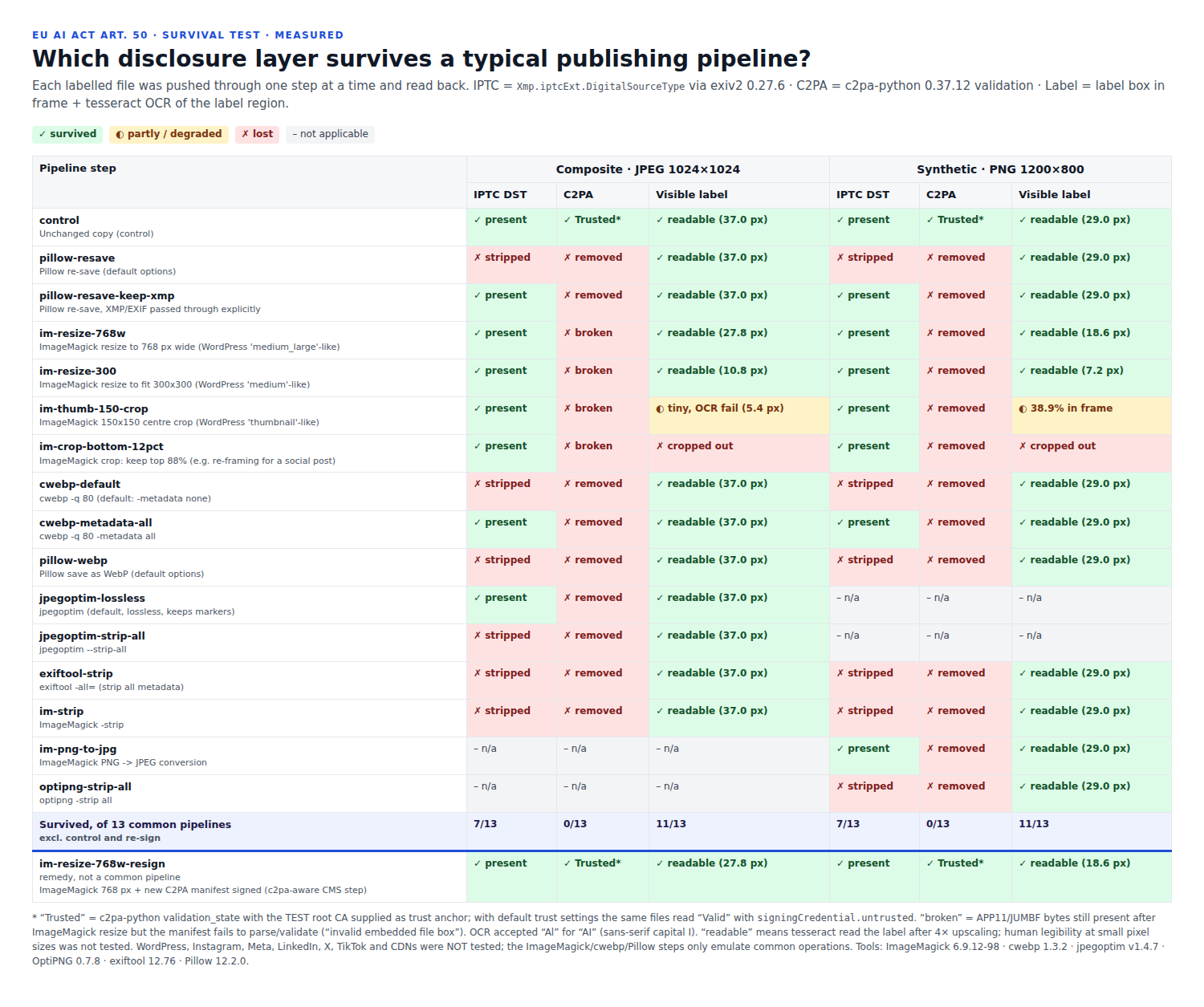
What the readers report, before and after
Before labelling, no tool finds anything. After, two independent metadata readers show the source type, and both C2PA verifiers find a valid manifest whose only failure is the untrusted test signer.
| Check | Before | After |
|---|---|---|
| IPTC digital source type (exiv2 0.27.6 and exiftool 12.76) | not present | compositeWithTrainedAlgorithmicMedia / trainedAlgorithmicMedia |
| c2pa-python 0.37.12, default trust | no manifest found | “Valid”, failure code signingCredential.untrusted |
| c2patool 0.26.0, default trust | “No claim found” | “Invalid”, signingCredential.untrusted |
| Both, test root supplied as trust anchor | no manifest | “Trusted” |
| Source type in the C2PA actions | – | same value as in IPTC |
| Visible label | none | “Edited with AI”, 37 px / “Created with AI”, 29 px; contrast 17.74:1 |
The two C2PA tools word the same result differently (“Valid” or “Invalid”, with the same code). With a certificate from an authority on the C2PA trust list, the untrusted code would not appear.
Label contrast
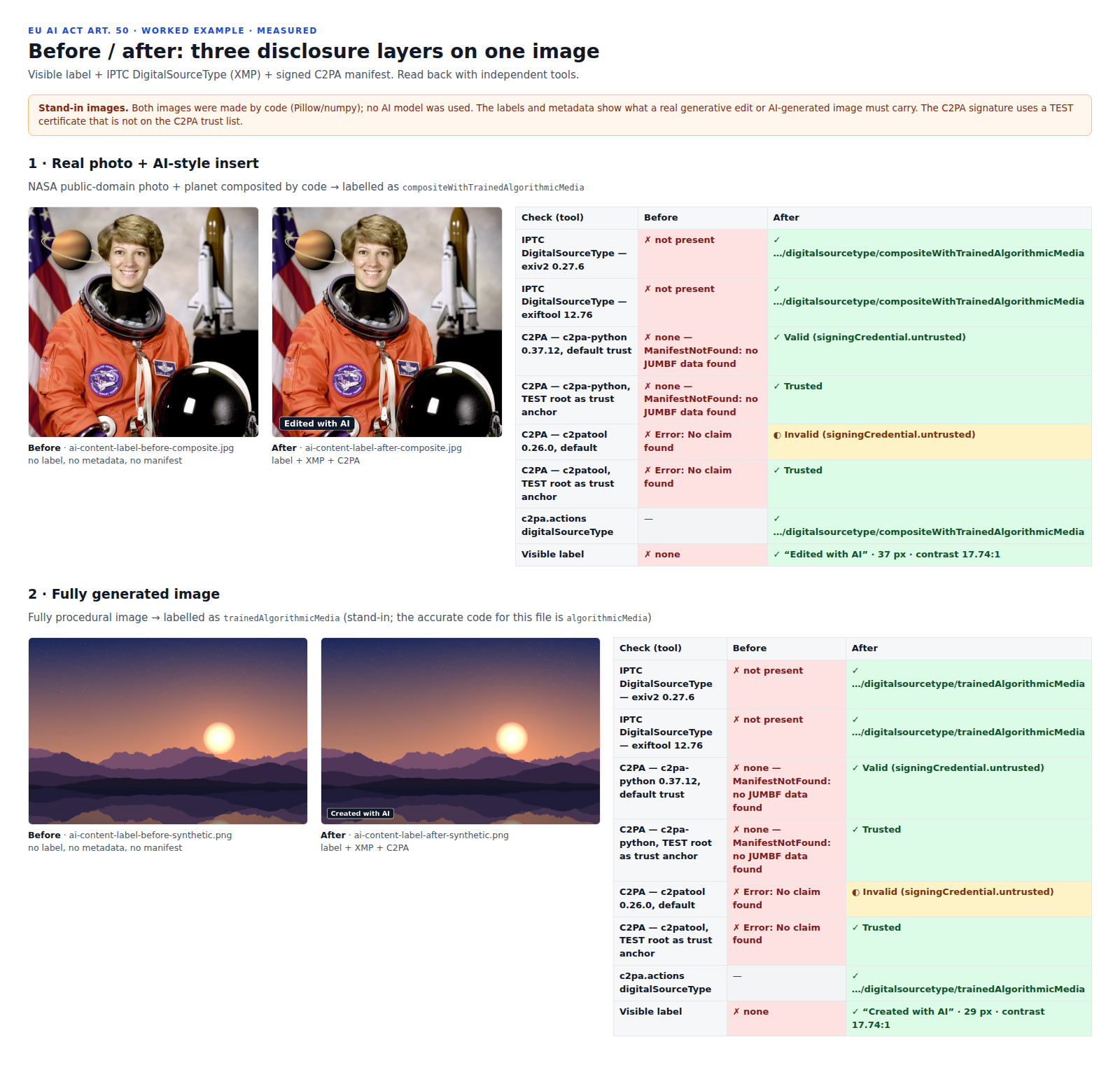
I measured the contrast on the rendered pixels, taking the worst case behind every letter. All 24 opaque variants (TR, EN, DE × created / edited × bright / dark background) reach 17.74:1. A translucent black box over the sun, made deliberately weak for comparison, fails in all three languages at 2.48 to 2.50:1.
Survival test: which layer survives which step
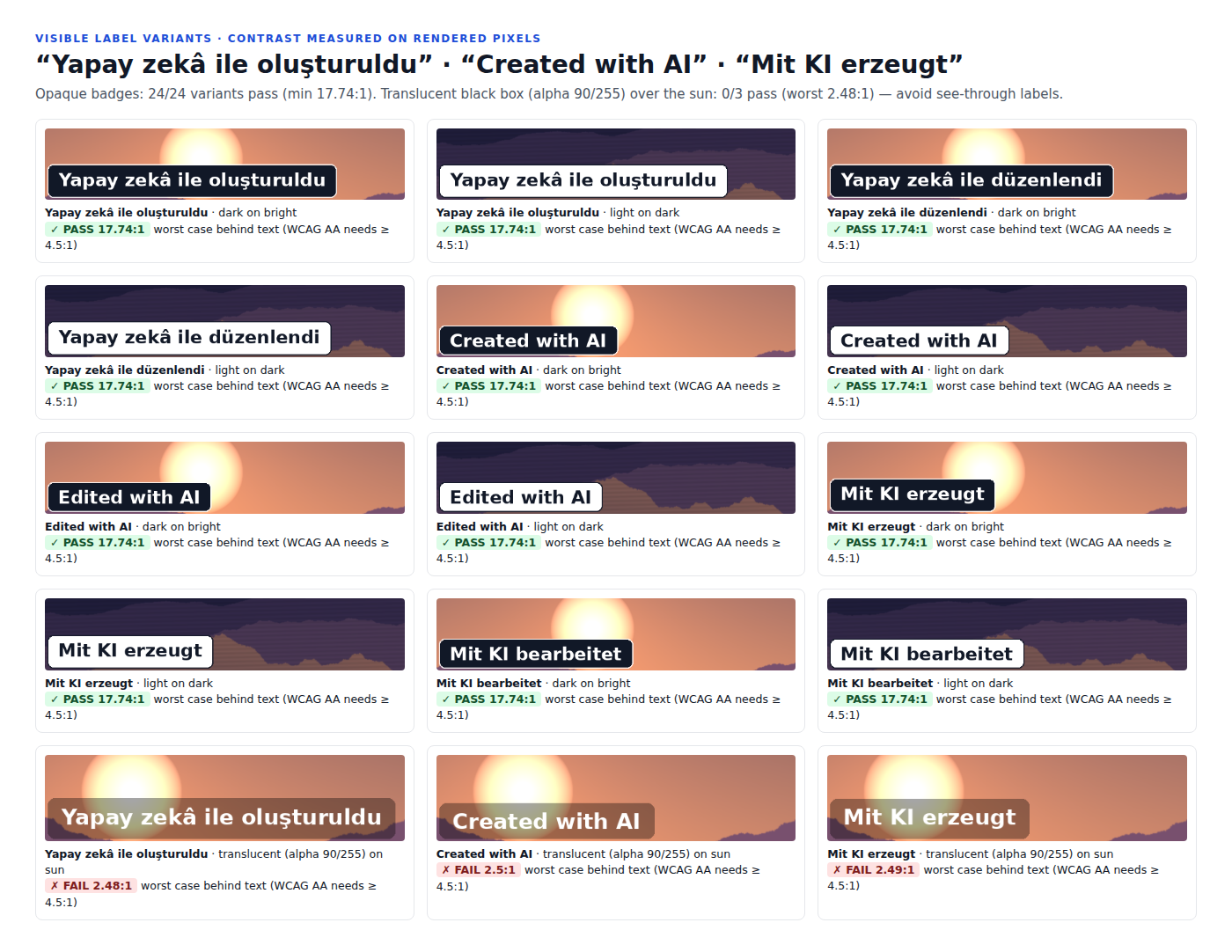
No layer survived everything, and every step left at least one. Metadata survived resizing and cropping but not stripping; the visible label survived stripping but not cropping; the C2PA manifest survived none of the 13 steps.
| Layer | Composite JPEG | Landscape PNG |
|---|---|---|
| IPTC digital source type | 7 of 13 | 7 of 13 |
| C2PA manifest, valid | 0 of 13 (4 present but broken) | 0 of 13 |
| Visible label readable | 11 of 13 | 11 of 13 |
| All three layers together | 0 of 13 | 0 of 13 |
| At least one layer | 13 of 13 | 13 of 13 |
Show all steps and results
| Step | Composite JPEG | Landscape PNG |
|---|---|---|
| Unchanged copy (control) | yes / trusted / yes | yes / trusted / yes |
| Pillow re-save, default | no / removed / yes | no / removed / yes |
| Pillow re-save, metadata passed through | yes / removed / yes | yes / removed / yes |
| ImageMagick, 768 px wide | yes / broken / yes (27.8 px) | yes / removed / yes (18.6 px) |
| ImageMagick, fit 300 × 300 | yes / broken / yes (10.8 px) | yes / removed / yes (7.2 px) |
| ImageMagick, 150 × 150 centre crop | yes / broken / too small, not read (5.4 px) | yes / removed / only 38.9 % in frame |
| ImageMagick, crop to top 88 % | yes / broken / cropped out | yes / removed / cropped out |
| cwebp -q 80, default | no / removed / yes | no / removed / yes |
| cwebp -q 80 -metadata all | yes / removed / yes | yes / removed / yes |
| Pillow, save as WebP | no / removed / yes | no / removed / yes |
| jpegoptim, lossless default | yes / removed / yes | – |
| jpegoptim –strip-all | no / removed / yes | – |
| ImageMagick, PNG to JPEG | – | yes / removed / yes |
| optipng -strip all | – | no / removed / yes |
| exiftool -all= | no / removed / yes | no / removed / yes |
| ImageMagick -strip | no / removed / yes | no / removed / yes |
| Remedy: 768 px + new C2PA manifest | yes / trusted / yes | yes / trusted / yes |
“Broken” means ImageMagick 6 copied the C2PA data into the resized JPEG, but it no longer validates (“invalid embedded file box”). “Removed” means no manifest was found. “Trusted” is with my test root supplied as trust anchor. The label size in brackets is the font height after resizing; “yes” means the OCR engine read the label text.
The remedy row matters most. When the resized file gets a new C2PA manifest with the labelled file as parent ingredient, all three layers are back, and the original source type stays in the manifest history. In a real pipeline that is a C2PA-aware step in your CMS or image service — what I look for in your chain.
What the survival test did and did not test
Each step ran on its own, locally, and the result was read back: IPTC with exiv2, C2PA with c2pa-python and the test anchor, the label by its position in the frame and by OCR (tesseract 5.3.4) after 4× upscaling. The ImageMagick sizes imitate WordPress image sizes; they are not WordPress.
- Not tested: WordPress itself, Instagram, Facebook/Meta, LinkedIn, X, TikTok, YouTube, WhatsApp, CDNs and image services, and the platforms’ own “AI info” labels.
- Not tested: video and audio files — the kit has wording for them, nothing more.
- Not tested: whether a person can read a small label. OCR reading “Edited with Al” (lower-case L for I, which I accepted as “AI”) is not human legibility; colour vision and screen readers were not tested either.
In a client job, the survival test runs through your real pipeline: the same upload, the same plugins, the file as your visitors and your social channels actually receive it.
What the tools do not report
Whether the label is true
exiv2 and exiftool show that a source type exists, not that it is correct. Stand-in 2 says trainedAlgorithmicMedia, although no model was used, and reads exactly like an honest file.
Whether the image is real
A valid C2PA manifest proves who signed which statements and that nothing changed afterwards. It does not prove the statements, and a test signer is not trusted by public verifiers.
Invisible watermarks
No AI detection or watermark tool was run. The files contain no invisible watermark, and this service does not add one.
Accessibility of text in images
The contrast figures are for the badge. WCAG has no specific rule for text inside images, and the label text inside the pixels is not available to a screen reader; that is what the alt text and caption in the kit are for.
Download the files and check them yourself
The signed images are offered only inside the ZIP: the content delivery network in front of this site recompresses images and removes the manifest, as described on the C2PA page. The ZIP also holds the public test root certificate, so you can reproduce the “Trusted” result.
| File | What it is | Size |
|---|---|---|
| Worked example (ZIP) | Before and after images (signed), all 30 survival outputs, C2PA manifest definitions, exiv2 / exiftool / C2PA readbacks (JSON, TXT), readback report (HTML), 12 label badges (SVG), disclosure kit in four formats, test root certificate, findings | 8.0 MB |
| Disclosure text kit (PDF) | TR/EN/DE wording and HTML snippets; page 1 is a one-page Article 50 checklist, marked “not legal advice” | 212 KB |
| Disclosure text kit (DOCX) | The same kit, editable | 42 KB |
| Before and after panel (PNG) | Both stand-ins with readback results | 527 KB |
| Survival matrix (PNG) | Every step and layer, as an image | 282 KB |
| Label variants (PNG) | 15 label samples with measured contrast | 355 KB |
The HTML, JSON, SVG and TXT files are available only inside the ZIP. The private keys of the test certificates are not published.
What you receive
You receive labelled files, proof of what they carry, a map of what your pipeline does to them, and the texts for everything that is not an image.
- Your images with visible label, IPTC metadata and C2PA manifest — signed with your certificate, or as marked previews.
- A label set in your wording and languages (SVG and burned-in), with measured contrast on light and dark backgrounds.
- A survival report: each step of your chain, which layer it keeps, and what to change.
- The disclosure text kit in TR, EN and DE, including artistic or satirical work, adapted to your wording.
- A findings report with the tool output for every file and what the tools did not check.
How the work runs
You send one real file or one page link first; the price is fixed before any work starts.
- Send one image or one page link, ideally with a note on how the image was made. I tell you what it carries now and where it is lost.
- You receive a scope and a fixed price for the labelling, the pipeline test and the texts, before anything starts.
- I do the work. You receive watermarked preview files signed with a test certificate, the readback and survival reports, and the draft texts for approval.
- Your approval releases the final files, the label set, the text kit and the findings report.
Pricing
I price each job after I have seen the material. Fifty product images on one shop with one CMS are a different job from a newsroom with several publishing channels, and the number of steps in the pipeline matters more than the number of images. You get a fixed price for the defined set before work starts — no hourly meter. Certificate costs for production signing are between you and the certification authority.
Why this matters now
The transparency rules in Article 50 of the EU AI Act have applied since 2 August 2026. For providers of generative systems placed on the market before that date, the machine-readable marking duty in Article 50(2) has a transition until 2 December 2026. What this means for your business is a legal question; this page covers the technical side.
- Article 50 of Regulation (EU) 2024/1689 (text read in the AI Act Explorer): 50(1) — providers make sure people know they are interacting with an AI system, such as a chatbot. 50(2) — providers of systems generating synthetic audio, image, video or text mark the outputs in a machine-readable format, detectable as artificially generated or manipulated. 50(3) — deployers of emotion recognition or biometric categorisation inform the people exposed. 50(4) — deployers disclose deep fakes (in a limited form for evidently artistic, satirical or fictional work) and AI-generated text published to inform the public on matters of public interest, unless it was humanly reviewed under someone’s editorial responsibility. 50(5) — the information must be clear, distinguishable, given at the first interaction or exposure at the latest, and accessible.
- Provider or deployer: the Act defines both in Article 3(3) and 3(4). An agency, brand or publisher can be one, the other or both, depending on its role. That decision belongs to your lawyer; the checklist on page 1 of the kit lists the questions to take there.
- The transition: the Digital Omnibus on AI, Regulation (EU) 2026/1744, was adopted on 8 July 2026, published in the Official Journal on 24 July and in force since 27 July 2026. It amends Article 111(4): providers of systems placed on the market before 2 August 2026 “shall take the necessary steps in order to comply with Article 50(2) by 2 December 2026”. I verified this in the AI Act Explorer’s Digital Omnibus page and in Cuatrecasas’ summary. Both describe the transition for Article 50(2) only.
- Methods: the Act does not prescribe IPTC or C2PA. They are widely used machine-readable methods; watermarking is another. Article 50(7), on codes of practice for detecting and labelling such content, is marked as amended in the AI Act Explorer.
Legal note: this page covers the technical side. Whether Article 50 applies to you, and whether you act as provider or deployer, is for your legal adviser to confirm.
Frequently asked questions
Is a visible “AI” label enough, or do we also need metadata?
They do different jobs: the label tells people, the metadata and C2PA manifest tell software. In the worked example the label survived stripping but not cropping, and the metadata survived cropping but not stripping, so I use both and test them in your pipeline. Which of them the law requires of you is for your lawyer.
Who has to label: we or the vendor of the AI tool?
Article 50 places some duties on providers, who make the AI system available, and others on deployers, who use it. Which role your company has for a given image or text is a legal decision. I document the technical facts — which tool, which step, which source type — so your lawyer can decide.
Our company is outside the EU. Does Article 50 concern us?
The AI Act’s scope also covers providers and deployers outside the EU when the output is used in the EU. Whether that applies to your content is for your lawyer. The technical work is the same wherever you are based.
Which IPTC digital source type is right for our images?
It depends on how the image was made: trainedAlgorithmicMedia for a fully generated image, compositeWithTrainedAlgorithmicMedia when generated elements are combined with a photo, algorithmicMedia for algorithmic images without a trained model. I ask how each image was made and record the answer; the tools do not check whether the value is true.
Why does the label metadata disappear on our website?
Because some step in the chain writes a new file without it. In the worked example, 6 of 13 common steps per image removed the IPTC data, and the C2PA manifest was removed or broken in all 13. The survival test finds the step and the setting to change.
Do you create the AI images too?
No. I label, sign and test the files you or your agency produce. The two images in the worked example are stand-ins made by code, without an AI model, so that the page shows the method without presenting anything as real AI output.
What about video, voice, text and chatbots?
The kit has short and long disclosure lines in TR, EN and DE for each, with HTML for captions, on-screen notices and chat messages. Machine-readable marking inside video or audio files is not part of the worked example; I would test a sample file of yours first.
Related services
Send me one image
One image or one page link — ideally the export and the published version of the same picture. You get back what it carries, where it gets lost, and what it would take to fix.
Ali Karabüyük · Tekirdağ, Türkiye · working remotely with clients worldwide · document and image production since 2004, professional practice since 2008.