
Wedding Budget & Guest List Planner
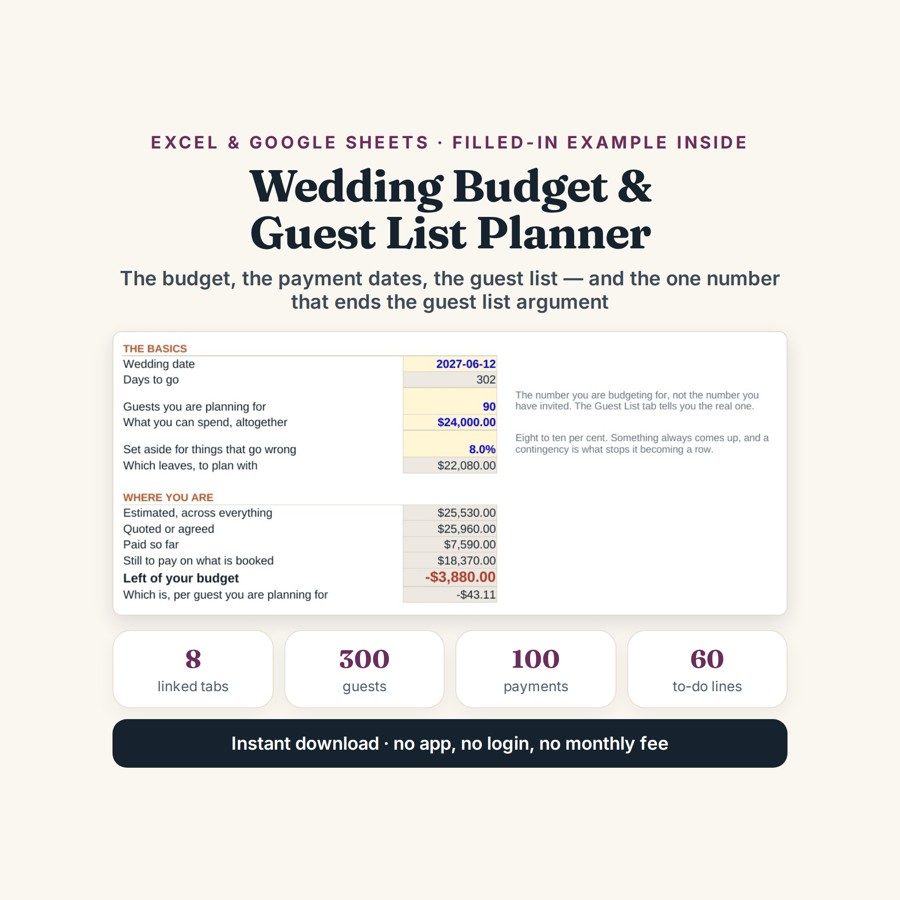
This wedding budget and guest list planner keeps the costs, the RSVPs, the payment dates and the real price of one more guest in a single file.
Wedding budgets do not go wrong at the big numbers. They go wrong in the forty small ones nobody wrote down, in the deposits that were paid but never deducted, and in a guest count that quietly moves after the catering was quoted. This file keeps the money and the guest list in the same workbook, because the two are the same problem.
What is in it
- Eight linked tabs, from START HERE to COUNTDOWN, with a whole wedding already filled in as a worked example.
- SETUP — four cells: the date, the guest count, the budget and the contingency. Estimated, quoted, paid and remaining all come off those.
- BUDGET — 50 lines with 18 already written in, each carrying an estimate, a quote, what has been paid and the gap between them; BY CATEGORY sorts them into 18 categories with each one’s share of the total.
- PAYMENTS — 100 payments in due-date order; anything due inside 30 days turns amber and anything overdue turns red.
- GUEST LIST — 300 rows with meal choice, dietary needs and table number, plus nine counts that keep themselves up to date as the RSVPs come in.
- PER HEAD — the tab that separates the costs that multiply by guest from the ones that do not, and COUNTDOWN, 60 tasks across 12 months with 34 already written for you.
Who it is for
Couples planning a wedding without a planner, and anyone who has been handed the budget by default. It is also the file to open in front of a parent who is contributing, because it shows what has been quoted, what has been paid and what is still owed without going through a single email thread.
The worked example
The example inside is a wedding about nine months out: 18 budget lines, 13 payments already made, 34 guests entered and 34 to-do items on the countdown. It is deliberately $3,880 over budget — that is what an honest wedding budget looks like nine months out, and a file with a problem in it is easier to learn than one that pretends everything is fine.
The PER HEAD tab answers the question the rest of the spreadsheet dodges: what one more guest actually costs, once the catering, the drinks, the favours and the hire are separated from the fixed costs. In the worked example that number is $106. Every yes said in a corridor has that price attached to it, and every name taken off the list gives $106 back — which is usually the cheapest cut available when a budget is $3,880 over.
How it works
Compatible with Microsoft Excel 2016 or newer on Windows or Mac, Google Sheets, and LibreOffice. No macros, no add-ons, no account to create, nothing to install.
The download has two workbooks: one with the example above already filled in, so you can see what every column expects, and the same file completely blank for your own figures. A plain-English guide comes as a PDF. Order on WhatsApp — $9
Orders are taken on WhatsApp: message me and I’ll send the payment details, then the files as soon as the payment is confirmed.
Questions people actually ask
What does one more wedding guest actually cost?
That is exactly what the PER HEAD tab works out: it separates the costs that multiply by guest — catering, drinks, favours, hire — from the fixed ones, and divides. In the worked example inside the file the answer is $106 a guest. Once you have that number, adding or cutting names becomes a budget decision rather than a feeling.
Can I use it if I already have a planner or a venue coordinator?
Yes — it is your copy of the money and the guest list, not a replacement for anyone. The BUDGET tab holds your estimate next to the quote you were given and what has actually been paid, so you can check an invoice against your own record before it is approved.
We are only just engaged and have no quotes yet. Is it too early?
No — put the date, the expected guest count, the budget and a contingency in SETUP and the file starts from estimates alone. The BUDGET tab arrives with 18 lines already written and the COUNTDOWN with 34 tasks spread across 12 months, so the earliest version of the file is a plan rather than a ledger.
Does it work in Google Sheets, or do I need Excel?
It works in both — the file is .xlsx and runs in Excel 2016 or newer on Windows or Mac, in Google Sheets, and in LibreOffice. For Sheets use File, then Import, then Upload and choose Replace spreadsheet; the nine automatic guest counts and the amber and red payment warnings all carry over.
Does it collect RSVPs or send anything to guests?
No — it is a planner, not a payment system or an RSVP website. Nothing is sent to guests, no bank is connected and no seating plan is drawn; you record the replies as they reach you. Capacity is 300 guests, 50 budget lines, 100 payments and 60 to-do lines, and the file stays on your own computer or Drive.
Need it built around your business?
This file assumes one couple, one budget and one guest list. If yours works differently — two families each funding their own categories, a destination wedding with travel and accommodation to track per guest, two events on two days, or a planner invoicing everything through one account — I can rebuild the same arithmetic around the way your wedding is actually being paid for.
All other templates are listed on the Excel & Google Sheets Templates page.