
Personal Trainer & Fitness Coach Income Tracker
This personal trainer income tracker works out what each session actually left you after the studio fee, travel and the booking platform’s cut.
A stack of paid invoices tells you what you billed, never what you kept. The gym floor fee, the drive to an in-home client and the platform’s commission all come off afterwards, session by session, and nothing adds them up. This file does, and then shows six months as one number.
What is in it
- Five tabs and 1,712 formulas: Start Here, Setup, Sessions, Expenses and Dashboard.
- Setup — one number, the booking platform’s fee rate on revenue. Change it and every session on the sheet recalculates.
- Sessions — one row per session: date, client, session type and duration typed in; platform fee, session cost and net session profit worked out on the row.
- Expenses — insurance, certification renewal, gym floor rental, marketing and equipment, all subtracted from the net number on the Dashboard.
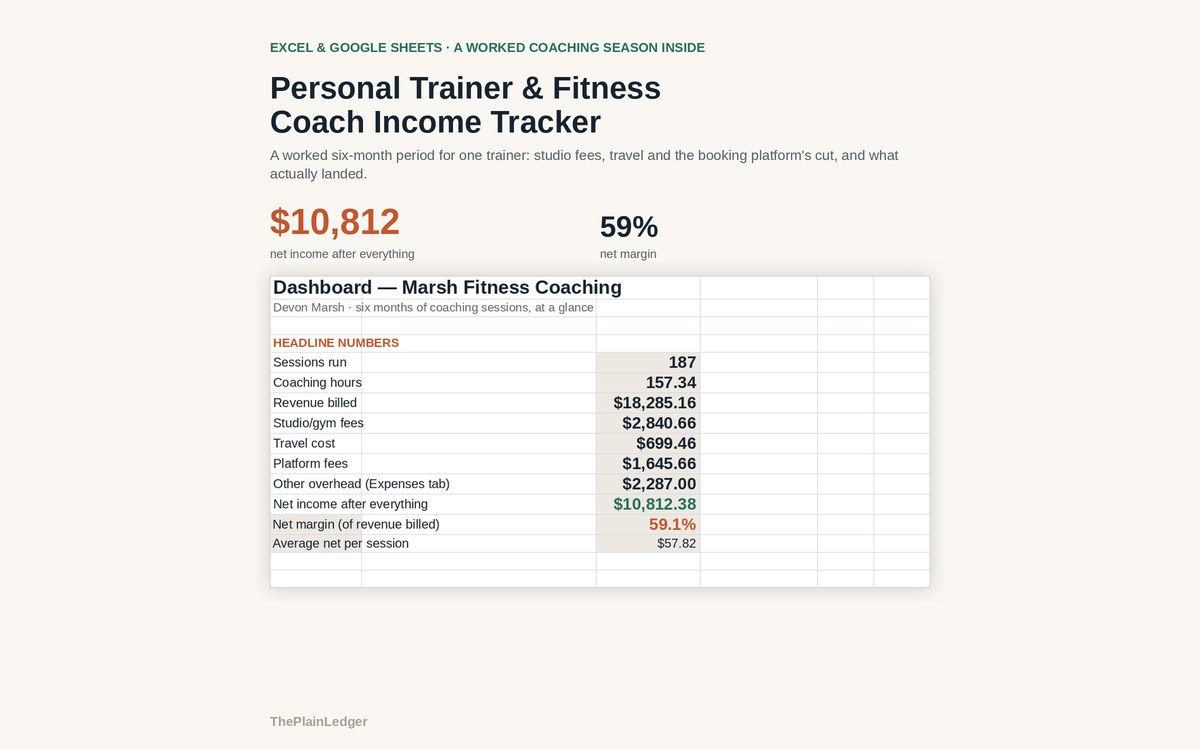
- Dashboard — sessions run, coaching hours, revenue billed, studio fees, travel, platform fees, other overhead, and what you actually netted.
- Revenue against net income month by month, plus every session ranked by net profit rather than by what it billed.
Who it is for
Independent trainers and coaches running a mix of 1:1, small group, virtual and sports-specific work, whether the bookings arrive through a platform, a gym floor agreement or directly from the client.
The worked example
The filled-in workbook is six months for one trainer: 187 sessions across 1:1, small group, virtual and sports-specific coaching. Revenue billed came to $18,285. Studio fees, travel, platform fees and overhead took $7,473, leaving $10,812 — a 59% net margin.
Per session the gap is plainer. A session billed at $75 loses the gym floor fee, any travel for an in-home visit, and the booking platform’s cut before anything reaches you. Ranked by net rather than by what was billed, the order changes: a busier month of virtual sessions does not automatically beat a quieter one full of small-group bookings.
How it works
Compatible with Microsoft Excel 2016 or newer on Windows or Mac, Google Sheets, and LibreOffice. No macros, no add-ons, no account to create, nothing to install.
The download has two workbooks: one with the example above already filled in, so you can see what every column expects, and the same file completely blank for your own figures. A plain-English guide comes as a PDF. Order on WhatsApp — $9
Orders are taken on WhatsApp: message me and I’ll send the payment details, then the files as soon as the payment is confirmed.
A look inside the file
Questions people actually ask
What does a personal trainer income tracker work out?
It works out net profit per session — what you billed minus the studio or gym floor fee, travel and the booking platform's commission — and totals it across the period. In the worked example, 187 sessions billing $18,285 left $10,812 after everything, a 59% net margin. Every session is also ranked by what it actually kept.
Does it work if clients pay me directly rather than through an app?
Yes — set the platform fee rate on the Setup tab to zero and the rest of the sheet works unchanged. It is built for trainers running a mix of 1:1, small group, virtual and sports-specific sessions, however the booking arrives. Studio fees and travel are still subtracted session by session.
I have never tracked my sessions. Where do I start?
Start on the Setup tab, which needs one number, your booking platform's fee rate, then enter sessions from whatever record you already have — a calendar, an invoice folder or an app export. The Dashboard fills in as rows are added. The filled-in workbook shows a complete six months so you can see the finished shape first.
Can I use it in Google Sheets or LibreOffice?
Yes — it is built as .xlsx and opens in Google Sheets through File, Import, Upload, with the formulas intact. It also runs in Excel 2016 or newer on Windows and Mac, and in LibreOffice. There are no macros, no add-ons and nothing to install.
Does it store client details or connect to my booking app?
No — it never connects to a booking app or a bank account, and the file stays on your own computer or Drive. You decide what goes in the client column; a first name or a code works exactly as well as a full name. It is a profit tracker, not a client management system or a tax return.
Need it built around your business?
This file assumes one blended platform fee rate applied to every session. If your work is split differently — two platforms on different commissions, a gym taking a percentage rather than a floor fee, packages sold up front and delivered over months, online programming billed monthly — I can rebuild the same arithmetic around how you actually get booked and paid.
All other templates are listed on the Excel & Google Sheets Templates page.