
Owner-Operator Trucking Cost Per Mile Spreadsheet
This owner-operator cost per mile spreadsheet counts deadhead miles in the rate, works out what a mile really costs you to run, and tells you whether the load on the phone is worth taking.
Load boards quote dollars per loaded mile, and the miles you drive empty to reach the load are paid by nobody. Fixed costs do not shrink in a slow week either — the truck payment is four figures on the first of the month whether you ran ten thousand miles or eight. Both gaps end up in the same place: the rate you agreed to.
What is in it
- Ten tabs, from Start Here through to the Dashboard.
- Loads — 400 rows. Every load with deadhead included, so each one gets a real profit, a real profit per mile and a plain verdict at the end of the row: good, thin or losing.
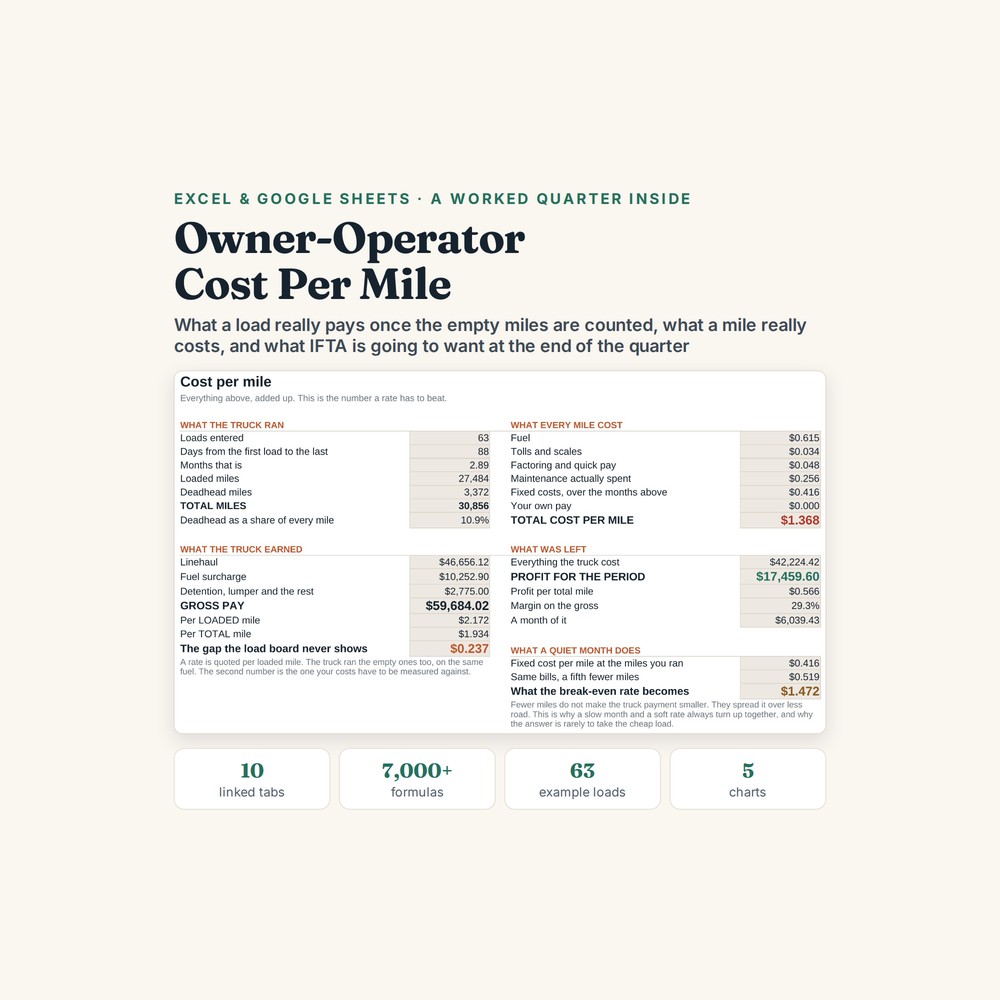
- Cost Per Mile — fuel, tolls, factoring, maintenance, fixed costs and driver pay, divided by all the miles you actually drove rather than only the paid ones.
- Rate Check — type in the load you have just been offered and get TAKE IT, THIN or WALK AWAY.
- IFTA — 60 jurisdictions, worked out state by state, because you pay tax where you drove and not where you bought the fuel.
- Fuel — 300 rows that calculate your real MPG and catch an odometer typed in backwards; Maintenance — 150 rows setting what you actually spent against what you set aside; with Setup, Fixed Costs and a thirteen-week Dashboard underneath the lot.
Who it is for
A one-truck owner-operator, a lease-purchase driver, a hot shot or a small dry-van operation — anyone who is the driver, the dispatcher and the bookkeeper on the same day. One truck per file, up to 400 loads, and it is not accounting software.
The worked example
The example inside is one driver, a 2019 Cascadia and thirteen weeks: 63 loads, 27,484 loaded miles and 3,372 empty miles, with 39 fuel stops across 23 states and 10 maintenance bills.
Three numbers show why the counting matters. Quoting per loaded mile instead of per total mile is a gap of twenty-four cents a mile, which over thirty thousand miles is $7,300. Fixed costs do not move with the miles either: $4,435 a month spread over 10,000 miles is 44 cents a mile, but the same bills over 8,000 miles is 55 cents. And at the end of the quarter, $188 of credit in Missouri against $157 down in Illinois leaves $363 owing in IFTA.
How it works
Compatible with Microsoft Excel 2016 or newer on Windows or Mac, Google Sheets, and LibreOffice. No macros, no add-ons, no account to create, nothing to install.
The download has two workbooks: one with the example above already filled in, so you can see what every column expects, and the same file completely blank for your own figures. A plain-English guide comes as a PDF. Order on WhatsApp — $9
Orders are taken on WhatsApp: message me and I’ll send the payment details, then the files as soon as the payment is confirmed.
A look inside the file
Questions people actually ask
How do I work out my real cost per mile as an owner-operator?
The Cost Per Mile tab adds fuel, tolls, factoring, maintenance, fixed costs and driver pay together and divides by every mile you drove, deadhead included, rather than only the paid ones. Fixed costs are the part that catches people out: in the worked example $4,435 a month over 10,000 miles is 44 cents a mile, and the same bills over 8,000 miles is 55 cents.
Can I use it for more than one truck?
No — it is one truck per file, and the fixed costs, fuel log and IFTA figures all belong to that truck. If you run two, you run two copies. The Loads tab holds up to 400 loads, which is roughly a year for most one-truck operations.
Should I take this load? Does the sheet tell me?
Yes — the Rate Check tab is built for exactly that call. You type in the offered rate, the loaded miles and the deadhead to get to it, and it comes back TAKE IT, THIN or WALK AWAY against your own cost per mile. Counting the empty miles is what changes the answer: the gap between per-loaded-mile and per-total-mile pricing is twenty-four cents a mile in the worked example, or $7,300 over thirty thousand miles.
Will it work in Google Sheets or do I need Excel?
Yes — it is built as .xlsx and imports into Google Sheets through File, then Import, then Upload, and the formulas carry over. It also opens in Excel 2016 or newer on Windows and Mac, and in LibreOffice. There are no macros and no add-ons to enable.
Does it file my IFTA return for me?
No — it works out the quarter, jurisdiction by jurisdiction, so you have the figures to file with, but it does not submit anything and it is not accounting software. In the worked example the IFTA tab shows $188 of credit in Missouri against $157 owed in Illinois, and $363 owing for the quarter overall. It never connects to an ELD, a fuel card or a bank.
Need it built around your business?
This file assumes one truck, loads booked from brokers, and a rate quoted per mile. If yours works differently — a flat rate per trip, dedicated lanes from your own customer, a second truck, or reefer and hazmat costs the truck carries itself — I can rebuild the same arithmetic around the way you actually run.
All other templates are listed on the Excel & Google Sheets Templates page.