
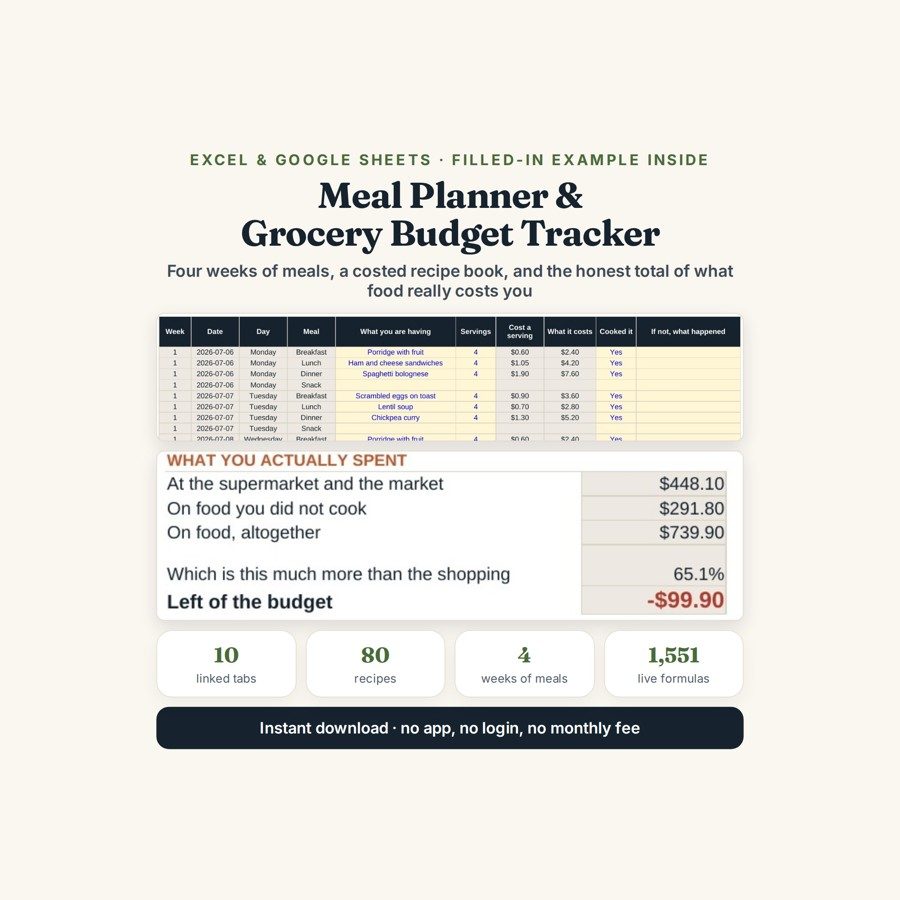
Meal Planner & Grocery Budget Tracker
This meal planner and grocery budget tracker puts the week’s meals, the shopping trips and every other dollar spent on food into one file, so the food budget covers the whole food bill.
Your food budget is not your shopping bill. The supermarket receipts are the part everyone counts; the takeaway on the night nobody cooked, the coffee, the top-up shop on the way home and the bag of salad that went in the bin are the part that decides the number. This file counts all of it against the same weekly budget.
What is in it
- Eleven linked tabs and 1,551 live formulas, from START HERE through to PANTRY.
- RECIPES — 80 recipes costed per portion, so the gap between a $0.60 breakfast and a $4.20 dinner is a figure rather than an impression.
- MEAL PLAN and GROCERY LIST — four weeks of plan and 200 list lines, so the week you cooked and the week you shopped for sit next to each other.
- FOOD SPENDING and SHOPPING TRIPS — 300 spending lines across ten categories and 40 shopping trips, so takeaways, delivery and top-up shops land in the same total as the big shop.
- WASTE — 100 lines for what was thrown away, what it cost and whether it could have been frozen on the night.
- BY WEEK and BY CATEGORY — every row totalled against the weekly budget and by category — plus PANTRY, 100 items you already own and keep re-buying.
Who it is for
Households trying to eat better and spend less at the same time, and anyone whose grocery budget keeps being met while the money still goes. It suits one person as easily as a family of five: the categories are the same, only the totals change.
The worked example
In the worked example the household spent $448.10 at the shops — and $739.90 on food. That is 65% more, on a $640 budget they thought they were comfortably under. $291.80 of the total went on food nobody cooked: 39% of the whole food bill, spread across takeaways, delivery and the incidental buys that never feel like grocery shopping.
The weekly view finds the second trap. Week 2 cost $233 on a $160 budget — and the shopping that week was the cheapest of the four, which is the whole point. The waste tab adds $34.15 thrown away in four weeks across 23 separate occasions, $20.55 of which could have been frozen on the night: about $267 a year sitting in a freezer drawer you already own.
How it works
Compatible with Microsoft Excel 2016 or newer on Windows or Mac, Google Sheets, and LibreOffice. No macros, no add-ons, no account to create, nothing to install.
The download has two workbooks: one with the example above already filled in, so you can see what every column expects, and the same file completely blank for your own figures. A plain-English guide comes as a PDF. Order on WhatsApp — $9
Orders are taken on WhatsApp: message me and I’ll send the payment details, then the files as soon as the payment is confirmed.
Questions people actually ask
Why does my grocery budget never match what I actually spend on food?
Because the shopping bill is only part of the food bill, and this file counts the rest of it. In the worked example the household spent $448.10 at the shops but $739.90 on food — 65% more, on a $640 budget — because $291.80 went on takeaways, delivery and incidental buys. The FOOD SPENDING tab puts all ten categories into one weekly total.
Is it useful for one person, or only for families?
Both — the tabs do not care how many people are eating. Capacity is 80 recipes, four weeks of plan, 200 grocery lines, 300 spending lines and 40 shopping trips, which is generous for one person and enough for a family; the per-portion recipe costs simply scale with the portions you enter.
I do not know what my recipes cost. Where do I start?
Start with the SHOPPING TRIPS and FOOD SPENDING tabs and just record what you spend for a fortnight — the weekly totals work with nothing else filled in. The RECIPES tab can come later, and the worked example is already costed, from a $0.60 porridge to a $4.20 salmon, so you can see what a finished row looks like.
Do I need Excel, or will it run in Google Sheets?
Both work — the file is .xlsx and runs in Excel 2016 or newer on Windows or Mac, in Google Sheets and in LibreOffice. For Sheets use File, then Import, then Upload and choose Replace spreadsheet; all 1,551 formulas carry over.
Does it count calories or build the shopping list for me?
No — it does no nutrition and no calorie counting, it cannot see supermarket prices, and it does not write your meal plan or generate the grocery list from your recipes. You plan and you type; the file does the costing, the weekly totals, the waste arithmetic and the category shares, in a single currency, with nothing connected to any account.
Need it built around your business?
This file assumes one household, one budget and one currency. If yours works differently — a shared flat splitting the shop several ways, a household cooking for a family with separate diets, or a small kitchen business that needs recipe costing with margins on top — I can rebuild the same arithmetic around how your food money is actually divided.
All other templates are listed on the Excel & Google Sheets Templates page.