
Landscaping & Lawn Care Business Income Tracker
This lawn care and landscaping income tracker works out what each job actually left you after crew labour, materials and equipment.
A seventy-dollar mow is not seventy dollars in your pocket. The crew hours it took at a real hourly rate, the fuel for the equipment, and the materials on a mulch or planting job all come off afterwards. A stack of paid invoices never shows the difference. This file works it out job by job and totals the season.
What is in it
- Five tabs and 1,163 formulas: Start Here, Setup, Jobs, Expenses and Dashboard.
- Setup — one number, the blended crew labour rate you pay per hour, yourself included. Change it and every job on the sheet recalculates.
- Jobs — one row per job: date, client, service and crew hours typed in; labour cost, job cost and net job profit worked out on the row.
- Expenses — insurance, the truck and trailer, equipment maintenance, licensing and marketing, all subtracted from the net number on the Dashboard.
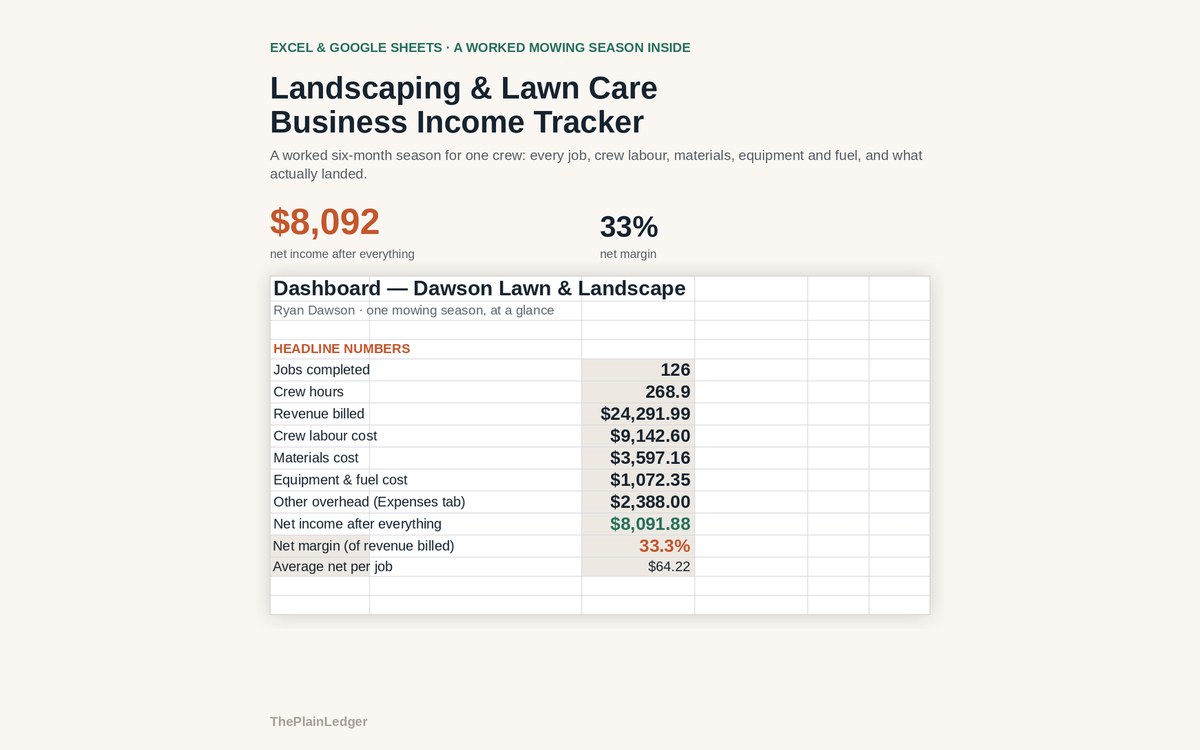
- Dashboard — jobs, crew hours, revenue billed, labour cost, materials, equipment and fuel, other overhead, and what you actually netted.
- Revenue against net income month by month, plus every job ranked by net profit rather than by what it billed.
Who it is for
Owners of a lawn care or landscaping crew mixing mowing, cleanups, mulch, planting and hardscape — anyone quoting jobs one at a time who has never lined a whole season up by what each job actually kept.
The worked example
The filled-in workbook is a six-month season for one crew: 126 jobs across mowing, cleanups, mulch, planting and hardscape. Revenue billed came to $24,292. Crew labour, materials and equipment took $13,812, leaving $8,092 — a 33% net margin.
Job by job the picture changes. A job billed at $70 loses the crew hours it took to mow it, at a real hourly rate, plus the fuel for the equipment. Ranked by net profit instead of by what was billed, a busier month does not always beat a quieter one carrying a couple of hardscape jobs.
How it works
Compatible with Microsoft Excel 2016 or newer on Windows or Mac, Google Sheets, and LibreOffice. No macros, no add-ons, no account to create, nothing to install.
The download has two workbooks: one with the example above already filled in, so you can see what every column expects, and the same file completely blank for your own figures. A plain-English guide comes as a PDF. Order on WhatsApp — $9
Orders are taken on WhatsApp: message me and I’ll send the payment details, then the files as soon as the payment is confirmed.
A look inside the file
Questions people actually ask
What does a lawn care income tracker calculate?
It calculates net profit per job — what you billed minus crew labour at a real hourly rate, materials, equipment and fuel — and totals the season. In the worked example, 126 jobs billing $24,292 left $8,092 after crew labour, materials and equipment, a 33% net margin.
Is it only for mowing?
No — the worked season mixes mowing, cleanups, mulch, planting and hardscape, and the Jobs tab accepts any service type you name. That mix is the point: mulch and hardscape jobs carry materials that a mow does not, and the ranking by net profit shows which of them actually pay. Delete the services you do not offer.
I quote by the job and do not track crew hours. Can I still use it?
Yes — crew hours are the one thing worth estimating, because labour is the largest deduction on most jobs. Put in your best figure per job and the sheet reprices the moment you sharpen it. Everything else on the Setup and Jobs tabs is editable in the same way.
Will it open in Google Sheets?
Yes — it is built as .xlsx and imports into Google Sheets through File, Import, Upload, with the formulas intact. It also runs in Excel 2016 or newer on Windows and Mac, and in LibreOffice. No macros, no add-ons, nothing to install.
Does it connect to my bank or handle my taxes?
No — it connects to no bank and no invoicing app, and it is not a tax return. You type the jobs in and the file stays on your own machine. It tracks what a job billed and what it cost, not self-employment tax or quarterly filings.
Need it built around your business?
This file assumes one blended crew rate applied to every job. If yours works differently — crews on different pay rates, seasonal contracts billed monthly rather than per visit, snow work over the winter, materials marked up rather than passed through at cost — I can rebuild the same arithmetic around how you actually quote and run a job.
All other templates are listed on the Excel & Google Sheets Templates page.