
Food Truck Owner Income Tracker
This food truck income tracker works out what each event actually left you after food cost, booth fees and propane — not what the POS said you took.
A day at a packed festival can gross more than a quiet lunch service and still put less in your pocket, because the booth fee, the food cost and the propane all come off afterwards. No POS summary subtracts them for you. This file does it for every event, then totals the season.
What is in it
- Five tabs and 1,019 formulas: Start Here, Setup, Events, Expenses and Dashboard.
- Setup — one number, your blended food cost rate as a percentage of gross sales. Change it and every event on the sheet recalculates.
- Events — one row per event: date, venue, event type and hours on site typed in; food cost, event cost and net event profit worked out on the row.
- Expenses — commissary kitchen rental, insurance, permits, truck maintenance and marketing, all subtracted from the net number on the Dashboard.
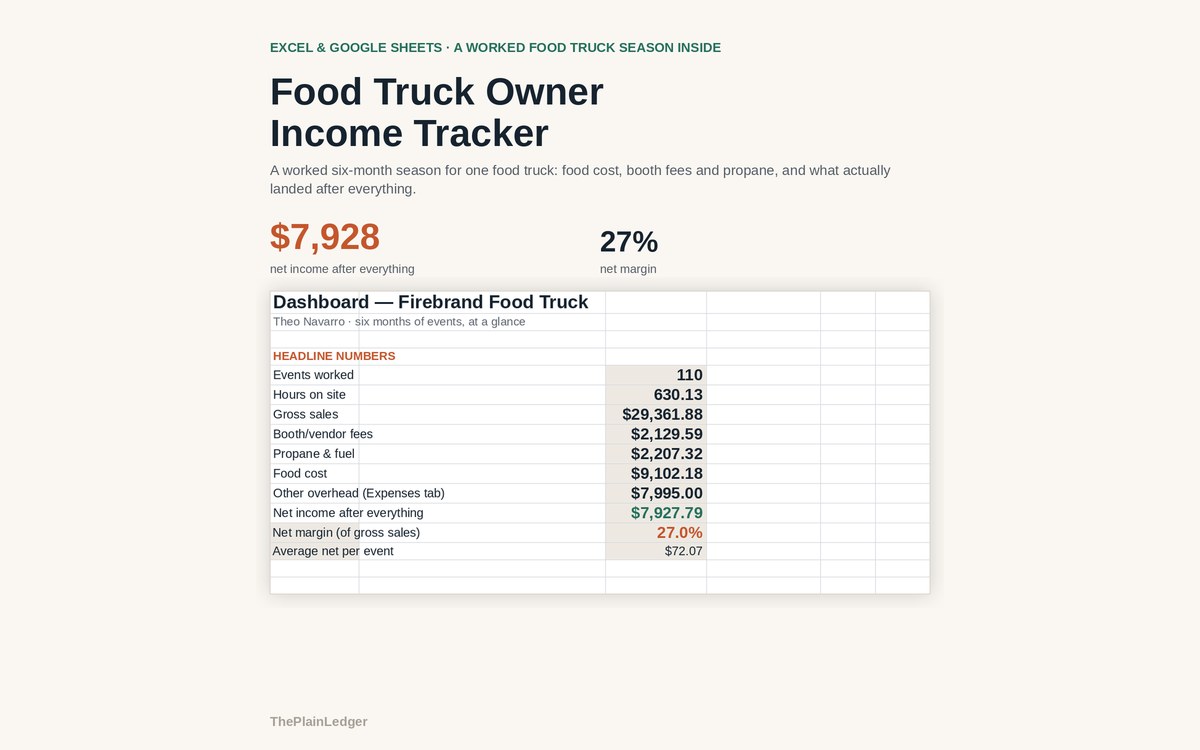
- Dashboard — events worked, hours on site, gross sales, booth fees, propane and fuel, food cost, other overhead, and what you actually netted.
- Month-by-month gross sales against net income, plus every event ranked by net profit rather than by what it grossed.
Who it is for
Owners of a single truck or trailer working a mix of farmers markets, downtown lunch service, catering, festivals and brewery nights — anyone who books events one at a time and has never seen a season added up with the costs taken out.
The worked example
The filled-in workbook is a six-month season for one truck: 110 events across farmers markets, downtown lunch service, catering, festivals and brewery nights. Gross sales came to $29,362. Food cost, booth fees, propane and overhead took $21,434 of it, leaving $7,928 — a 27% net margin.
The per-event view is where the surprise sits. An event grossing $250 loses roughly a third to food cost alone, before the booth or vendor fee and the propane for the night. Lined up by net profit rather than by gross, the order of the season changes: a packed festival month with high booth fees does not always beat a quieter one full of downtown lunch service.
How it works
Compatible with Microsoft Excel 2016 or newer on Windows or Mac, Google Sheets, and LibreOffice. No macros, no add-ons, no account to create, nothing to install.
The download has two workbooks: one with the example above already filled in, so you can see what every column expects, and the same file completely blank for your own figures. A plain-English guide comes as a PDF. Order on WhatsApp — $9
Orders are taken on WhatsApp: message me and I’ll send the payment details, then the files as soon as the payment is confirmed.
A look inside the file
Questions people actually ask
What does a food truck income tracker actually calculate?
It calculates net profit per event — gross sales minus food cost, the booth or vendor fee, propane and fuel — and then totals the season. In the worked example, 110 events grossing $29,362 left $7,928 after everything, a 27% net margin. Every event is also ranked by what it actually kept.
Is it useful if I only work farmers markets?
Yes — the Events tab accepts any event type you name, so a season of nothing but farmers markets works exactly the same. The worked example mixes markets, lunch service, catering, festivals and brewery nights only to show the range. Delete the types you do not use and the totals still hold.
I have not kept proper records. Can I still use it?
Yes — start with the events you can find on your POS exports or remember, and add the rest as you go. Setup needs one number to begin with, your blended food cost rate, and the Dashboard fills in as events are entered. The filled-in workbook shows a complete season so you can see the finished shape first.
Does it work in Google Sheets?
Yes — it is built as .xlsx and opens in Google Sheets through File, Import, Upload, with formulas carrying over intact. It also runs in Excel 2016 or newer on Windows and Mac, and in LibreOffice. There are no macros and nothing to install.
Does it connect to my POS or file my taxes?
No — it never connects to your POS system or bank account, and it is not a tax return. You type events in yourself and the file stays on your own computer. It tracks what an event grossed and what it cost, not self-employment tax or quarterly filings.
Need it built around your business?
This file assumes one truck and one blended food cost rate applied to every event. If yours works differently — two trucks, a trailer and a cart on the same books, wildly different menus by event type, a commissary charging by the hour rather than by the month — I can rebuild the same arithmetic around how you actually book and cost an event.
All other templates are listed on the Excel & Google Sheets Templates page.