
Short-Term Rental Host Income & Expense Tracker
This short-term rental income and expense tracker takes every booking, subtracts the platform fee, the cleaning cost and the running expenses, and shows what the host actually kept.
A payout summary tells you what the platform sent you, not what the stay cost you to run. The cleaning fee arrives in your account as revenue and leaves again as a cleaner’s invoice, and utilities, supplies and insurance never appear on that summary at all. This file puts all of it against each individual booking.
What is in it
- Five tabs and 606 formulas, from Start Here through to the Dashboard.
- Setup — four numbers: the property, the cleaning fee you charge the guest, what you actually pay the cleaner, and the platform’s host-service fee. Change any of them and every booking recalculates.
- Bookings — one row per reservation. Check-in, check-out and nightly rate go in; nights, the platform fee, the net payout and your net booking income calculate themselves.
- Expenses — utilities, supplies, insurance, HOA fees and pricing software: everything you pay to run the property outside the platform.
- Dashboard — bookings, nights, occupancy rate, gross revenue, platform fees, cleaning costs, overhead and net income, plus a month-by-month table and every booking ranked by what it actually netted.
- Start Here — what to fill in, in what order, in three steps.
Who it is for
Hosts running a single property on Airbnb, Vrbo or direct bookings who get a payout summary every month and still cannot say what the six months actually made. The file assumes one property and a flat per-booking cleaning fee; a multi-property portfolio or tiered cleaning pricing would need it adjusted.
The worked example
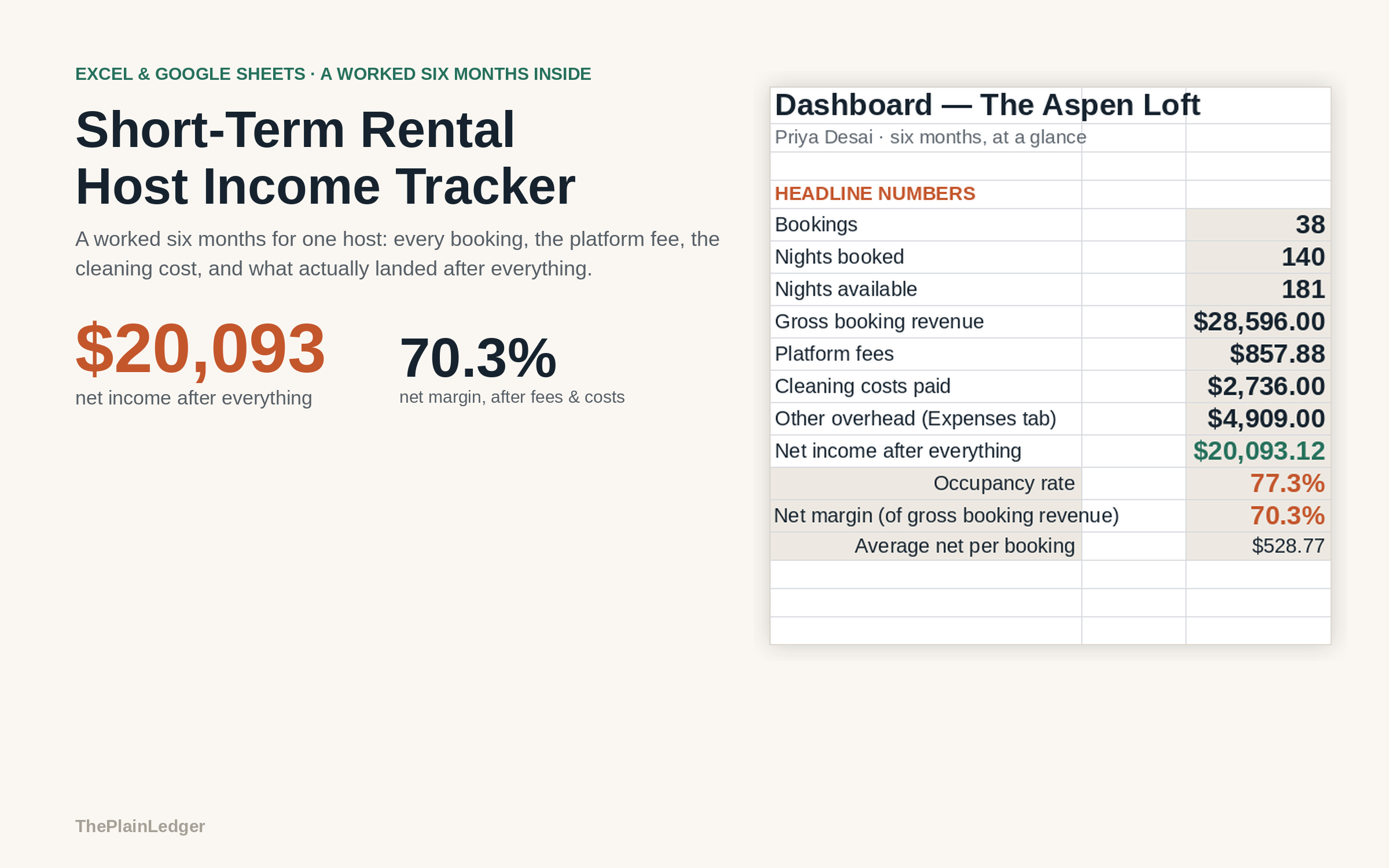
The example inside is six months for one property: 38 bookings and $28,596 of gross booking revenue. After the platform’s host-service fee, the cleaning cost on every stay and $4,909 of running expenses across the six months, $20,093 is what the host actually kept — a 70.3% net margin.
Most of the gap is the part hosts forget to subtract. In the example the guest is charged $85 for cleaning and the cleaner is paid $72, and that $72 never appears as a cost on a platform payout summary, so it comes quietly out of profit on every single stay. The sheet takes it off each booking before the net number is reached, then ranks all 38 bookings by what actually landed rather than by the nightly rate.
How it works
Compatible with Microsoft Excel 2016 or newer on Windows or Mac, Google Sheets, and LibreOffice. No macros, no add-ons, no account to create, nothing to install.
The download has two workbooks: one with the example above already filled in, so you can see what every column expects, and the same file completely blank for your own figures. A plain-English guide comes as a PDF. Order on WhatsApp — $9
Orders are taken on WhatsApp: message me and I’ll send the payment details, then the files as soon as the payment is confirmed.
A look inside the file
Questions people actually ask
How do I work out what my short-term rental actually made?
You enter each booking's check-in, check-out and nightly rate, and the sheet subtracts the platform's host-service fee, the cleaning you pay for and your running expenses to give a net figure for that stay. The Dashboard adds those up into gross revenue, total fees, total costs and net income for the period. In the worked example that is $28,596 gross and $20,093 net across six months.
Does it handle more than one property?
No — it is built for a single property, and the Setup tab holds one cleaning fee and one platform fee rate that every booking is measured against. A portfolio of several listings, or tiered cleaning pricing that changes with the length of stay, would need the file adjusted. For one flat or one house it works as it stands.
What if I don't know my platform fee or my real cleaning cost yet?
Open the filled-in workbook first and read the example figures — an $85 cleaning fee charged to the guest against $72 paid to the cleaner, worked across 38 bookings. Every rate on the Setup tab is editable, so once you check one payout statement and one cleaner's invoice you type your own numbers over the example.
Will it work in Google Sheets or do I need Excel?
Yes — it is built as .xlsx and imports into Google Sheets through File, then Import, then Upload, and all 606 formulas carry over. It also opens in Excel 2016 or newer on Windows and Mac, and in LibreOffice. There are no macros and no add-ons to enable.
Does it connect to Airbnb or to my bank account?
No — it never connects to a booking platform, a bank or a payment account, and it never asks for a login or a password. You type the bookings and the costs in yourself. It is also not a tax return: it tracks what you were paid and what you spent, not occupancy-tax remittance or income-tax filing.
Need it built around your business?
This file assumes one property, one platform fee rate and a flat cleaning fee per booking. If yours works differently — three flats across two platforms, a cleaner paid by the hour, or a co-host taking a percentage off the top — I can rebuild the same arithmetic around the way you actually let.
All other templates are listed on the Excel & Google Sheets Templates page.