
Recipe Costing and Menu Profit Spreadsheet
This recipe costing spreadsheet prices every dish on the gram that actually reaches the plate rather than the line on the invoice, then shows which dishes pay the rent and which are being carried.
The price on the delivery note is not the price of what reaches the plate. A case gets trimmed, and the yield you actually portion out of it costs more per kilo than the invoice says. Food cost percentage hides the rest: a low percentage on a cheap item can leave less in the till than a high percentage on an expensive one.
What is in it
- Ten tabs, from Start Here through to the Dashboard, with a plain-English PDF guide alongside.
- Ingredients — 200 rows. Case price, case size and trim waste go in; the cost of the gram that actually reaches the plate comes out.
- Preps — 30 batches of stocks, sauces, doughs and butters, costed once and then spent by the gram. Recipe Lines is the 900-row engine underneath them.
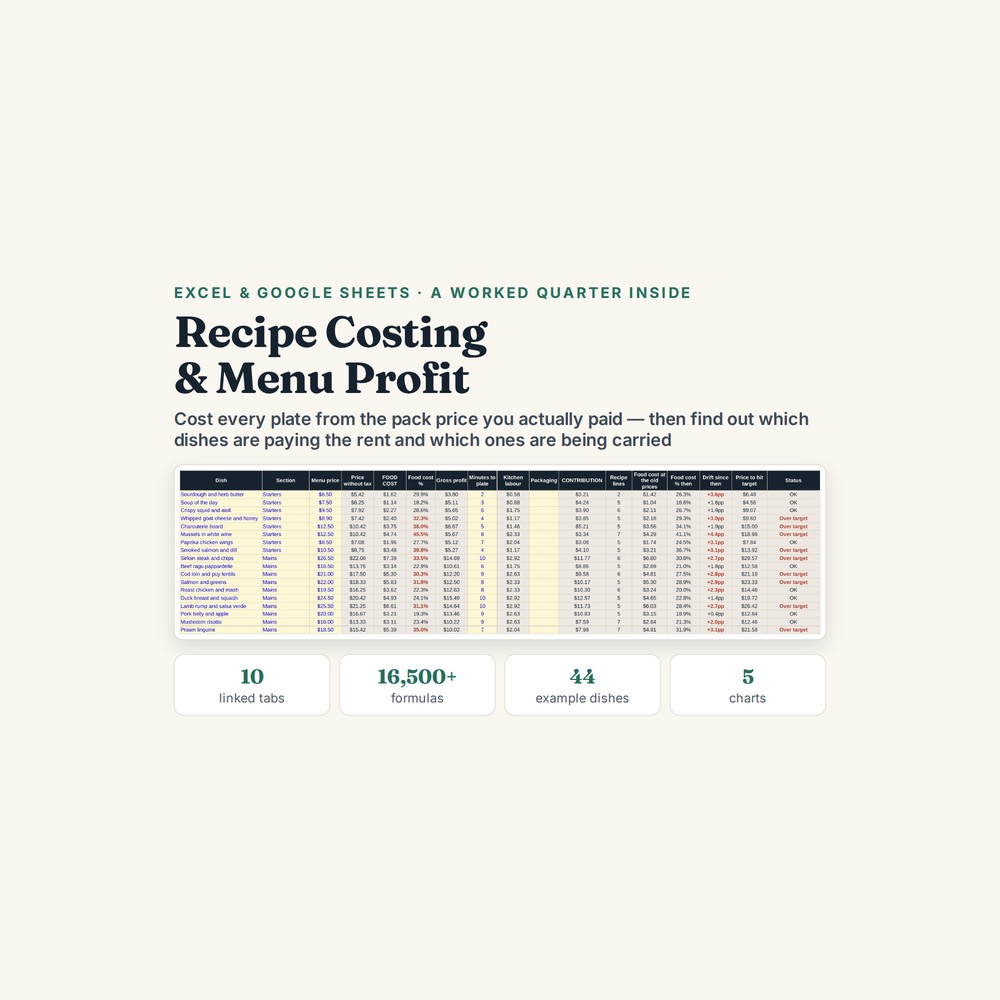
- Menu — 60 dishes, each with a food cost percentage next to its contribution: what one sale leaves behind after the food, the minutes of prep and the box it goes out in.
- Menu Engineering — the four-box view, split by section so a coffee is never ranked against a sirloin: Stars, Plowhorses, Puzzles and Dogs. Sales holds thirteen weeks of till data underneath it.
- Purchasing & Usage — cases a week worked back from every prep, plus an order list. The Dashboard is five charts and summary tables.
Who it is for
A café, bistro, pub kitchen, bakery, food truck, coffee shop, small caterer or ghost kitchen — anywhere the same person orders the stock, prices the menu and writes the rota. Built for menus up to sixty items, with 200 ingredients, 30 preps and 900 recipe lines behind them.
The worked example
The example inside is a neighbourhood bistro called Harrow & Vine: forty-four covers, 93 ingredients, 12 preps, 44 dishes and thirteen weeks of till sales. A 5 kg vac pack of sirloin at $118 reads as $23.60 a kilo on the invoice; after 12% trim loss the usable kilo costs $26.82, and the portion moves from $5.90 to $6.71.
The second figure is the one that reorders the menu. A flat white at $3.60 runs a nine per cent food cost and contributes $2.08; the sirloin at $26.50 runs thirty-three per cent and contributes $11.77. On percentage the coffee wins every time. On what it actually leaves in the till, it does not — which is why the Menu Engineering tab ranks by section rather than lumping the two together.
How it works
Compatible with Microsoft Excel 2016 or newer on Windows or Mac, Google Sheets, and LibreOffice. No macros, no add-ons, no account to create, nothing to install.
The download has two workbooks: one with the example above already filled in, so you can see what every column expects, and the same file completely blank for your own figures. A plain-English guide comes as a PDF. Order on WhatsApp — $9
Orders are taken on WhatsApp: message me and I’ll send the payment details, then the files as soon as the payment is confirmed.
A look inside the file
Questions people actually ask
How do I work out what a dish really costs me to make?
You enter each ingredient's case price, case size and trim waste, and the sheet gives you the cost of the usable gram rather than the invoice gram; every recipe line then draws on that figure. In the worked example a 5 kg vac pack of sirloin at $118 looks like $23.60 a kilo, but after 12% trim loss the usable kilo is $26.82 and the portion costs $6.71 instead of $5.90.
How big a menu does it handle?
Up to 60 dishes, built on 200 ingredients, 30 preps and 900 recipe lines, with thirteen weeks of sales alongside them. That covers a café, bistro, pub kitchen, bakery, food truck, coffee shop, small caterer or ghost kitchen. It uses a single level of prep, so a prep made out of another prep needs a small adjustment.
I don't have my supplier invoices to hand. Can I start anyway?
Yes — open the filled-in workbook and work through the Harrow & Vine example first, with its 93 ingredients and 44 dishes already costed, so you can see what each column expects. Then type your own case prices over the top as the invoices come in. The file also tracks price drift, so you can see how far a dish has moved since the last supplier round.
Will it work in Google Sheets or do I need Excel?
Yes — it is built as .xlsx and imports into Google Sheets through File, then Import, then Upload, and the formulas carry over. It also opens in Excel 2016 or newer on Windows and Mac, and in LibreOffice. There are no macros, no logins and no monthly fee.
Is this a stock counting system?
No — it costs recipes and menus, and it is not a stock counting system or accounting software. It will not tell you what is in the walk-in tonight. Kitchen labour is handled as an average rather than a rota, and the Purchasing tab works back to cases a week from your recipes rather than from a physical count.
Need it built around your business?
This file assumes you buy by the case and sell by the plate, with a single level of prep. If you break down whole carcasses yourself, sell by weight or by buffet, or send the same prep out at different portion sizes for dine-in and delivery, I can rebuild the same costing around your kitchen.
All other templates are listed on the Excel & Google Sheets Templates page.