
Structured e-invoices
ZUGFeRD, Factur-X and XRechnung e-invoices for suppliers outside the EU
A ZUGFeRD or XRechnung e-invoice is an invoice a German or French customer’s software can read without anyone typing it in: the invoice data travels as structured XML, either alone (XRechnung) or embedded in a PDF/A-3 that still looks like your usual invoice (ZUGFeRD / Factur-X). I produce these e-invoices for exporters and freelancers in Türkiye and elsewhere who invoice customers in Germany or France, set up templates so you can issue them yourself, and check the e-invoices your software already creates. Each file comes with the validator reports — and a plain list of what those validators do not check.
In short
What I do
- Produce ZUGFeRD 2.x / Factur-X hybrid invoices (PDF/A-3 with embedded XML, profile EN 16931) from your invoice data or your existing PDF layout.
- Produce XRechnung 3.0 XML for German public-sector customers, including the Leitweg-ID they give you.
- Set up an invoice template and a documented workflow so that you can issue the next invoices yourself, with a validation step built in.
- Check e-invoices your accounting or invoicing software already produces, and tell you which rule fails and why.
- Deliver validator reports (Mustang with veraPDF, KoSIT validator) and a readable rendering of the XML with every file.
Not part of this service
- Accounting and tax advice. Which VAT category and exemption reason your invoice carries, and how the export is treated in Türkiye, Germany or France, is decided by your accountant or tax adviser. I put their decision into the file correctly.
- Peppol access. I do not operate a Peppol access point and I do not send invoices on your behalf. If a customer requires Peppol delivery, you need an access-point provider; I can prepare files that pass the same rules.
- Turkish e-Fatura and e-Arşiv. Your obligations towards the Turkish Revenue Administration (GİB) stay as they are. This service does not replace or connect to them.
- Bookkeeping, dunning, payment collection. The file carries the payment details you give me; what happens after sending is outside it.
Is this page for you?
This page is for you if one of these describes your situation:
- You export goods or sell services to businesses in Germany or France, and a customer asked for “ZUGFeRD”, “Factur-X”, “XRechnung” or “an e-invoice, not a PDF”.
- You won a contract with a German public authority and received a Leitweg-ID, an upload portal and a request for XRechnung.
- Your invoicing software has a “ZUGFeRD export” button, but a customer’s system rejects the file and nobody can tell you which rule it breaks.
- You are a freelancer with a handful of German clients and want to issue correct e-invoices without buying a large ERP system.
Check one of your invoices in one minute
Open one of your PDF invoices in Adobe Acrobat Reader and click the paperclip (attachments) icon.
- If there is no attachment, the PDF is an ordinary PDF. In Germany it counts as an “other invoice”, not an e-invoice.
- If you see
factur-x.xml,zugferd-invoice.xmlorxrechnung.xml, the PDF is a hybrid invoice. Open the file properties: a document that is not marked as PDF/A-3 is already a warning sign. - If you send pure XML files, open one in a text editor and search for
GuidelineSpecifiedDocumentContextParameter(CII) orCustomizationID(UBL). The value there says which rule set the file claims to follow.
An attached XML is a good sign, not proof: whether the XML is valid, matches the PDF and carries the right VAT data does not show up in this test.
Read on for the technical detail. Below: how the formats work, a measured worked example with downloadable files and reports, and the current German and French timelines. To skip ahead, send one invoice and I will tell you what is wrong with it.
A PDF invoice is not an e-invoice
An e-invoice is structured data that software can process; a PDF, however tidy, is a picture of an invoice. Germany and France both base their e-invoicing on the European standard EN 16931, which defines the invoice fields (business terms such as BT-31 for the seller’s VAT identifier) and the rules they must satisfy.
ZUGFeRD and Factur-X: the hybrid invoice
ZUGFeRD (Germany) and Factur-X (France) are the same technical format today: a PDF/A-3 file that shows the invoice to people and carries an XML file in UN/CEFACT CII syntax for software. The profile says how much data the XML contains. In Germany the German Federal Ministry of Finance accepts ZUGFeRD from version 2.0.1 as an e-invoice, except the profiles MINIMUM and BASIC-WL; the profile EN 16931 (formerly “COMFORT”) is the usual choice for business-to-business invoices.
XRechnung: the German public-sector format
XRechnung is the German specification (a “CIUS”) of EN 16931. It adds rules — for example the Buyer reference (BT-10), which for public authorities holds the Leitweg-ID, and a mandatory seller contact and payment instructions. An XRechnung is pure XML in UBL or CII syntax; the human-readable view is generated from it. Public-sector buyers in Germany generally ask for XRechnung and accept it through their upload portals; many private companies accept it as well.
Where export invoices usually fail
For a supplier outside the EU invoicing an EU business, the typical failures are not in the layout but in the data:
- A zero VAT amount with no reason. Every VAT category other than standard rate needs its own rules satisfied — for category G (export), an exemption reason code or text (rule BR-G-10) and the VAT identifier of the seller or its tax representative (BR-G-02).
- Totals that do not add up to the cent. Line totals, document charges, tax basis and amount due are recalculated by the validator (rules BR-CO-10 to BR-CO-16).
- Missing mandatory parties and addresses. XRechnung requires, among others, the seller’s contact person, electronic addresses and payment instructions.
- A PDF that is not PDF/A-3, or an XML attached without the required file relationship and metadata, so the receiving system does not find it.
- A PDF that says something different from its XML. No validator compares the two.
The VAT category is a tax decision, not a formatting choice
EN 16931 offers several codes for invoices without VAT, among them G (“free export item, VAT not charged”) and O (“not subject to VAT”). They are not interchangeable: with O, the seller’s VAT identifier must not appear; with G, it must. The validator checks that the invoice is consistent with the category you chose. It does not check whether the category is correct for your transaction — your accountant decides that.
Evidence: one export invoice as ZUGFeRD and XRechnung, before and after
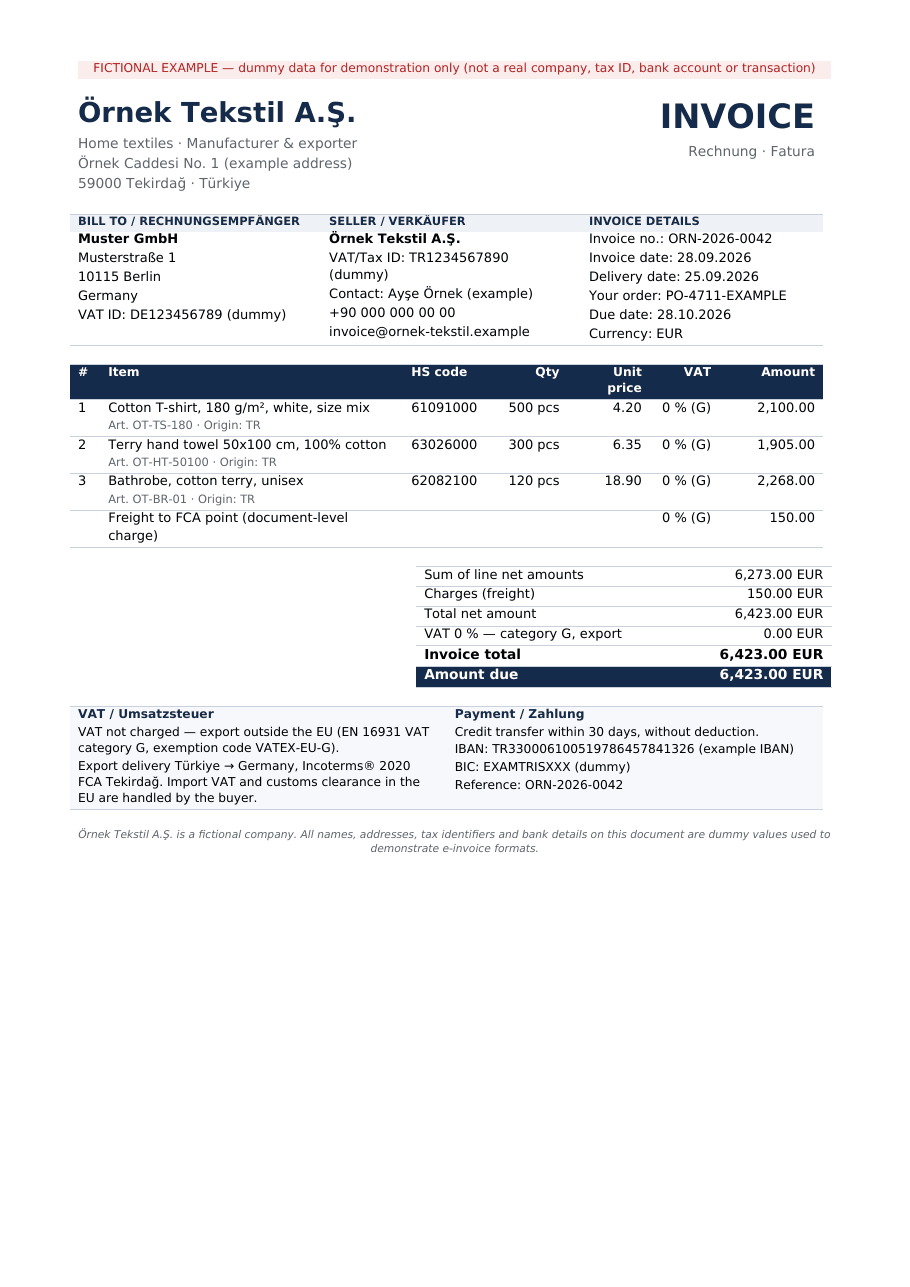
Here is a measured worked example on fictional data — not a client job. A textile exporter in Tekirdağ invoices a German company for three product lines plus freight; the same delivery is then invoiced to a German public authority as XRechnung. All files and reports can be downloaded below.
Source and license
The seller “Örnek Tekstil A.Ş.”, the buyer “Muster GmbH” and the authority “Stadt Musterstadt” are invented, and every file says so. The tax identifiers, the IBAN (the example IBAN from the IBAN registry), the BIC, the e-mail domains and the Leitweg-ID (in the style of the KoSIT test suite) are dummy values. I wrote the invoice data and layout myself; no third-party document was used. The validators are open source: Mustang 2.22.0 (Apache 2.0, with veraPDF inside) and the KoSIT Validator 1.6.3 with its XRechnung 3.0.2 configuration of 31 August 2026 (Apache 2.0).
The invoice: 500 T-shirts at 4.20, 300 hand towels at 6.35 and 120 bathrobes at 18.90, plus 150.00 freight — 6,273.00 net for the lines, 6,423.00 EUR in total, VAT category G at 0 %, exemption code VATEX-EU-G. The “before” file is a typical plain PDF exported from the office suite, the way most small exporters send invoices today.
What was wrong, measured
| Measured | Before (plain PDF) | After (hybrid e-invoice) |
|---|---|---|
| Embedded invoice XML | none — “XML could not be extracted” | factur-x.xml, relationship “Alternative”, profile EN 16931 |
| PDF/A | not PDF/A — “Not a PDF/A-3” | PDF/A-3 (declared 3u) |
| veraPDF checks | 8,701 assertions, 107 failed checks listed | 12,441 assertions, 0 failed |
| XML extracted from the PDF vs. source XML | — | byte-identical |
| Visible page, rendered at 100 dpi | 827 × 1170 px | 0 pixels differ from the “before” page |
The 107 failed checks on the plain PDF: 100 for colour without a PDF/A output intent (veraPDF stops listing this rule at 100), 6 for document information not matching XMP metadata, 1 for missing XMP metadata.
What the validators report
Both e-invoices passed both validators without an error or warning. The plain PDF failed, as expected — it is not an e-invoice.
| File and validator | Checks | Result |
|---|---|---|
| Plain PDF — Mustang 2.22.0 | veraPDF, XML extraction | invalid |
| Hybrid PDF — Mustang 2.22.0 | veraPDF PDF/A-3, Factur-X schema, EN 16931 rules | valid; 0 errors, 3 notices (XRechnung-only rules, not applicable to Factur-X) |
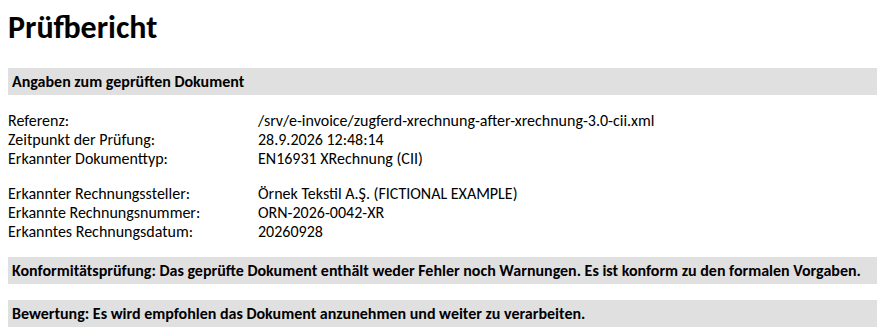
| Embedded XML — KoSIT Validator 1.6.3, scenario EN16931 (CII) | CII schema, EN 16931 schematron 1.3.16 | acceptable; 0 errors, 0 warnings |
| XRechnung XML — KoSIT Validator 1.6.3, scenario XRechnung (CII) | CII schema, EN 16931 schematron, XRechnung schematron 2.6.0 | acceptable; 0 errors, 0 warnings |
| XRechnung XML — Mustang 2.22.0 | schema, EN 16931 and XRechnung rules | valid; 0 failed rules |
A clean result only means something if the validator reacts to errors. So I broke four copies of the XRechnung file on purpose. Both validators rejected all four, naming the right rule each time.
| Change | KoSIT 1.6.3 | Mustang 2.22.0 |
|---|---|---|
| Amount due 6,423.00 → 6,423.01 | rejected, BR-CO-16 | invalid, BR-CO-16 |
| Leitweg-ID removed | rejected, BR-DE-15 | invalid, BR-DE-15 |
| VAT exemption reason removed | rejected, BR-G-10 | invalid, BR-G-10 |
| Category G changed to O, seller VAT ID kept | rejected, BR-O-02 (3×), BR-O-04, BR-DE-14 | invalid, same rules |
What the validators do not report
A green report says the file follows the rules. It says nothing about whether the invoice is right.
Whether G is the right category
The validators accepted category G because the file is consistent with it. Whether a Turkish exporter should use G, O or something else, and whether the export exemption in Türkiye is documented, is for your accountant. The last control above shows that the choice also changes which data may appear in the file.
Whether the PDF matches the XML
Neither Mustang nor KoSIT compares the visible page with the embedded data. In the example both come from one data file; in Germany the XML is the part that counts.
Whether the data is real
Tax IDs, IBAN, BIC and Leitweg-ID are checked for presence and format, not looked up. The dummy values in the example pass.
Delivery and archiving
How the invoice reaches the customer (e-mail, portal, Peppol), signatures, archiving duties, and your Turkish e-Fatura or e-Arşiv obligations are outside the file.
Rule sets also have versions: Mustang 2.22.0 bundles XRechnung schematron 2.4.0, the KoSIT configuration used 2.6.0. Both passed here; a customer on another version can report differently. PDF accessibility (PDF/UA) was not assessed.
Download the files and check them yourself
You do not have to take the tables on trust. The ZIP contains both PDFs, both XML files, the extracted XML, all Mustang and KoSIT reports and the visualisations.
| File | What it is | Size |
|---|---|---|
| Worked example (ZIP) | All invoices, XML files, validator reports (XML and HTML) and visualisations | 442 KB |
| Before: plain PDF | The invoice as an ordinary PDF, no XML | 76 KB |
| After: Factur-X / ZUGFeRD PDF | PDF/A-3 with embedded factur-x.xml, profile EN 16931 | 93 KB |
| Factur-X data, rendered (PDF) | What the receiving software reads from the embedded XML | 40 KB |
| XRechnung data, rendered (PDF) | The XRechnung for the public authority, as a readable document | 40 KB |
| KoSIT verdict (PNG) | Top of the KoSIT test report | 49 KB |
The rendered PDFs are generated by Mustang with German field labels, as a German recipient would see them. Open the hybrid PDF in Acrobat Reader and look at the attachments to find the XML.
What you receive
You receive e-invoices that pass the validators, the reports that show it, and a written note of what the validators cannot confirm.
- ZUGFeRD / Factur-X hybrid PDFs (PDF/A-3, profile EN 16931 unless your customer asks for another) and/or XRechnung 3.0 XML in CII or UBL syntax.
- Mustang and KoSIT validation reports for every file, and a readable rendering of the XML.
- If you want to issue invoices yourself: a template and a short written workflow for your data, including how to validate each new invoice before sending.
- For existing files from your software: a findings report naming each failed rule, the field it concerns and what has to change — in the software settings or in your master data.
- A list of the decisions that are not mine to make (VAT category, exemption wording, delivery channel), so you can take them to your accountant or customer.
How the work runs
You send one real invoice first; the price is fixed before any work starts.
- Send one invoice. A PDF you sent recently, an e-invoice a customer rejected, or the customer’s requirements (format, Leitweg-ID, portal). I tell you what is missing, including anything your accountant has to decide.
- You receive a scope and a fixed price for the set of invoices or the template, before anything starts.
- I do the work. You receive preview files marked as test invoices, together with the validator reports, to check with your customer or in their portal’s test mode where one exists.
- Your approval releases the final files, the template and the findings report.
Pricing
I price each job after I have seen the material. A single freelancer invoice with one VAT rate is a different job from a monthly export run with allowances, several currencies and credit notes. You get a fixed price for the set or the template before any work starts — no hourly meter.
Why this matters now
German and French businesses are moving their invoice processing to structured e-invoices, and that reaches their suppliers abroad through what the customers ask for. What the rules mean for your company is a question for your tax adviser; this page covers the technical side.
- Germany, business to business. According to the Federal Ministry of Finance’s FAQ on the e-invoice (as of March 2026), businesses established in Germany must be able to receive e-invoices since 1 January 2025; an e-mail inbox is enough for that. Until 31 December 2026 every issuer may still send other invoices; for issuers with a prior-year turnover up to 800,000 euros this is extended to the end of 2027. After that, e-invoices are mandatory for transactions between domestic businesses. The FAQ names XRechnung and ZUGFeRD from version 2.0.1 (except the profiles MINIMUM and BASIC-WL) as formats that meet the requirements.
- Suppliers outside Germany. The German obligation applies to transactions between businesses established in Germany. A supplier in Türkiye is therefore, as a rule, not the one bound by it — but the German customer’s accounts payable process is being built for structured invoices, and customers increasingly ask for them. If you have a German VAT registration or a fixed establishment in Germany, ask your tax adviser how the rules apply to you.
- Germany, public sector. The same FAQ (question 4a) notes that suppliers to public authorities are obliged to invoice electronically under public procurement rules. For federal authorities, the E-Rechnungsverordnung, § 3 requires electronic invoices, with an exception for direct orders up to 1,000 euros; the federal states have their own rules. The contract or order tells you whether XRechnung and a Leitweg-ID are required.
- France. According to the French Ministry of the Economy, since 1 September 2026 all businesses must be able to receive e-invoices and large and mid-sized companies must issue them; small and micro businesses must issue them from 1 September 2027, through state-approved platforms. The obligation covers transactions between VAT-registered businesses established in France; cross-border transactions are handled through separate transaction reporting (e-reporting). Factur-X is one of the formats the reform uses, which is why French customers ask for it.
In short: for a supplier abroad the pressure comes from the customer’s side, not from a law addressed to you. A correct e-invoice makes you easier to pay.
Frequently asked questions
My German customer still accepts PDF invoices. Why change?
Until the end of 2026 many German customers can still process PDFs, and there is no German rule that forces a supplier in Türkiye to switch. But German businesses must be able to receive e-invoices since January 2025, and their processes are being built around them. If a customer asks for ZUGFeRD or XRechnung, the question is usually how soon, not whether.
Do I need ZUGFeRD or XRechnung?
For German public authorities, usually XRechnung, with the Leitweg-ID from your order. For private companies in Germany or France, a ZUGFeRD / Factur-X hybrid invoice in profile EN 16931 is the common choice, because it also works for people who only look at the PDF. Ask the customer; if they have no preference, I recommend the hybrid invoice.
Which VAT category goes on my export invoice?
That is your accountant’s decision, not mine and not the validator’s. The worked example uses category G (export, VAT not charged) with exemption code VATEX-EU-G, and the validators accept it because the file is consistent. Another category would change which data the invoice may and must contain; I implement whichever your accountant decides.
Can you send the invoices through Peppol for us?
No. I do not operate a Peppol access point and do not send invoices on your behalf. If your customer requires Peppol delivery, you need an access-point provider; the files I prepare follow the same EN 16931 and XRechnung rules.
Does this replace Turkish e-Fatura or e-Arşiv?
No. Your invoicing obligations in Türkiye, including e-Fatura and e-Arşiv towards the Revenue Administration, remain separate and unchanged. The German or French customer receives an e-invoice in their format; how the same sale is documented in Türkiye is for your accountant to arrange.
Can you check the e-invoices our software already produces?
Yes. Send one file that a customer rejected, or one you are unsure about. You receive the validator reports, the failed rules in plain language and what has to change — often a setting or a missing field in your master data rather than the software itself.
Is a validated file guaranteed to be accepted?
No. A validated file meets the rule sets the validators check, in the versions named in the report. A customer can use a different rule version, add their own requirements or reject an invoice for commercial reasons. The report shows exactly what was checked.
Related services
Send me one invoice
One invoice — the one a customer rejected, or the one you are about to send to Germany or France. You get back a straight account of what an e-invoice version needs, and what only your accountant can decide.
Ali Karabüyük · Tekirdağ, Türkiye · working remotely with clients worldwide · document and image production since 2004, professional practice since 2008.