
Etsy Seller Profit and Fee Tracker Spreadsheet
This Etsy seller fee tracker puts the listing fee, the transaction fee, payment processing and Offsite Ads next to every order, and shows how much of each dollar the shop actually keeps.
Etsy takes its cut in four or five small pieces, and every one of them is too small to notice on a single order. Nothing in the seller dashboard adds six months of those pieces together and sets the total next to what it cost you to make the thing. That total is the number this file exists to show you.
What is in it
- Six tabs and 1,279 formulas, from Start Here through to the Dashboard.
- Setup — Etsy’s listing fee, transaction fee, payment processing rate and Offsite Ads rate. Etsy changes these from time to time, so they are editable and no formula ever has to be touched.
- Listings — one row per item you sell: price, cost to make or license it, packaging if it is physical, whether it is digital, and the renewal fee Etsy charges every few months just to keep it live.
- Orders — every sale with its whole fee stack beside it: item total, transaction fee, payment processing, Offsite Ads fee, cost of goods, and what is actually left over.
- Expenses — Etsy Plus, Canva, packaging, a font licence: anything you pay for to run the shop that never shows up on an Etsy statement.
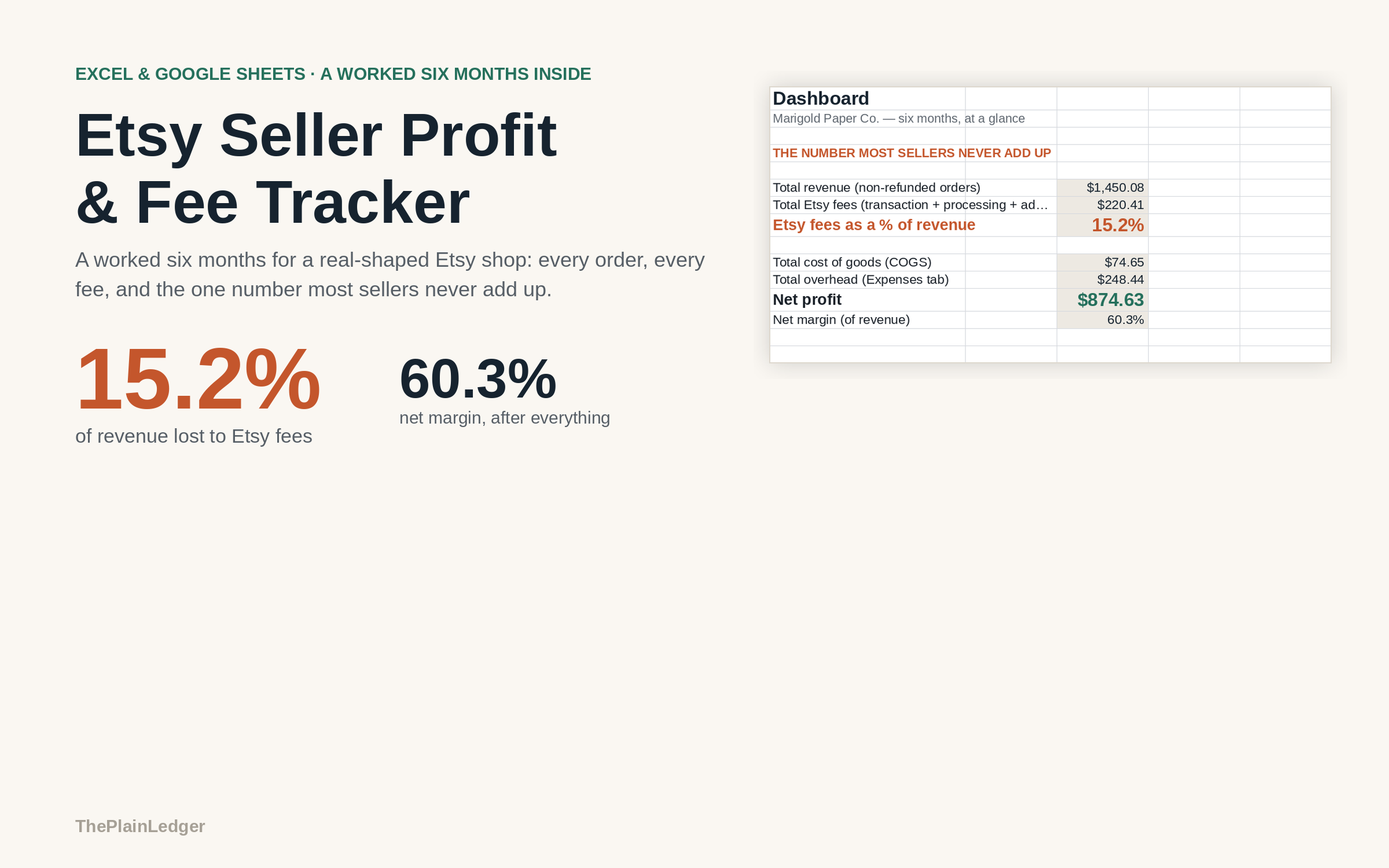
- Dashboard — total revenue, total fees, fees as a percentage of revenue, cost of goods, overhead, net profit and net margin, plus revenue and fees month by month and every listing ranked by profit.
Who it is for
Sellers with a shop of a dozen or so listings, physical or digital, who can see their revenue easily enough but have never put the fee total next to it. It costs a listing rather than a customer, so it will not tell you which buyer is worth chasing for a repeat order.
The worked example
The example inside is a six-month shop with 12 listings and 168 orders. Revenue across those six months is $1,450.08, and Etsy’s fees — listing, transaction, payment processing and Offsite Ads added together — come to $220.41.
That is 15.2% of every dollar the shop took, a share no single order ever makes obvious. After the cost of goods and the expenses that never appear on an Etsy statement, the example shop lands on a 60.3% net margin. Revenue climbs every month in the example, and so do the fees, which is why the sheet tracks the two side by side rather than letting a busier month pass for a better one.
How it works
Compatible with Microsoft Excel 2016 or newer on Windows or Mac, Google Sheets, and LibreOffice. No macros, no add-ons, no account to create, nothing to install.
The download has two workbooks: one with the example above already filled in, so you can see what every column expects, and the same file completely blank for your own figures. A plain-English guide comes as a PDF. Order on WhatsApp — $9
Orders are taken on WhatsApp: message me and I’ll send the payment details, then the files as soon as the payment is confirmed.
A look inside the file
Questions people actually ask
How do I work out how much Etsy is really taking from me?
You set Etsy's four rates once on the Setup tab, then enter each order, and the sheet works out the listing fee, transaction fee, payment processing and Offsite Ads fee triggered by that sale. The Dashboard totals them and shows fees as a percentage of revenue. In the worked example, $1,450.08 of revenue over six months carries $220.41 of Etsy fees — 15.2% of every dollar.
Does it work for a digital shop or only for physical products?
Both — the Listings tab has a column for whether an item is digital, and packaging cost only applies to the physical ones. It is built around a shop of roughly a dozen listings, which is the size of the worked example, and it costs a listing rather than a customer.
Etsy changed its fees. Will the sheet still be right?
Yes — every Etsy rate lives on the Setup tab as an editable number, not buried inside a formula. When Etsy moves the transaction fee or the Offsite Ads rate, you type the new figure in one cell and all 1,279 formulas recalculate against it. Nothing else in the file has to change.
Will it work in Google Sheets or do I need Excel?
Yes — it is built as .xlsx and imports into Google Sheets through File, then Import, then Upload, and the formulas carry over. It also opens in Excel 2016 or newer on Windows and Mac, and in LibreOffice. There are no macros and no add-ons to enable.
Does it connect to my Etsy shop or need account access?
No — it never connects to your Etsy account, asks for a password or requests a manager invite or app permission. You type the orders and costs in yourself. Sales tax that Etsy collects and remits on your behalf is deliberately left out, because it never touches your payout.
Need it built around your business?
This file assumes one shop, Etsy’s own fee stack, and a cost of goods held at listing level. If you sell on Etsy and somewhere else as well, if you make in batches rather than per order, or if you pay a maker per piece, I can rebuild the same arithmetic around the way your shop actually runs.
All other templates are listed on the Excel & Google Sheets Templates page.