
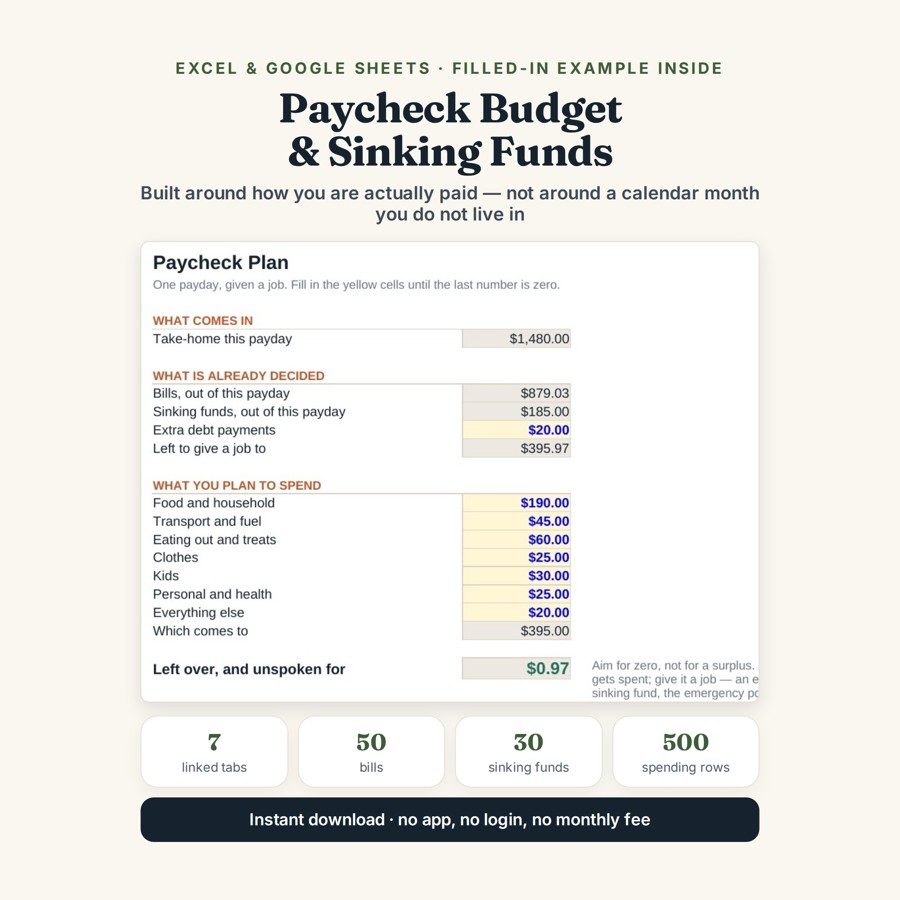
Paycheck Budget & Sinking Funds Planner
This paycheck budget planner converts every bill — weekly, monthly, quarterly or annual — into what it costs out of one single payday, and puts what is left on the screen as one number.
Your bills are monthly. You are probably not. If you are paid every two weeks, weekly or every four weeks, a monthly budget is a translation you redo in your head every payday — which is why the plan that worked in January quietly stops working in March.
What is in it
- Seven tabs: Start Here, Setup, Bills, Sinking Funds, Paycheck Plan, Spending Log and Month by Month.
- Bills — 50 bills at any frequency, each converted into what it costs out of one payday across the 26 paydays of a biweekly year.
- Sinking Funds — 30 funds for the costs that are not monthly but are not surprises either, each showing what it needs a payday against what it is actually getting.
- Paycheck Plan — the number that matters: what is left once every bill and every fund has taken its share, given per payday and per week.
- Spending Log — 500 rows for what actually went out, so the plan can be checked against the fortnight rather than trusted.
- Month by Month — 24 months, so a plan that is drifting shows up as a trend instead of a surprise.
Who it is for
Anyone paid fortnightly, weekly or four-weekly who is tired of doing the conversion in their head — and anyone whose budget survives the monthly bills but falls over on the annual ones. If you have ever been caught out by an insurance renewal or by December, the sinking funds side is the half that fixes it.
The worked example
The example arrives with fifteen bills, seven sinking funds and a fortnight of spending already entered. A $540 yearly car insurance becomes $20.77 out of every fortnightly payday — the same money, expressed in the unit you are actually paid in, which is the whole trick the file performs on all fifty bill slots at once.
The funds are where a plan usually breaks, and the file says so out loud: Christmas needs $61.79 a payday and is getting $40, so it shows short by $21.79 — in red, in August, five months before it matters. Once every bill and every fund has taken its share, the number that matters in the example comes out at $415.97 a payday, or $207.98 a week.
How it works
Compatible with Microsoft Excel 2016 or newer on Windows or Mac, Google Sheets, and LibreOffice. No macros, no add-ons, no account to create, nothing to install.
The download has two workbooks: one with the example above already filled in, so you can see what every column expects, and the same file completely blank for your own figures. A plain-English guide comes as a PDF. Order on WhatsApp — $9
Orders are taken on WhatsApp: message me and I’ll send the payment details, then the files as soon as the payment is confirmed.
Questions people actually ask
How does a biweekly paycheck budget actually work?
Every bill is converted into what it costs out of one payday, using the 26 paydays in a biweekly year, so nothing has to be translated from monthly in your head. A $540 yearly car insurance, for instance, becomes $20.77 out of every fortnightly payday. Once all 50 bill slots and 30 sinking funds are covered, the Paycheck Plan tab shows what is left — $415.97 a payday in the worked example.
Is this only for people paid every two weeks?
No — it handles weekly, fortnightly and four-weekly pay, and bills entered at any frequency. It is built for anyone whose payday does not line up with the calendar month, which is where a standard monthly budget starts costing mental arithmetic. People paid monthly can use it, but they gain the least from it.
What are sinking funds and why does the file have thirty of them?
A sinking fund is money set aside each payday for a cost that is not monthly but is not a surprise either — insurance renewals, Christmas, car servicing. The file gives each fund a per-payday target and compares it with what you are actually putting in, flagging shortfalls in red. In the example Christmas needs $61.79 a payday, is getting $40, and shows short by $21.79 in August.
Do I need Excel, or will Google Sheets do?
Google Sheets is fine — the file is .xlsx and imports through File, then Import, then Upload, choosing Replace spreadsheet, with the formulas intact. Excel 2016 or newer works on Windows and Mac, and LibreOffice opens it as well. There are no macros or add-ons, so it opens on a phone or a locked-down laptop too.
Does it connect to my bank or move money for me?
No — it is a plan, not a bank account, and nothing in it is automatic. It never connects to a bank or card, moves no money between pots and sends no reminders; you enter the bills, the funds and the spending yourself. The file stays on your own device, so none of your figures leave it.
Need it built around your business?
The file works best on income that is roughly the same each payday and months that are roughly equal. If yours is not — commission or tips that swing, two incomes on different pay cycles, a partner paid monthly while you are paid fortnightly, or a self-employed month that varies by half — I can rebuild the same per-payday arithmetic around the way your money actually arrives.
All other templates are listed on the Excel & Google Sheets Templates page.