
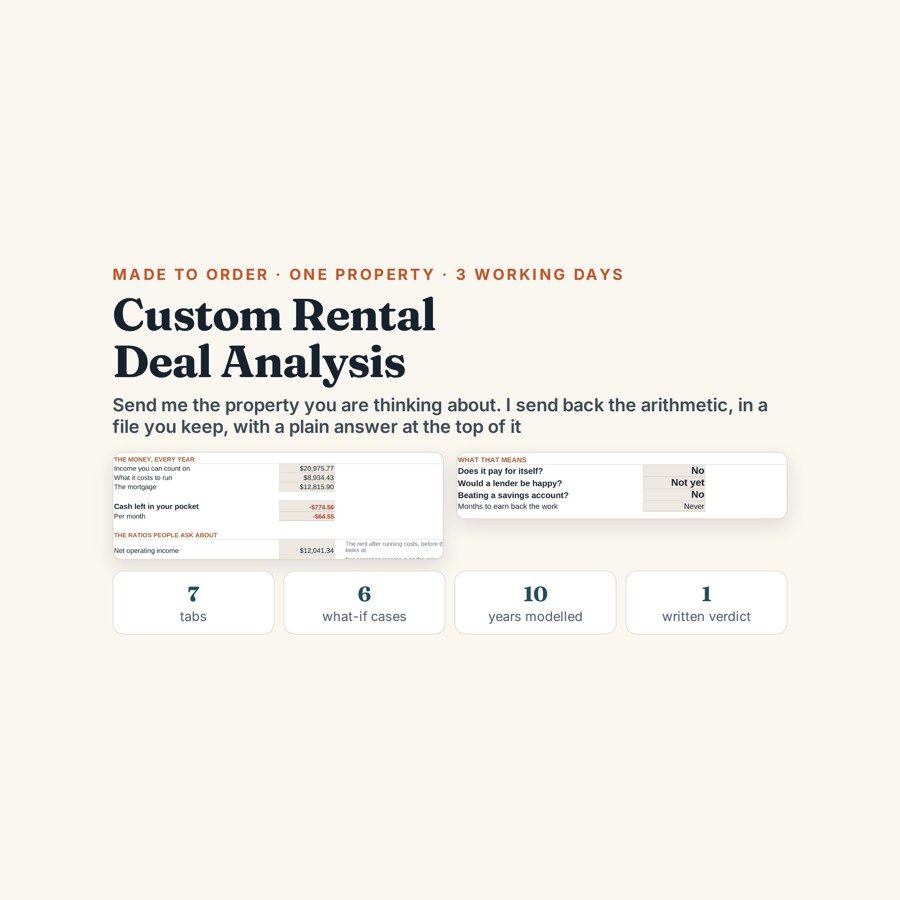
Custom Rental Property Deal Analysis
Send the numbers on one rental property and get a seven-tab deal analysis back, built by hand around that specific deal, within three working days.
Buying a rental on a spreadsheet you half trust is an expensive way to find out what you left out. The costs that decide whether a deal works — the service charge, the void weeks, the reserve you ought to be holding — are exactly the ones a generic calculator has no row for. This is done for your actual figures, by hand, in a file you keep.
What is in it
- Six questions at checkout: the address or listing link, the asking price and what you intend to offer, the expected monthly rent and where that figure came from, your mortgage rate, term and deposit, what specifically worries you about the property, and a screenshot of the listing if you have one.
- A seven-tab workbook: The Deal, Income and Costs, The Verdict, Ten Years, What If, a Dashboard with charts, and a Start Here page.
- The Verdict — cash left in your pocket every year and every month, net operating income, cap rate, cash-on-cash return, debt service cover, and break-even rent: the rent at which the property stops costing you money each month.
- What If — the deal stress-tested against void periods and rate rises, with every assumption written down where you can change it yourself.
- Ten Years — the same deal carried forward a decade rather than judged on its first year alone.
- A written note explaining what the numbers actually say and which questions to put to the agent, plus one round of revisions if your offer price or your mortgage quote changes.
Who it is for
Buyers weighing up one specific rental property — a first buy-to-let, or an experienced landlord who wants a second pair of eyes before making an offer. It is arithmetic done properly, not advice: I am not a financial adviser, a surveyor, an agent or an accountant, and tax is not modelled.
The worked example
The example on the listing is a $208,000 property bought with a 25% deposit and let at $1,795 a month. On the face of it that is a comfortable deal, and on most quick calculators it would come back positive.
Once the service charge and a proper maintenance reserve are written in against the rent, it misses by $65 a month. That gap is the whole point of the exercise: $65 is small enough to stay invisible on a back-of-an-envelope sum and large enough to decide whether you offer at all — and it only appears when every cost is set down against the income in one place.
How it works
Compatible with Microsoft Excel 2016 or newer on Windows or Mac, Google Sheets, and LibreOffice. No macros, no add-ons, no account to create, nothing to install.
This one is made to order rather than an instant download. You answer the six questions at checkout, I build the workbook around your property by hand and send it back within three working days, along with a written note on what the numbers actually say. One round of revisions is included if your offer price or your mortgage quote changes. Order on WhatsApp — $35
Orders are taken on WhatsApp: message me and I’ll send the payment details, then the files as soon as the payment is confirmed.
Questions people actually ask
What do I actually get for the money?
You get a seven-tab workbook built around your specific property, plus a written note on what the numbers say and which questions to put to the agent. The tabs are The Deal, Income and Costs, The Verdict, Ten Years, What If, a Dashboard and a Start Here page, and it comes back within three working days. One round of revisions is included if your offer or your mortgage quote changes.
Is this worth it if I am buying my first rental?
A first buy-to-let is the case it is most useful for, because the costs that sink a deal are the ones you do not know to look for yet. Experienced landlords use it as a second pair of eyes before offering. In the worked example a $208,000 property at $1,795 rent looks fine and actually misses by $65 a month once the service charge and reserve go in.
What if I do not have all the figures yet?
Send what you have and say where the gaps are — the six questions at checkout include what specifically worries you, and that is where the unknowns go. Estimates get labelled as estimates on the What If tab so you can see how much each one moves the answer. If a firm mortgage quote or a real rent figure lands later, that is exactly what the included revision round is for.
What format does it arrive in?
As a working spreadsheet you keep, not a PDF verdict — .xlsx, so it opens in Excel 2016 or newer on Windows or Mac, in Google Sheets, and in LibreOffice. Every assumption is in a cell you can change yourself afterwards. There are no macros, no add-ons and no account to create.
Is this financial advice, and does it cover tax?
No to both — it is arithmetic done properly, not advice, and tax is not modelled. I am not a financial adviser, a surveyor, an agent or an accountant, and nothing in the file tells you whether to buy. It shows you what the deal does at the numbers you supplied so that you, or your accountant, can decide.
Need it built around your business?
This is already built around one specific deal. If you are weighing several properties at once, buying through a company, or running a portfolio where the real question is refinancing rather than a single purchase, tell me what you are actually deciding and I will build the file around that instead.
All other templates are listed on the Excel & Google Sheets Templates page.